Remote Work Digest: May 11, 2016

The latest on all kinds of information, news, and resources that help you make working remotely better.
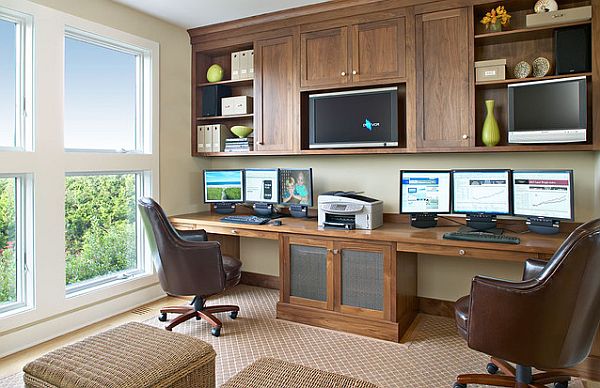
natural-walnut-home-office-furniture

Image from Decoist.com

5 easy steps to create the perfect home office | Josh Nicholas, Businessinsider.com.au

For employees, working from home can provide much needed flexibility, allowing for more time with loved ones, and to pursue other interests.

Remote workers often report greater satisfaction, as they skip the daily commute, see more of their kids, and even eat even better. But working from home can require more than a computer and a stable internet connection.

Here are some key aspects to focus on if you want to do have the perfect home office setup.

1. Create a separate space
Having a separate space has other benefits as well. Not having to pack and unpack your work gear means you have a consistent work environment – your files or other tools are always in the same place. It provides a space for you to be in “work mode”, something that you can leave behind at the end of the day.

2. Ergonomics
Relative heights are an important aspect of setting up your work space – ensure your desk, computer monitor, keyboard, mouse and chair are in the correct position to ensure good posture – bad posture can impact both your body and your mind. Once you have your space sorted, remember to move around regularly to keep the blood flowing.

3. Manage distractions
A good way to manage distractions is to send a signal – close a door, put on some headphones or wear a “uniform”. Ensure others can tell that you’re busy and shouldn’t be disturbed.

Alternatively, depending on the task at hand, being distracted may be exactly what you need. Researchers have found that introducing more stimuli can foster more creativity, allowing your mind to create connections and wander down new pathways.

4. Include greenery and light
Office aesthetics don’t end with decor. How you organize your desk can have big impact on productivity and peace of mind. As much as you can, don’t over-clutter you desk – try and leave one side free. Eschew piles of papers and tools, using tools and files to organize your workflow. Stash rarely used items in draws or someplace else you can’t see them.

5. Play the right ambient music and sounds
Not everyone works well in silence, and different ambient noises and music can suit different work and environments.

If music doesn’t work for you, you may want to try some of the various apps and tools that offer ambient sounds. There’s Coffitivity for coffee shop sounds, plenty of white noise on Youtube, and play lists for the ocean, and even Wikipedia edits.


Three Ways To Create A Productive Working Space | Rob Clark, Minutehack.com

When planning an office space, various factors need to be taken into consideration; the availability of technology around the office, the quality of equipment, as well as the visual design and structure of the space.

Here are three top tips on creating productive office space.

Make your office look good

An attractive environment doesn’t just improve employee well-being. Research shows that visually stimulating spaces can actually influence buying behavior, whether it’s shoppers or potential business clients. Business which provide a visually stimulating working environment can reap rewards in terms of productivity and business success.

Don’t run a marathon to access technology

if you’re relying on centralized technology models in your business, chances are your employees are running a marathon – and wasting a lot of time! A successful office space is equipped with technology that is accessible. If business rely on centralized models, the reality is that productivity could be impeded.

Collaborate, collaborate, collaborate

Today’s business environment calls for increased collaboration and knowledge sharing, in order to drive creativity and efficiency for companies looking to maintain that innovative edge. Modern work spaces, therefore, must encourage the idea of the ‘connected employee’.
Productive working spaces, then, rely on a mix of thoughtful landscaping, accessible technology and using collaborative whiteboards and projection in order to encourage employees to interact.
7 Smart Ways to Increase Employee Productivity | Akinde Hafiz, Business2community.com

It’s quite normal for employees to experience dips in their performances due to factors like stress, personal problems and organizational gaffes. However, it’s the duty of every manager to help employees get their grooves back in order to achieve the set goals.
So if you’re looking to get the best out of your employees, you should put in place certain measures that would boost their productivity levels. Here are 7 smart ways to do that without losing a drop of sweat.

1. Set realistic goals
It is obvious that goal setting plays a central role in achieving productivity at work. But these goals have to be clearly defined and realistic. Realistic goals are not determined by how complex they are. Rather, they should be assigned based on priority and time-bound.
2. Create a sense of ownership
Every employee must be made to take ownership of all issues in their buckets. This attitude will create a sense of accountability, allowing them to focus on the most important aspects of their jobs.
However, you must realize that employees don’t take ownership when they’re treated like employees. In other words, you should create a sense of belonging for each and every team member, make them feel valued, and make the system as transparent as possible.

3. Provide an outstanding reward system
There’s a popular cliché that the reward for hard work is more work. But then employees need more than just work to stay on top of their game. You’d be surprised at how much impact a small gift card can make. This has nothing to do with the monetary value attached to the gift but the feeling that their efforts are being appreciated.

4. Operate a virtual office
The advantages of going virtual are quite numerous. They include lower equipment and installation cost, good communication network, and all-round accessibility. On the part of employees, virtual offices provide flexibility and freedom, reduces stress of commuting and increase morale. So it’s not the question of whether or not running a virtual office really boosts productivity, it’s a question of why you’re not yet leveraging it.

5. Empower them
Empowering your employees involves training them to work independently without being micro-managed, appreciating their contributions and innovations, encouraging self-improvement, and presenting new challenges and opportunities. With this kind of atmosphere, employees will feel more engaged at work and might even exceed expectations.

6. Invest in the right tools
Providing the right tools simplifies the work process and ensures that employees get prompt and accurate results. It increases efficiency and prevents early burnout. Thus workers can work productively and keep customers happy.

7. Make work fun
Normally employees do have twenty minutes or thereabout to observe power naps. But you could make it fun by allowing them bring their mats. You could also create a yoga room for the yogis among employees, just as smokers have designated areas in the work place to smoke.
Allow them to decorate their individual work spaces with inspiring quotes, pictures and other decors. This has the power to sustain the positive mood and energy that are required to focus on their tasks.
Lastly, it goes without saying that these tips are not just mere speculations. They’re capable of producing great results regarding employee productivity. Because in the end, you’ll realize that only a productive workforce is capable of meeting organizational goals, and ultimately increasing Return on Investment.


16 Jobs That Allow You to Be a Digital Nomad | Maria Onzain, Tech.co

Having experience, enough knowledge and the right set of skills you can start your own online business, which will give you massive independence. However, before you take any risk, there are many possibilities out there to start your nomad career as a freelancer or consultant. This transitional stage will give you the know-how and confidence you need to start your entrepreneurial adventure.

These are 16 good examples of jobs that will allow you to become a digital nomad.
Freelance Writer
As content marketing importance increases, professionals with copy writing skills are more demanded by companies. You can also start a blog sharing your travel adventures as you go along. Once you have a number of well-written articles on your portfolio, it is time to start your career as a freelance writer.
Graphic Designer
If your talent is in visual arts, the graphic design industry may be a wise choice. Being a graphic design freelancer is a very creative job that will give you a huge freedom to travel the world.

Illustrator
This type of work is highly-demanded both online and offline, so create a profile showing your skills on the main online workplace platforms and search for some interesting projects to work on.

Front-End or Back-End Developer
Working remotely as a developer is now very common, all you need is to find the right projects on the freelancing platforms mentioned before.

Photographer
There are a number of specialties within photography that you could focus on: photojournalism, food photography, landscape photography, sports…the list is endless!

Online Marketing Strategist
If you already have experience in online marketing you can share your know-how with other companies as an online marketing strategist. Analyzing their existing marketing and working as a consultant to improve their communications may be a good way to start.

SEO Specialist
You could also specialize in the area of digital marketing you are best at and offer your expertise as an SEO consultant, for instance. You can either only work on the strategy or get hands on implementing the changes the website needs to improve their online visibility and rankings.

Social Media Manager
If your favorite part of online marketing is social media and you are good at it, you can help companies with their social media communications.

UX Developer
Crafting an appropriate user experience for both websites and mobile apps is an increasingly demanded job. If you are either a generalist or a specialist UX developer, you are in a great position to start your digital nomad adventure.

Translator
There are a number of online platforms where you can create a profile and offer translation and transcription services. If you are bilingual, this option may be perfect for you.

Online Language Tutor
There are millions of people around the world willing to learn another language and very handy online platforms such as Verbalplanet that connect them with a suitable teacher.

Guitar Online Teacher
Using communication tools like Skype or Google hangouts you can teach whatever you are good at, independently from your location. A good way to start is by creating a YouTube channel showing off your skills and joining Take Lessons as a teacher.

Virtual Personal Assistant
If you are organized and have excellent admin skills, a remote personal assistant opportunity may be for you. To become a virtual PA you may want to check out Ask Sunday.

Photo Editor
This may sound a bit peculiar but there are so many companies and entrepreneurs looking for people to edit their photos and this job doesn’t always require previous experience or qualifications.

Restaurant Critic
To take the first steps towards this fascinating career you will need to have excellent writing skills and an extremely audacious palate. If these are your strengths, work on your portfolio before applying for restaurant critic jobs.

Restaurant Marketing Strategist
If you have run a restaurant before, you can help other restaurant owners to get more clients and improve their services. This includes menu creation, customer service, improving ordering systems and restaurant consultancy in general.
Another option to make this life changing decision would be to negotiate a remote work arrangement in your actual job. This is a good way to take the first step without any risk.


Earth Day Message From The Planet — Please Telecommute | James Conca, Forbes.com

Also known as remote work, telework, teleworking, flexjob, home-sourcing or working-at-home, telecommuting is a work arrangement in which employees do not commute to a central workplace, but work at some other location, usually their home. In the information age, this arrangement becomes more and more possible, and the benefits more and more obvious.
According to Global Workplace Analytics, almost half of all jobs in the United States are telecommuting-compatible at least half of the time. If these jobs became telecommuting, the annual economic benefit would total over $700 billion.

The overall advantages to employees, employers, the nation and the world would be enormous. Annual savings in real estate, electricity, absenteeism, turnover and productivity would exceed $500 billion, or more than $11,000 per employee. National productivity would increase by 5 million man-years or $270 billion in net worth.
The nation would save:
– about 90,000 lives from traffic-related injury or death, saving at least $10 billion a year in related costs
– over 119 billion miles a year of wear and tear on our nation’s highways, saving hundreds of millions of dollars in highway maintenance
– over 640 million barrels of oil, a third of our Persian Gulf imports, valued at more than $60 billion
– 54 million tons of greenhouse gas emissions, the equivalent of taking 10 million cars off the road.
Employees themselves would save:
– two to three weeks of free time per year, time they’d have otherwise spent commuting to some workplace
– between $2,000 and $7,000 in transportation and work-related costs
– after-school and elder care costs would decrease in most cases and most workers would qualify for home office tax breaks.

Telecommuting even reduces many of the workplace employee problems like sexism and racism since one is not forced to work alongside others in close quarters under sometimes hostile conditions. It also allows women to participate in the workforce in cultures that otherwise do not allow women in the workplace.


Remote Work Digest: April 14, 2016

The latest on all kinds of information, news, and resources that help you make working remotely better.

1076x615-home-office

Image from Zliving.com

Simple Ways to Add 2 Hours More to Your Day | Laura Vanderkam, Fortune.com

Easy ways to reclaim two hours to spend on the good stuff.

If you free up two hours to spend on the good stuff, that’s the next best thing to manufacturing time. Here’s how to escape the ceaseless ticking, according to Laura Vanderkam.

1. Plan you days
Figuring out what’s most important keeps you from losing hours as you blindly respond to whatever comes in. It also encourages investing time in high-yield activities such as mentoring new employees. By thinking through your days, you can also match the right kind of activity to the right time. Deep focused work is best done when you have a lot of energy.

2. Manage distractions
Between social media alerts, emails, and drive-by visits, people can be distracted dozens or more times per day. One study found that people take 25 minutes to resume interrupted tasks (after dabbling, on average, in more than 2 other “work spheres” in the meantime), pushing distractions to predictable times can easily save hours. One study also found that people spend 47% of their time on the internet procrastinating.

3. Don’t do what others can do (or that doesn’t need to be done)
If you’re in upper management, you can easily spend 50% of your day in meetings, which comes out to 4 (or more) hours a day. If 25% of those meetings didn’t need to happen – a conservative figure based on surveys, and how much people despise meetings generally – killing them would buy you an hour per day right there. It is also hard to rescue the time once a meeting starts, and many people are so busy going from meeting to meeting that they don’t triage their schedules ahead of time. The solution is getting in the habit, on Friday afternoons, of looking at your calendar for the next week and asking what can be skipped or killed. Five minutes can buy back hours.

4. Change your schedule
Chances are, the reason you want more hours in your day is that you’re too busy with work and family obligations to tackle your personal priorities. But most people, even busy professionals, have leisure time. The problem is that much of it occurs late at night when people are too tired to do anything but watch TV. The solution? Go to bed earlier, and wake up earlier. Most people feel more productive in the morning, so turning the TV off earlier turns unproductive evening hours into productive morning hours.

5. Telecommute
To be sure, even in most information jobs, working from home daily won’t fly. But once or twice a week buys back massive time on those days. It’s not just the 50 minutes of average daily commuting telecommuters save on the days they work from home.

10 Secrets to managing remote teams | John Doyle, Finextra.com

The secret to successfully managing remote teams is in recognizing that it’s more a leadership role than a manager one.

Too often, managers try to manage remote teams as if they were locally based and it doesn’t work. Remote teams need to have more attention and more support than locally based teams. You have to compensate for the lack of interaction with other colleagues and you must see your role as their manager as a supporting one.

Managing remote teams is a full-time job, not just a task and it needs to be addressed that way. Here are John Doyle’s suggestions for the 10 things that you need to do to successfully manage a remote team are:

1. Have clear expectations upon deliverables. What this means is that when you assign a remote team member a task, you need to be clear about what you want them to do and what the deliverable will be.
2. Set accountability parameters. Be clear about accountability with remote teams as they don’t have the opportunity to pop their head round the door and ask you for advice when they have an issue. Encourage your team to tell what they’re doing and share the results of their task.
3. Lead your team. Don’t manage, lead. Leading is about providing the team with a vision they can follow, understanding their role in achieving that vision and then providing the support they need to succeed.
4. Celebrate personal and work achievements. A good leader will always take time to connect with team members on a personal level after all, that’s when you really understand people.
5. Instigate team meetings. Team meetings are vital to success, but they’re much more than reporting mechanisms. Try not to use them to report, that you can do on a one-to-one as part of the daily process of keeping in touch.
6. Have away days. Every 3 months at least, an overnight away day is essential to rekindle friendships, restate common goals and objectives and generally bond. Makes them feel that they’re a part of the whole.
7. Provide them with the right tools. The remote worker doesn’t have colleagues in the next room or a stationery cupboard or an IT department. If you want them to do a good job, you have to provide the right tools.
8. Encourage collaboration wherever possible. Remote workers, more than anyone, need to have ‘engineered companionship’ and they respond to the idea of a joint venture with enthusiasm.
9. Provide them with the right information. Most remote workers are the type of people who like a brief and then they get on and deliver. The disappointment they feel when they’re told it’s not quite what was wanted is palpable. It’s fine that they do the research, but if you can help you should do so.
10. Have a rolling feedback model and regular reporting. With remote teams this is much more difficult as specific calls need to be set up and you focus instead on milestones rather than being involved in the whole process. Regularly checking in with the team is vital to your joint success.

Obviously the talents of a successful remote team manager are different, but they ultimately call for an empathy and caring approach to managing people.

Your Ultimate Work-From-Home Productivity Guide | Rachel Grumman Bender, Learnvest.com

No morning commute. No open floor plan that makes it challenging to focus on your work. No boss looking over your shoulder or co-worker who insists on showing you photos of his cat every morning. The sweet freedom of working from home can seem like a dream come true for some—and the number of people doing so is growing.

Although statistics indicate that the trend is picking up steam, that doesn’t mean it’s easy to work from home successfully. Whether you’re telecommuting to a full-time job or running a home-based business, there are distinct challenges that come from merging your work and home lives.

To help you tackle the specific work issues you’re likely to face, Rachel Grumman Bender of Learnvest.com tapped three work-from-home experts for their tips on how to maximize four key areas of home-based office life so you can boost productivity and success.

Work-From-Home Tip #1: Turbocharge Your Space
Whether you’re working at the corner table next to the couch or have an entire spare room to devote to your home business, it’s important to create a space that helps get you into work mode and keeps your attention there.

A little separation is a good thing: If you can, carve out a designated space in your home as an office where you can keep your work organized.

Get your (organizational) act together: Having an orderly desk helps you stay focused, boosting productivity so you don’t lose precious time looking for that critical contract—or whatever it may be—under a messy pile of papers.

If your office is the kitchen table one day and the back porch another, consider putting your work projects in separate boxes so you can grab the one you need at that time, and then put it away when you’re done.

And remember, there may be tax benefits to creating a home office: Whether you rent or own your home, if you use part of the square footage regularly and exclusively for business, you may be able to do a home office deduction on your taxes, according to the IRS.

Work-From-Home Tip #2: Stay Connected
If you telecommute, it may be easier to set these boundaries with a work email that’s tied to your main office. If you have a home-based business, it can be trickier.

Customize your communication: Instead of handing out your primary personal email for work-related matters, create a second custom work email address, such as [email protected], for a more professional touch. To better manage your inbox, there are tools that let you schedule emails so they’re sent during business hours, rather than when you’re burning the midnight oil. You can also use apps to schedule texts to go out when you want, rather than pinging someone when you’re working on the weekend.

Streamline your phone system: Many small business owners have ditched their land lines and exclusively use a mobile phone for business. But if you use your primary number for work, it can be hard to gauge whether that incoming call is personal or business when you’re on—or off—the clock. If you’re using your own home phone or cellphone for business and don’t necessarily want your personal number out there, try using Google Voice, which lets you choose a brand new number from Google.

Work-From-Home Tip #3: Create a Schedule That Fits Your Life
If you’re telecommuting, your hours may be set by your boss. But if your office is flexible or you run a business out of your home, one of the perks is setting your own hours. While there’s freedom in that flexibility, it’s also easy for work-life balance to get really out of whack.

Block out your days with a hard stop: Morgenstern, , time management expert and author of Time Management From the Inside Out: The Foolproof System for Taking Control of Your Schedule—and Your Life, recommends thinking of your day in three blocks of time—morning, afternoon and evening—and factor in how much energy you have in each time period. “If you’re more productive in the morning, then get up and do your work then,” she says. You should also factor in what time you typically need to interact with co-workers and clients, as well as your family’s schedule.

Be realistic about your time: Anyone can write a to-do list, but completing every action is another feat entirely, especially if you’re overly optimistic about what you can reasonably accomplish in a day. Instead of creating a never-ending task list, Morgenstern advises asking yourself three questions: What do I need to do? How long will that take? When will I do it? Keeping in mind your deadlines for each, prioritize and block out your schedule to tackle these responsibilities during a time window when you can maximize your attention toward them.

Don’t forget to schedule breaks: In general, whatever schedule you choose, aim to work no more than 90 minutes at a time before taking a quick break. The combination will keep you productive and give you time to clear your head.

Work-From-Home Tip #4: Know That You Don’t Have to Do Everything
It can be overwhelming when you are your own tech support, accountant and executive assistant while working from home. So how do you make sure you keep your business running?

Get your go-to people in place: Luckily, this is easier than ever since there are plenty of businesses geared toward home-based workers that offer tech support, such as Support.com, and billing services, such as FreshBooks, at reasonable prices.

Go virtual: A virtual assistant can help with various tasks, such as bookkeeping and following up on outstanding invoices, creating a monthly newsletter or doing research for a work project. Having a virtual assistant saves you from getting bogged down in mundane tasks, allowing you to spend more time focusing on building your home-based business and reaping the rewards.

Four ways to improve security and productivity across a small business IT network | Paul Yung, Itportal.com

With business networks increasingly vulnerable to security breaches and constant pressure to increase office productivity, IT managers have a responsibility to ensure employees’ PCs and laptops are not a hindrance in these areas.

Here are Paul Yung’s four main considerations that will help ensure employees are protected in small businesses and new machines are future-proofed.

1. Update Windows
The benefits of keeping refreshed with the latest updates are three-fold. Firstly, many updates include security patches that plug potential security flaws in Windows and its components that may render the computer vulnerable to malware and/or hackers. Secondly, updates often fix any bugs or glitches in the operating system and thus help improve its stability and remove any annoying issues. Lastly, updates can sometimes include new features or functionality that benefit end-users.

2. Install anti virus
For most small businesses, Microsoft Security Essentials, which comes with Windows, will fulfill their initial needs. As businesses grow in size however, the need to have an enterprise-grade AV solution becomes necessary to protect multiple computers from a centrally managed console and benefit from additional features, such as more sophisticated scanning and rule creation and detailed reporting tools.

3. Maintain a healthy and optimized network
Proactively optimizing PCs now means reduced IT support costs in future, as well as happy employees as they work on fast, efficient machines.

4. Get a suite which suits
In today’s collaboration-focused business environment where cloud-based technology, SaaS products and file sharing tools are commonplace, some small businesses may see Microsoft Online alternatives suiting their needs. Free SaaS solutions, such as Google Docs, or open-source software such as OpenOffice are created with the basic productivity needs of businesses in mind, including word processing, spreadsheets, email and presentation builders. There are a few premium alternatives, such as LibreOffice, which also include drawing applications and database tools.

When making decisions on the tools available to small businesses, make sure to consider the nature of the business, its level of compliance and any regulations it must adhere to. Although online products offer increased flexibility, there comes attached a higher element of risk as documents are accessed via a password. While high productivity and collaboration are important to businesses, it should never be a trade-off for security.

7 Industries You Need to Keep an Eye on in 2016 | John Smith, Business2community.com

It can be quite daunting to keep a tab of this ever evolving world. To keep your feet on the ground, here are John Smith’s list on few industries you need to keep an eye on in 2016. Let’s check out on them.

1. Telemedicine
According to the experts of the industry, telemedicine is capacitated to improve the health status of patients by enhancing access to medical care as well as offering real-time responses at low costs.

2. 3D Printing
The experts predict that this industry has the capacity to revolutionize the manufacturing industry. You need to keep an eye on 3D printing this year.

3. Voice over Internet Protocol (VoIP)
VoIP is best to be used by the businesses that need to make international phone calls as it brings down the cost. The expense of the local calls has been brought down by 40% whereas that of the international calls has come down by 90%.
With internet usage increasing every year, it does not appear at all surprising that most people would prefer to switch to VoIP.

4. Remote Staffing
Several companies have given the verdict that the companies of today need to give up restricting themselves to local talent pool in case they plan to keep pace in this fast moving world. You can expect this sector to take off with the demand for remote work escalating.

5. Gamification Service
Several companies have given the verdict that the companies of today need to give up restricting themselves to local talent pool in case they plan to keep pace in this fast moving world. You can expect this sector to take off with the demand for remote work escalating.

6. Virtual Reality
Virtual reality is all set to be bigger than mobiles and apps.
“Our entire way of learning, communicating and how we experience our existence with one another is going to take 3D form with virtual reality. Also, people won’t care what model phone you have — it’ll be what goggles you wear.”

7. Solar Energy Development
With the push for alternative sources of energy high, we can expect solar energy to make it big this year.

Now you know the industries that will make it big in 2016, which industries do you feel will rule in the next 5 years?

Remote Work Digest: March 7, 2016

The latest on all kinds of information, news, and resources that help you make working remotely better.

more-productive-work

Photo from Investopedia.com

5 Key Design Factors for an Effective Home Office | David Adams, Entrepreneur.com

Every entrepreneur faces difficulty when working from home. Designing the perfect home office environment can be a great solution in order to avoid stress all together. Here are David’s five tips to help you there:

1. Preserve the bedroom logic.
If your living arrangements don’t allow you to keep your office in a separate room, subdivide your studio to create areas for work and rest.

2. Choose the right furniture.
You’re going to be sitting in your desk chair for a long time, so find one that best suits your needs.

3. Light it up.
Strike a balance between natural light and artificial. Try out different rooms in your house and different desk placements withing each room. Finding the right light environment won’t help your daytime productivity; it will also ensure you get a good night’s rest.

4. Keep your space organized.
The neater your office, the neater your mind. Going wireless cuts out one of major bugbears: cables. Ditch as many cables as you can by adopting Bluetooth-enabled devices, and keep the essential ones wrapped and routed to their appropriate location.

5. Don’t hate on distraction.
Everyone has different working habits. Some people hate distractions while others crave them. Find the right level of distraction to boost your productivity.

Motivation is fleeting, but discipline is the lifeblood of any entrepreneur. If you keep your focus and create the right environment, you’ll set yourself up for success.

Remote Control: How To Pick The Best Remote Employee | Taylor Tomita, Business.com

When looking for a remote employee, employers should begin by understanding how both the employee and the employee benefit from remote work.

Before interviewing the perfect person for the job, keep in mind that every person work differently. Someone who needs constant direction, interaction and validation might not be the right fit for the position. This doesn’t mean they aren’t a fantastic employee, it just means they might need to be placed elsewhere.

How do you know if a person will be more independent or need a more hands on experience? Let’s start with understanding why someone wants to work remotely in the first place.

Why Does an Employee Prefer Remote Work?

Don’t just hire a remote worker because that is what fits best for the company strategy. To get the best work and overall potential out of employees, the recruiter should understand why this person needs or wants to work remotely in the first place.

How Do I Know If My Employee Will Do Good Work?

Skill assessments are absolutely essential before bringing on any candidate. The perfect person should be able to get all tasks finished in a timely manner, be able to finish all work independently, and communicate efficiently in written form (and often). This is why it is always a great idea to allow as much time as possible between the interview and hiring date.

How Do I Know If They’re Actually Working?

Require your candidate to get a reasonable task finished within a short time (maybe a couple of hours) and see how well they were able to deliver. If they don’t finish or are missing areas, then they aren’t able to follow direction properly. The other option is they may have been doing other activities during what should have been strict work time.

Although extra time might be required during the hiring process for remote employees, these workers can and will do equally impressive work (if not better) as office employees. Finding someone with a flexible schedule, pinpoint time management, and independent work skills can be truly invaluable to a workforce. In the long run, this employee is likely to be more loyal, do fantastic work, and might even be happier on the job.

Thanks to tech, it’s time to telecommute | Marc Saltzman, Usatoday.com

With traffic on the rise in major city centers, not to mention all the nasty weather hitting many states, you might be tempted to ask to work from home – even if it’s just a day or two a week.

The good news is telecommuting is much easier in today’s day and age, thanks to technological tools like high-speed internet, mobile devices, and secure cloud services that remotely host your files.

The following is look at some of the factors to consider, along with a list of 5 tech items that can make the move to a home office a smoother one.

PROS

For the employee: Staying at home paves the way for a better work-life balance. A Stanford University report, and a joint study by the University of Wisconsin-Milwaukee and Northwestern University, both found those who work from home are less stressed and more productive than those who work a 9-to5 job out of the home.

For the business: Those who work from home are often happier and more productive, which is good for company morale and efficiency.

For the environment, and other cubicle dwellers: Not only can telecommuting save time and money, but it has an Eco-advantage, too: fewer cars on the road reduces the amount of gas emissions that contribute to pollution and global warming

CONS

For the employee: While it may sound appealing to work from home, many have trouble staying motivated without a supervisor or boss looking over their shoulder.

For the business: Without physical proximity with your employees, there’s an increased security and privacy risk; not only could it be easier for a disgruntled at-home worker to wreak havoc, perhaps by stealing data, but even accidental breaches can happen (like giving your teen the wrong USB stick) or a breach in the network connection between the office and the home. (This is why a secured cloud solution for those with administrative privileges is a smart consideration.)

Given the advantages and challenges, a business interested in telecommuting must first assess whether it’s practicable for employees to work from home – obviously, some positions aren’t conducive for this option – and companies should asses whether the person is self-motivated enough.

Gear up

And now onto some suggestions for five types of tech products you’ll need to get going:

Laptop: A personal computer is the most important consideration for a teleworker. It’ll likely be your primary work tool for productivity, communication and information.
Multifunction printer: Invest in an inexpensive printer that can also scan, copy, and (if you need it), fax, as well. It’ll save you money and space in your home office.
Powerful router: Along with needing fast and reliable high-speed connectivity from your Internet Service Provider (ISP), be sure to have a decent router, as well, which distributes your Wi-Fi signal around your home.

External hard drive: An external hard drive is a smart local back-up solution that offers ample storage (opposed to an online “cloud” backup), but be sure to make more than one copy of your backed-up files (to hedge your bets) and keep the drives in separate dry locations.

Wireless headset: Go hands-free with a Bluetooth wireless headset for a mobile device or perhaps a DECT 6.0 model for a land line, and you’ll find it’ll be easier to multitask ask well as you walk around your place while chatting. A speaker phone is also ideal, but a headset will sound better to the people on the other end of the call.

3 Time Management Hacks for Busy Entrepreneurs | Josh MacDonald, Business2community.com

Everyone gets a full 24 hours a day to work with, but for some reason, it feels like it’s never enough. Especially if you’re an entrepreneur. With so many things on your plate on a day to day basis – ranging from meetings and sales calls, to personal time with your family, it’s definitely tough to juggle everything into place.

Here are Josh MacDonald‘s 3 time management hacks that will allow you to make the most out of your 168 hours a week.

1.) The Pomodoro Technique
If you’re the type of person who thrives under pressure, you’ll surely love the Pomodoro Technique. The main reason why it’s effective is because it allows you to laser focus on a specific task at a given time while avoiding burnout. To get you started, you can download your personal “pomodoro” on Google Play Store or the App Store.

You will appreciate the true impact of the Pomodoro Technique once you use it religiously. Use it today and see how much time you can really save.

2.) Get Momentum
Momentum lets you focus on just one thing at a time, which further boosts your productivity for the day. It eliminates distractions and helps you work in peace.

The best practice is to put in that ONE THING you really need to get done. After you finish, you can then write in your new “focus” for the rest of the day.

3.) Hire a Virtual Assistant
Most entrepreneurs want to handle things on their own. And that’s normal. You probably wouldn’t be in the position you’re in right now if you weren’t hands on with pretty much everything.

But there comes a time where you should be able to let go of certain tasks and have someone else handle them for you. This is where your personal virtual assistant comes in.
A VA can get basic tasks done for you. It might not be much, but if you audit how you handle your time, you’ll be able to see that you’re actually wasting plenty of hours on things that a VA can actually do for you.

The 24 hours per day can be a myth if you’re smart about how you handle your time. So how about trying out these time management hacks, and start optimizing your hours today!

5 Stress-Relieving Daily Habits for Entrepreneurs | Larry Alton, Entrepreneur.com

Choosing to become an entrepreneur can lead to a fun, exciting journey – but it can also be rife with stress. Even if you don’t feel especially stressed in the moment, the pressures can add up over time and bring serious consequences for your health and well-being.

The dangers of excess stress

It’s no secret that stress can be damaging, to both body and mind. The symptoms might begin innocuously, making you irritable, leaving you susceptible to bouts of worrying and leaving you with low levels of energy.

The time crunch

Time management is one of the biggest challenges entrepreneurs face. You’re probably working excessive hours, often through the weekends, and no matter how many tasks you manage to fit in a day, there always seem to be more around the corner.

5 Daily Habits

Try these five habits on a daily basis to start fighting back against stress.

1. Start (or end) the day with exercise. Getting some exercise in before you go to work can set you up for a productive, lower-stress day, but that’s not your only option. You can also work out when you get home to rid yourself of some of the stress you’ve accumulated throughout the day.

2. Drink green tea. Green tea has been shown to have powerful anti-anxiety effects. It can help you to relax in stressful situations while still providing enough caffeine to get your morning started.

3. Stretch and break away from the screen. Use physical stretching as a break from your daily tasks. This will force you to give yourself breaks throughout the day, reduce the eye strain from your digital screen, help you relax and improve your blood circulation – all at the same time.

4. Reduce your commitments. To reduce the stress, cut down the number of commitments you accept. If this sounds impossible to you, try making it a daily habit, and you’ll see how easy it can become.

5. Surround yourself with scents. Aromatherapy has consistently been found to reduce stress, and there are multiple scents that work, including lavender. Candles, incense and diffusers are all options here, depending on your preference.

There are several ways to create a new habit, from designing a behavior chain to planning a process rather than a result. How you do it is up to you. The key is to start managing your stress now while you still have considerable control over the state of your health.

Remote Work Digest: December 9, 2015

The latest on all kinds of information, news, and resources that help you make working remotely better.

Image from Kiplinger.com

Image from Kiplinger.com

The 5 best Time Management Productivity Apps | Cormac Reynolds, Tech.co

There are great productivity apps out there that help lower our stress levels and make us feel better about our lives. Let’s take a look at Cormac Reynolds‘ top five time management apps to make your day more productive.

In Time

In time alters the way we deal with traffic and setting alarms in the morning, setting up a wake-up and leave system that’s based on how long it will take you to arrive at your destination safely. The alarm automatically monitors your trip and adjusts in accordance with traffic, ensuring you’re always on time.

Headspace

Tapping into this app can teach you how to meditate in only 10 minutes per day. The Headspace podcast will guide you through modern meditations for issues such as how to take time truly appreciate your food, how to have a stress-free daily commute, and how to fall asleep easily and quickly.

GPS for the Soul

Presented by HeartMath, bLife and the Huffington Post, this app uses the camera lens on your phone to measure your level of stress, and then invites you to correct it through photos of your loved ones, breathing exercises, poetry, music and much more.

Sunrise

This calendar app is visually appealing and sync with Exchange, iCloud and Google Calendar calendars. There are several features on the app that makes it possible to organize your time better such as reminders, time zone support, location tagging, background syncing, and fast event entry.

Any.do

Any.do is a task-managing app packed with features and makes it possible for users to create notes, reminders and to-do lists for getting things done. It is easy to input tasks. You can either dictate them or type them in. The app features a touch screen interface that allows you to drag and drop tasks into categories.

These five apps are among the most up and coming and well worth taking a look at if you want to become happier and more productive.

Cybersecurity for Freelancers: Protecting Your Clients’ Data | Nicole Fallon Taylor, Businessnewsdaily.com

According to Nicole Fallon Taylor of Business News Daily, full-time freelancing affords professionals the opportunity to be self-employed, set their own schedules and regularly work on new projects. But there’s one aspect of this type of remote work that both freelancers and businesses sometimes fail to consider: cybersecurity.

Here are a few best practices to keep your clients’ data secure.

Always work from a secure connection

Public Wi-Fi hotspots are some of the biggest sources of potential problems for people connecting outside of a secure office network. If you’re working in a public space, you should tether your smart device to your laptop or use your own mobile modem or hotspot, if possible, as these are more secure than public networks, advised Lysa Myers, a researcher at security software provide ESET. Regardless of whether you are using your own private hotspot or a public one, it is a good idea to encrypt as much traffic as possible. Additionally, Myers advised cropping down your list of “trusted” public Wi-Fi networks that you’ve accessed in the past.

Keep software and operating systems up to date

When you don’t install the latest version of a program, you leave yourself open to any security holes that may have been left open in the previous iteration. Anyone working outside of a secure enterprise network to keep their personal devices, operating systems, applications and other software updated and patched at all times.

Invest in a backup solution

You likely use a cloud storage solution like Google Drive or Dropbox to store, share and synchronize files for client projects. But there’s a difference between storage and backup, and anyone who wants to securely preserve and manage their work should consider a backup solution.

Encrypt and scan your data

As a freelancer, you are technically a self-employed business owner. Therefore, you should look into protecting your work devices the way a business would. While you likely can’t afford top-of-the-line enterprise-security solutions, you should use an encryption solution to help secure the information on your device, advised Michel Bechard, director of service provider technologies at Internet security provider Comodo.

For a side-by-side comparison of the best encryption software, visit Business News Daily’s sister site Top Ten Reviews.

Ask clients for access to resources

If you have any doubts about your ability to secure a client’s data, ask your point of contact if you are allowed access to the company’s security resources as a freelancer.

Even if the access is limited, your data and activity will likely be safer with enterprise-level firewalls, filters, encryption and backup than on your own personal devices, and the cost is significantly lower to you.

Have Young Kids? Here’s How You Can Still Be Productive Working From Home. | Elle Martinez, Entrepreneur.com

Work-life balance is an absolute necessity for home based entrepreneurs to get the job done well. Kids have bad days, and to be honest, so do clients, with last minute changes and deadlines. Staying on top of things doesn’t require superhuman skill, but it takes effort.

After speaking with several entrepreneurs, Elle Martinez enumerates the critical keys to their successes.

1. Design your schedule to minimize disruptions.
It can be easy to miss appointments and double book when an entrepreneur has to manage professional and family obligations. Whether it’s using an online calendar on the phone or going old school with a wall calendar for easy access, seeing your workload allows you to parse out your time accordingly to meet deadlines and maintain quality work.
2. Lighten and share your load.
The idea that you can do it all is a myth – especially for parents who work from home. Delegating and outsourcing certain tasks are essential to success.

3. Design systems to maximize productivity.
With children, some entrepreneurs have found it beneficial to get them on a routine. Having activities planned helped for when they had to take calls for business or handle a quick client emergency.
4. Take time away from kids.
Parents who work from home realize that balance can mean hiring an occasional sitter, signing up the kids in part-time daycare or having a family member watch them from time to time.
5. Roll with the punches.
Of course, there are times when work and family don’t go as smoothly as expected. While it is common to rehash mistakes, entrepreneurs seeking to grow use those opportunities to refine their systems.

Working from home with kids can be overwhelming periodically, but all agree its an opportunity they didn’t want to pass up.

8 ways to keep your employees productive and motivated | Amit Ghosh, Yourstory.com

Keeping employees motivated and productive can be a challenging task for a self-made entrepreneur. But following these seven tips by Amit Ghosh can keep their happiness and output at an all-time high.

Host a white elephant party
Holiday parties are common during Christmas or any other festive season, but a white elephant party can add an exciting level of anticipation and amusement among employees

Innovative interior design and working areas
Natural air with dynamic ambience and soothing colours keep you cheerful. Nap regulations with flexible timings also helps.

Tap your employees’ interests and strengths with open arms
Employees are most productive when they use their strengths at work and are open-minded without fear or anxiety. Tapping into what they excel at will help them feel a personal connection with your brand, which in turn will boost self-motivation.

Participate in local games and social activities
Creating bonding time by participating in local games like marathon runs or spreading a cause with an NGO will not only get the blood flowing to the brain to help boost productivity, but also ensure that employees enjoy supporting a good cause.

Bring in some doughnuts or surprise goodies
A little thoughtfulness from you can increase work efficiency on many levels, leading to a happier work environment.

Give them some time off
Allow someone to go home without docking their hours when they have a cold. Your employees will be grateful.

Family ties
You can have a family day or picnic where there is no boundary between the employer and employee and interact with the family members. This creates a bonding between the employee and the brand and also helps in workforce retention.

Slow down every now and then
Slowing down a little every now and then can re-energize your employees and your company while ultimately boosting productivity in the long run. Take some time to celebrate success.

Building and maintaining employee productivity and motivation is vital to the success of your company. By following these seven tips, you will ensure that your employees are crucial assets to your bootstrapped company. Fostering a work environment that keeps employees happy and motivated will reflect the foundation of the company and its owner, ultimately leading to success.

5 Bad Leadership Habits That Undercut Your Team’s Productivity | Larry Alton, Entrepreneur.com

In the entrepreneurial world, every second counts. In the early stages of a startup, you’ll only have limited resources despite operating under high pressure and tight deadlines. Every decision you make could potentially set a course for success or failure.

The last thing you’d want is for a simple, seemingly innocuous habit to start interfering with this delicate balance. We all have good habits and bad habits, but as the leader and entrepreneur of your company, your actions set a tone for the organization and bear more weight when put into practice.
These five habits, in particular, can have a negative and disruptive effect on your team’s productivity:
1. Managing the details.
Set a general course or a general goal that you want your employees to achieve, and let them worry about how they want to get it done. If you don’t trust them to do that alone, you probably have the wrong person for the job.
2. Neglecting the individual.
While it’s a good idea to establish a general work culture that appeals to the type of people you want to work with, not everybody works the same way. It’s your responsibility to know each person’s strengths and weaknesses, and cater to those as much as you can.
3. Not making your expectations clear.
If you have expectations, or a clear idea in your head, you need to make that clear, otherwise, don’t be surprised when your employee submits something different and needs to start the whole project over again.
4. Indecisiveness.
The inability to commit to decisions leads to a productivity halt for your entire business. Your employees won’t know which work to start and which to ignore, and they won’t have faith in the direction of your business overall. Commit to decisions, even if you’re not 100 percent sure of the outcomes. A bad decision is still better than no decision.
5. Refusing to delegate.
Some entrepreneurs view this as a merit-worthy habit. They take on as much work as possible by themselves, delegating little to the employees below them. While on the surface this might seem a noble effort to avoid overworking your underlings, the reality is it can detract from your productivity as a group.

It pays to be aware of your own habits, despite their tendency to slip by unnoticed. Pay close attention to how your actions affect the members of your team, especially in a tight-knit startup setting. Work to make positive changes to your approach over time.

8 Team Building Activities for Remote Teams

As technology evolves, more workers are allowed into telecommuting, thus; reaping the numerous benefits that come with it. However, sitting in a home office all day, without any kind of work mate interaction and water cooler conversations, may take its toll on one’s health and well-being. As most managers know, team building activities are useful for improving team dynamics, building trust, facilitating communication, and boosting teamwork. Here are 8 team building activities that will help your company build a team that is as productive as is focused:

Work Space Decorating Contest

Organize a virtual (desktop) or home office decorating contest. You don’t need an office or a cubicle to run a themed decoration contest. DIY contests are cheaper, and if you’re feeling generous, send your team members some supplies they’ll need. Ask them to take pictures then post it for everyone to see, or use video-conferencing so everyone can show off their creations. To get everyone involved, let them act as judges and vote for their favorites. Give out awards to the funniest and best effort.

Social Networking

Aside from project management tools, the Social Media can provide an excellent means for communication and collaboration. Create an exclusive Facebook group that is for your team members only, where they can post non-work-related photos, information, and other updates. Ask each team member to upload a few photos every week, describing how they spent their weekend. This gives them the opportunity to communicate on a personal level. Connecting co-workers on an entertainment level also increases engagement and productivity among them.


Host an Online Game

Challenge your work team to show off their gaming skills through a friendly competition. Choose a multiple-player online game that will encourage them to participate and strategize with their team mates. You can do this every Friday to prevent stress and burnout from the previous week’s work load. Aside from promoting camaraderie, it also promotes team leadership and sportsmanship.


Distribute Weekly Newsletters and Joke Emails

Keep your team members on the same page by distributing weekly updates and performance reviews. Don’t forget to recognize their contributions. Send out birthday cards virtually or through the mail. A newsletter offers some useful information that will help your team members shine and connect, while also building their essential skills. Encourage your team to provide honest feedback regarding key issues in your company. Add a little sense of humor by sending out lighthearted articles, comics, videos, photos and funny jokes. Break up the workday with some laughter to help reduce stress, improve blood flow, and even burn calories.

Eat Out or Hold Potlucks

Most remote teams don’t get the chance to meet personally, however, these may be possible for team mates who live in the same area. It may come as an effort to bring the team together, but meeting up and sharing some food can be a bridge in building a strong relationship between team members. A simple conversation between teammates can serve as a tool for better communication among members, which is essential for improved productivity.


Virtual Charades

team-building-3Unlike online games, virtual charades will only require installation of video-conferencing programs like Skype or Google Hangouts. Furthermore, not all of your teammates may be interested in video games. Like all team building activities, it coerces your team members to shed their inhibitions, participate in solving problems, and contribute their strengths for the success of their teams. Best of all, they can do all these while having fun at the same time.


Rotational Leadership

Leadership-Quotes-44Having a new leader every week will allow your team members to demonstrate their own leadership skills. Management and leadership have never been easy jobs, but this opportunity will give you the chance to see how they can personally impact the company. People are more energized when they feel that their contributions matter. Team members might not always bump into each other, but assigning a different leader every once in a while encourage them to reach out.

Annual Team Building Trip and Vacation

27063-happy-people-on-the-beachAs an employer or manager, it’s essential to understand the importance of taking the time off. There is nothing like creating the feeling of team spirit by going on trips with your team members. This may seem expensive, but the benefits that come along with it are considerable. It is important for employees to rest and relax, and come back to work feeling rejuvenated and more productive.

Taking employees out of their home office helps them bond, eliminate distractions, break down barriers, and have fun, all while improving communication, morale, productivity, and motivation at the same time. Organizing these events may be the hardest and most resource heavy activity for team building but it is definitely the most rewarding.

Images from: Lifehacker, Apriso, Mmogames, Admail, Meetup, RedBoothDesktopwallpapers8 and Vandebilt.edu

11 Awesome Tech Tools for Enhancing Work Productivity

Taking the initiative to boost your work habits, take your productivity to the next level, and simply doing better at your job is now easier, thanks to all those peripherals and gadgetry the market now brings to us today. Many of these must-have productivity boosters have many other functions, making them even more valuable and investment-worthy.

So take a look at this compilation of the best and coolest productivity-enhancers you got to have this year.

For going green and paperless:

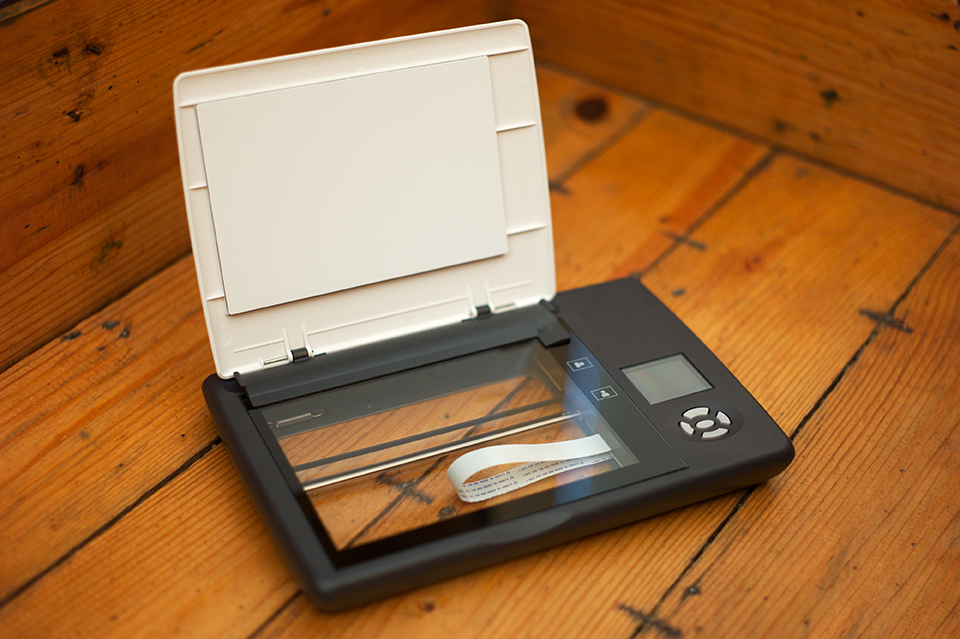
Doxie Scanner1. Portable Scanners

Doxie Flip is a portable, battery-run flatbed scanner that will help you finally go paperless. It is basically a flatbed scanner in a miniature form, making it easy for you to carry it around with you anywhere. It also comes with a detachable lid, underneath of which is the transparent scanning window you can use to scan virtually anything – from photos to sketches to book pages to fabric patterns. Find out more here.

Another great choice in this category is the IRIScan Anywhere 3 Portable Scanner, which, like the Doxie Flip, is also battery-operated. It is designed for digitizing receipts, business cards, brochures, and just about any other document you need to create soft copies of – all while on the go. Here’s where you can learn more about this cool gadget.

For supporting your body:
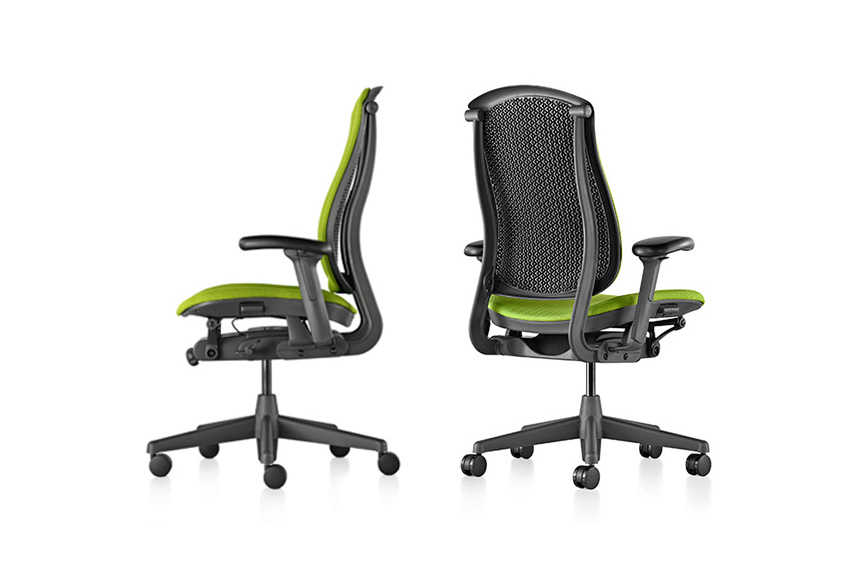
photo_gallery_celle_32. Celle Chair

Ergonomic chairs are a must for those who spend a lot of time behind the desk, typing away at their keyboards for long hours every single day. Your body needs ample support to keep you comfortable enough and prevent aches. This is what the Celle Chair, designed by Jerome Caruso, is designed to do. It is an intelligent, supportive, comfortable and durable chair that will help keep you focused and productive all day. Check out more details here.


Darma-grey-background3. Darma Cushion

Smart and healthy are two apt terms to describe the Darma Cushion. Don’t get fooled by its appearance: though it looks just like any other cushion, embedded inside are hidden sensors designed to detect the user’s breathing patterns, stress levels, heart rate, and sitting posture. It then uses these readings to notify the user to stand up, do some stretches, and correct improper sitting posture. And good news for those who are into meditating: it also prompts you to do what you love. Get your own here.


For quick, safe, and secure storage:

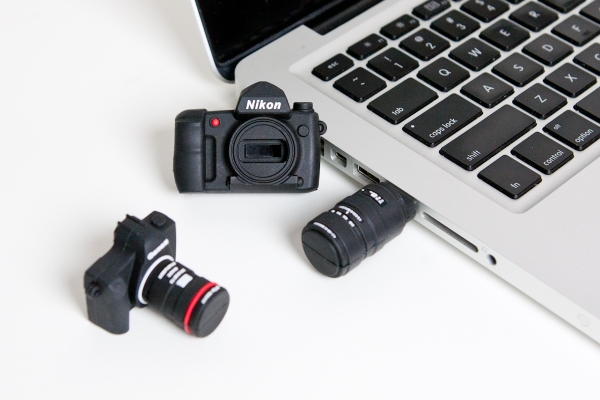
Camera USB Drive4. Camera USB Drive

Tired of your boring-looking USB drive? Then the Camera USB Drive from Photo Jojo is just what you are looking for. As the name already suggests, it looks just like a tiny DSLR camera, allowing you to carry around with you digital copies of your photos or get them transferred to another device without any hassle. Learn more about this quirky USB here.


Wireless Desktop 20005. Wireless Desktop 2000

With the Wireless Desktop 2000, everything you enter through the keyboard is automatically encrypted. Aside from helping you save time on arduous data-protection procedures, it also helps you save money since you no longer have to purchase pricey encryption software. And since it is wireless, you can bring it with you anywhere and let you get your job done safely, wherever you may be. Find out more about it here.
For powering up multiple devices:

Griffin PowerDock6. Griffin PowerDock 5 Charging Station

Getting annoyed with how your desk always ends up cluttered with different chargers for various devices? Then get yourself the Griffin PowerDock 5 Charging Station. It is specifically designed to safely recharge your mobile devices’ juices – up to five, in fact. Best of all, the recharging process takes place in just a single spot, eliminating the need for four other chargers or separate power banks. Learn more about this space-saving, clutter-freeing gadget here.


HyperJuice Batt Pack7. Battery Packs

CIO has three recommendations when it comes to battery packs. First is the most heavy-duty of all: the HyperJuice 2 External Battery. Although it is quite a handy in terms of weight (1.6 pounds), it is also the heaviest in terms of performance, thanks to its 27,000mAh battery. You can juice up your devices several times with just a single charging of this battery pack. In fact, it is so powerful you can recharge a MacBook with it.

The other two are the 7,000-mAh Sony CycleEnergy (CP-F2LSAVP) and the 6,000-mAh Zaggsparq 6000.

For fueling up, the fun way:

Canon Camera Lens8. Canon Camera Lens Mug

Ask anyone what gives their bodies and brain a boost while tiring away at work, and they will tell you coffee does the trick. And with the Canon Camera Lens Mug, you can make your cup of Joe even more interesting. It works in two amazing ways: it keeps your hot beverages hot (or cold drinks cold) and it also functions as a camera lens. This is a perfect gadget for those working in the photography/print media industry, but you can enjoy it even if you are not in any of these fields. Grab one for yourself here.

Self Stirring Mug9. Self Stirring Mug

Harry Potter’s world is not the only place you can find magic: with the Self Stirring Mug, you will feel as if you have been transported into the land of wizards and witches. As the name already suggests, this mug will do all the stirring of your beverages for you, saving you time and also helping you avoid scorching your tongue. Find out more here.


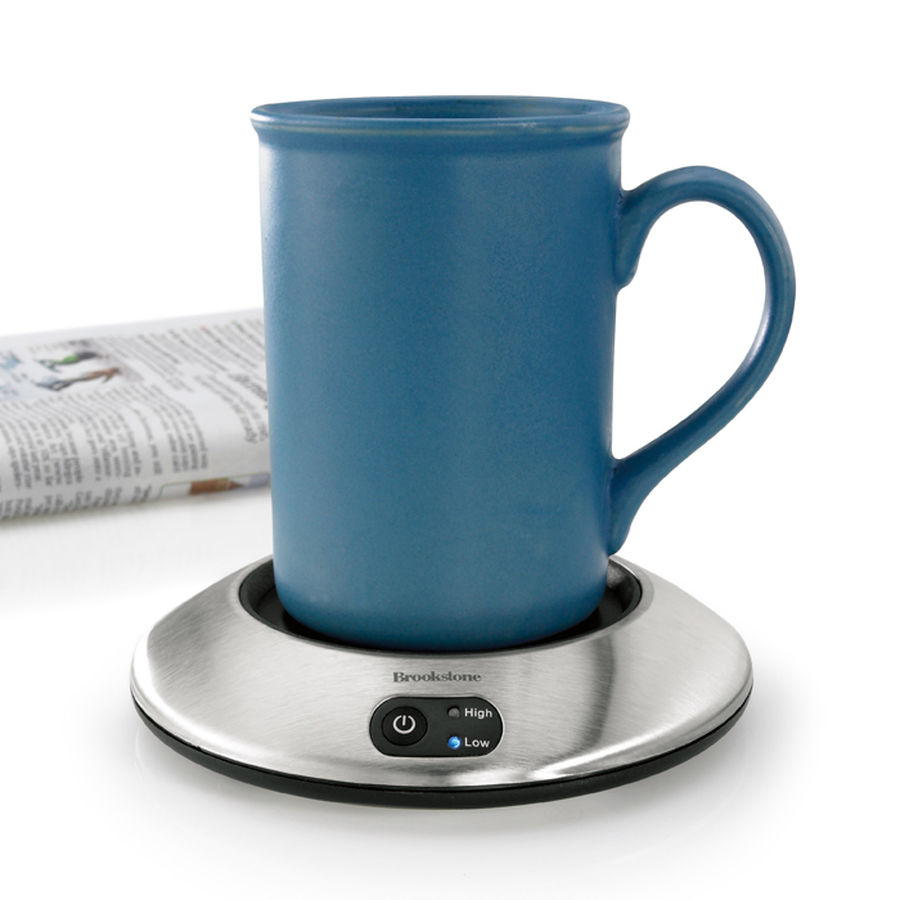
Brookstone Beverage Warmer10. Brookstone Beverage Warmer

With your busy schedule, you cannot afford to take numerous trips to the pantry to get a fresh cup of coffee or tea. Thanks to the Brookstone Beverage Warmer, you can have a supply of these beverages by your side, all throughout the day. Get more info here.


For stirring up and refreshing your creativity, too:

Klipsch Headphones11. Klipsch Mode M40 Noise Canceling Headphones

A lot of people find it easier to focus, concentrate, and perform better at work when they listen to their favorite tracks. If you are like one of them, then you need more than just a pair of regular headphones. You need one that delivers exceptional listening experience, like the Klipsch Mode M40 Noise Cancelling Headphones. They filter out distracting noise from your surroundings, allowing you to enjoy unadulterated, pure musical joy. Go here to learn more.

Staying productive is a must, not only at work, but in general, since being unable to meet deadlines and produce quality results can stress you out and take a huge toll on your mental and emotional well-being. With these gadgets in your armory, you can keep doing what you do best, and deliver even better results for your company.

Other Sources: Inc.com and Useoftechnology.com

Remote Work Digest: September 23, 2015

The latest on all kinds of information, news, and resources that help you make working remotely better.

Image from Lifehack.org

Image from Lifehack.org

10 Tips for Working from Home | Emily Schuman, Thefashionspot.com

Blogger Emily Schuman has worked at home for almost seven years. According to her, procrastination has been a part of her day and then she would work late into the night just to get the next day’s post finished. Here are the changes she made in order to be much more productive when working at home.

  1. Staying in pajamas may sound more appealing but getting dressed and doing your hair will make you feel that you are ready to conquer the day.
  2.  Set up an office space. It will help differentiate the times when working or when hanging out at home.
  3.  Set specific hours. It’s easy for the lines to get blurred and shutting your office door when the days ends reinforces the idea that work is done for the day.
  4.  Always make it a point to take a morning walk and regularly have small breaks.
  5.  Working for yourself means you may lose certain perks like access to employer’s retirement plant and health insurance. Implement a plan with those types of benefits and/or work with a reputable accountant to manage taxes and payroll.
  6.  Socialize. Schedule a couple of lunch meals out with friends, several meetings and a nighttime event.
  7.  Remember to take advantage of flexibility.
  8.  Stock healthier foods. It’s hard to stay away from the refrigerator when your procrastinating and picking on fruits, nuts and crackers are better options.
  9.  Make a to-do list. Using work flow programs like Asana can help keep you accountable.
  10.  Take a minute or two to tidy up your work space. It’s nice to come in the next day and feel inspired instead of dejected because of a mess.

Continue reading

Remote Work Digest: August 24, 2015

The latest on all kinds of information, news and resources that help you make working remotely better.

Image from Coloradohomeexplorer.com

Image from Coloradohomeexplorer.com

Keep Virtual Workers Engaged From the Start With These 4 Simple Onboarding Practices | Entrepreneur.com

When you work with remote employees, an exceptional and thorough onboarding program is critical. It’s even more challenging to keep remote workers engaged. Setting the right tone at the onboarding stage will improve engagement, productivity and employee satisfaction.

If your company utilizes remote workers, here are Beth Miller‘s four best practices to set up your entire team for success.

1. Recognize that onboarding starts at hiring
Always look for signs that candidates are self-starters and will thrive in an often isolated work environment. It’s important to remember that working remotely is very different from working on site. Assessing skills is important, but it is equally imperative to assess a candidate’s ability to thrive while working from a distance.

2. Deploy the right technology
Choose your technology based up on the needs of the group, and be sure that your company has the bandwidth and capabilities to keep those technologies up and running. These technologies humanize the digital experience, and foster a connection with remote employees that’s stronger and better that a phone call or email.

3. Maintain a continuous connection
Remote employees and managers should speak each day for the first two to three weeks. During those check-ins, managers should make sure the employee is clear on his or her priorities and what needs to be done.

4. Help telecommuters help themselves
Managers aren’t the only team members challenged by telecommuting. The employees themselves also face challenges. Working from home can be isolating, and employees face a daily onslaught of distractions. Virtual workers can also face challenges when it comes to establishing connections with team members and colleagues.

Through strong hiring practices, the strategic deployment of technology, continuous communication and some creative thinking, managers can set the tone for a great working environment for even their most geographically distant team members.

Is Remote Working Right For You? | Worksmart.org.uk

Is working from home right for you? Taking a telecon in a hip cafe; commuting ten paces to work in your pajamas; fitting a trip to the gym into a long lunch hour…what’s not to like about the attractive and endlessly flexible ways of modern remote working? But is the grass really as green as it looks? Here are a few things to consider if you are considering asking to telework.

The pros

Remote workers can look forward to saving time on commuting, and having more control over their working time, often helping them to reconcile work and home life.

Benefits to workers include:

  • the potential to work virtually anywhere you want
  • freedom from the time-consuming distractions of the office
  • contact with other teleworkers could help stimulate more creative approaches to your own work

Employers can also benefit. They save on desk space to cut office overheads, and create more agile workforce. There is also evidence that trusting staff to organize themselves effectively to do their job can boost morale, nurture greater responsibility and pride in their work, and ultimately deliver better results for companies and organizations.

The cons

There are some great benefits to teleworking for both employees and employers. You should weigh these against the pitfalls of teleworking. Here are just a few;

  • People working from home often find themselves going ‘stir-crazy’ after a day or two away from the social life of the office.
  • Slowly losing some of the workplace social and professional skills you need to keep aquiring to develop in your career.
  • Slipping into bad work habits is very easy without traditional work structure around you.
  • Flexible working needs boundaries and it’s easy for your colleagues to assume you are absolutely flexible and perpetually ‘on call’.
  • Teleworking: your rights

If you have started to telework but found it isn’t for you, you should be able to change your mind.

Why Home-Based Jobs for Moms Work for Stay-at-Home Mothers | Latinospost.com

There are so many opportunities online that only require a little of your time, and you can earn money, which you can use for perhaps, additional budget on groceries. You just need to treat technology as your best friend and know which websites offer legitimate work.

If you have experience doing administrative or technical tasks, you can check out Upwork, formerly known as Elance – oDesk, or FlexJobs, where you can search for data entry, medical transcription jobs and the like. If you are considering a full-time career even while at home, there are so many available jobs out there that you can fit in your busy schedule. Here are some jobs being offered online.

  1. Call center representative/ Tech support specialist
  2.  Writer / Editor
  3. Online Teacher / Tutor
  4. Web Developer / Designer

Having a work from home career is very stressful at first, but if you have the support of your family, this will be easy as a pie in the long run.

How to Take Advantage of your Brain’s Hidden Productivity Powers | Fastcompany.com

If you think keeping everything you need to know neatly packed away in your head is a smart way to run your life, you’re probably hurting your productivity and stifling your creativity. Mental lists, like keeping track and remembering appointments, meetings, deadlines, and to-dos, distract you from more productive uses of your brain like solving problems. According to Scott Shafer, associate dean and professor of management at Wake Forest University School of Business, Mental lists are more difficult to manage than physical lists. Shafer recommends doing a brain dump and to – do lists out of your head and onto a physical list and calendar.

Brain Dumps Fill Your Calendar

One a week, set aside a half hour and write or type all the loose thoughts in your brain about what you have to do or need to remember. Capture this information in whatever way feels most comfortable to you, says Shafer, such as in a Word document, Excel file, task list or legal pad.

Brain Dumps Can Also Jumpstart Creative Projects

According to Barnet Bain, producer of the Oscar – winning film What Dreams May Come and author of The Book of Doing and Being: Rediscovering Creativity in Life, Love, and Work, “You need to be willing to let your inner censor take a break, just as you would suspend criticism of a child who is sharing an idea with you or showing you an art project.”

Using your head as a place to store information and ideas is not an effective use of your brain, nor is it an efficient way to keep track of your work, says Shafer. “Trying to keep track of everything that way just creates mental and physical stress,” he says.

10 Ways to Identify a Bad Manager! | Linkedin.com

There are several books, articles, and papers that show you ways to be a good manager. Here are ten characteristics of a bad manager:

Manages everyone the same – Bad managers manage everyone the same. It doesn’t matter to them whether you are able to perform at the same level as other members of the team, the expectations are the same.

Picks their favorites – Bad managers pick favorites. Not necessarily because they are better performers than you, but because they simply like them better than you. The favorites will get the best assignments, the most kudos, the best yearly reviews, and the biggest raises.

Their point of view is the only point of view – Bad managers are terrible listeners. They neither want to hear nor do they accept others’ opinions and even if they do listen, they will come up with an excuse why that won’t work in their department.

Technical to management – Technical people are good at managing technical things, not necessarily managing people. They simply don’t have the people skills and empathy to deal with subordinates’ problems, both work-related and personal. Technical people, for the most part, should stay technical.

Heart is not in the game – Bad managers really don’t want to manage. They don’t want to put in the time, energy, and effort to become better managers. If you want to be a manager, then you really need to want to manage people.

Lack of empathy – Bad managers don’t care about their subordinates. They spend more time finding things that their subordinates are doing wrong instead of rewarding things they are doing right. They have little tolerance for people who may need help and don’t want to take the time to train, coach or improve each member of the team.

Lack of management skills – Many managers have never taken a management, leadership, or communication workshop or class. Many have never managed people before. Many don’t believe they need to take any training, seek any advice, or accept any coaching to be able to manage people. They are wrong.

Lack of time – Bad managers don’t want to invest the time necessary to become good managers.

Lack of effort – Managing people takes effort. It doesn’t happen overnight and it doesn’t happen by chance. It is an ever-learning process where the emphasis is on the end result of being able to effectively coach, mentor, and improve your subordinates.

Lack of smart goal setting – Bad managers set terrible goals. They are generally nonspecific, non-measurable, non-attainable, non-realistic, and not time bound so it is up to the manager to determine if the subordinate actually achieved the goals set forth.

Bad managers come from those who realistically do not want to manage people. If you have the heart, and are willing to put in the time and effort, you can be more than a manager. You can be a good coach and mentor, which is what all managers should strive for anyway.


Remote Work Digest: August 6, 2015

The latest on all kinds of information, news and resources that help you make working remotely better.

Image from Ph.jobsdb.com

Image from Ph.jobsdb.com

5 ways to keep your employees happy | Bizjournals.com

No one seems to work nine-to-five anymore, not you or your employees. To explore this work flexibility, a new study conducted by the business-to-business division of Staples gets at the heart of the employee attitudes toward the shifting ways we work, and what keep employees happy at their jobs.

Study results

The study revealed surprising statistics that cause companies to look at workplace happiness in a new way and, more importantly, motivated and productivity staff. While 52% of office workers say they are suffering from burnout as a result of the hours they work, 86% are still happy at work and motivated to rise in their organizations, so there’s more to workplace happines than what we might initially think.

According to Dan Schawbel, founder of WorkplaceTrends.com, employees are overworked and burnt out, yet they are still happy, loyal and interested in moving up to management in the next few years. Here are five tips to keeping that upbeat feeling:

1. Hours aren’t everything

Encouraging employees to work outside “normal” hours – flexible scheduling – can result in better, more productive work and increased happiness.

2. Invest in your employees

Spending to provide employees with the latest and greatest technology will ultimately mean happier, more loyal staff.

3. Encourage breaks

Encouraging breaks for staff helps them recharge and increase both productivity and morale.

4. Implement a telecommuting/flex work policy

Implementing an official flexible work policy will encourage employees to work in the environment that suits them.

5. Go green

The happiest workers are more likely to work in companies with Eco-friendly policies of some kind (74%). Sustainability plays a huge factor in talent retention and helps keep employees motivated.

Small changes can go a long way to keeping employees happy and loyal. After all, a happy, motivated employee is a productive employee.

Working from Home? 6 Free Tools That Boost Your Productivity | Business.com

According to the 2010 U.S. Census, 13.4 million Americans telecommute at least one day per week, up substantially from the 9.5 million who did so in 1999. A study by the Harvard Business Review found that working from home dramatically improves productivity and increases employee happiness.

Here are 6 helpful apps and tools that make it easy to organize your work flow, enhance your productivity and leave yourself with some time to unwind when you’re a remote worker.

1. Evernote: Keep Everything Organized

Evernote is an all-in-one app that allows you to collect your ideas, notes, and tasks in one place. Think of it as an external hard drive for your brain. You can draft quick notes, attach documents and emails, set up to-do lists, and organize everything by category.

2. Wunderlist: Balance Personal and Professional Tasks

Wunderlist helps you organize and prioritize everything you need to accomplish. You can arrange your tasks by category and due date, set up recurring reminders, and check off items once they’re completed.

3. Hours: Manage Your Time

Track the time you spend on different tasks throughout the day. Set up as many task categories you need and set a timer with a simple thumb tap.

4. How Much Speed Do I Need Tool: Increase Digital Productivity

Do some research and find out how much Internet speed you need. You may find that the productivity gains of faster Internet more than makeup the added service costs.

5. Boomerang: Schedule Emails for Later

Boomerang lets you schedule emails in advance. If you’re a night owl, you can type out emails when you’re most productive, click “Send Later”, and have them sent out during daytime hours.

6. Timely: Track Your Hours

This app lets you track how much time you spend completing tasks throughout the day. You can set goals for completion and organize tasks by level of priority.

With these apps and websites, you can ding the tools you need to make the most productive use of your at-home work time.

How Good Design Can Make Telecommuting Work for You | Metropolismag.com

Spurred by shifting family dynamics, an upswing in non-traditional work environments and in increasingly digital age, employees and independent contractors are giving up office walls for the convenience and confines of their homes. This shift has spurred contract furniture manufacturers to add or expand their home-office furniture collections.

Define a Work Space

Clearly defined spaces devoid of distractions like TVs and gaming consoles help to keep the stay-at-home worker on task. Creating a dedicated work space, especially in a small apartment, can be as simple as hanging a curtain or erecting partitions that can also double as a storage.

Aesthetics, Aesthetics, Aesthetics

Incorporate your personality into a space by adding curios of interest. But restraint is a virtue, as the addition of unnecessary distractions might actually keep you from getting tasks fulfilled.

Ergonomic Furniture is Key

Invest in comfortable and ergonomic furniture that can help you concentrate over extended periods of time. Sit/stand desks can help introduce a new level of activity into your workday, while a chair with an adjustable seat and backrest can help avoid repetitive injuries.

Four tips to help start up founders develop high performance remote team | Startupsmart.com.au

Flexible work options have become an important tool for start ups wishing to attract high quality candidates, and retain them over the long term.

But business leaders still struggle to adapt traditional management practices to this new way of working. So how do you manage your remote workforce in a way that delivers results?

Here are four strategies that are essential to developing a high performance remote team:

Find the right people

Remote work isn’t for everyone. It usually means working alone without the social aspects of an office environment. This means you need people who are self-motivated and can manage their own work flow.

Work to outcomes

Rather than tracking daily activities and tasks, agree on project milestones and deadlines with your team. Give your staff the flexibility to manage their own time to achieve those results.

Communicate consistently

It’s important to establish clear rules for how and when interaction will take place. This provides a sense of stability and structure for your team.

Build a team culture

Working remotely can leave people feeling invisible and unappreciated. It’s important to give regular feedback and recognize good work. Constructive criticism is equally important. It ensures your relationship is focused on progressing, learning and achieving your goals together.

3 Management Mistakes That Could Destroy Professional Services Business | Entrepreneur.com

A professional services business is only as the work it does for clients. If projects fails, a business can lose clients and revenue or even worse, kill the business.

As professional service business continue to see record employment growth, now is the perfect time to focus on three common project management mistakes businesses make and how to avoid them.

1. Client communication failures

With growing teams and bigger projects, it’s impossible to keep track of every small detail using traditional manual approaches, such as copying and pasting or multiple all-hands meetings. While new collaboration tools are trying – unsuccessfully – to replace email entirely, the real solution is to use project management software that integrates with email automatically, tracking conversations and treating the content of their messages as assets to share across the team.

2. Inaccurate budget tracking

Even when firms attempt to properly track time, managers are often in the dark around budgets and time spent by team members when it matters most: while the project is running. Our study found that only about 30 percent of professionals use a time sheet connected to their project management software. The vast majority, about 69 percent, track time spent on projects manually or not at all, leaving them uninformed and risking financially catastrophic project failure.

3. Assuming projects are too short for management

Professional services businesses are only profitable if they can effectively manage projects and keep clients happy. Unhappy clients lead to loss of business and poor project organization leads to loss of profits. Without clients or profits, a professional services business cannot succeed. These matters are made even worse as businesses grow out of old processes. All growing businesses should re-evaluate their project management capabilities and consider new technology to ensure long-term success.

Remote Work Digest: JULY 13, 2015

The latest on all kinds of information, news and resources that help you make working remotely better.

Image from Tassuru.com

Image from Tassuru.com

3 Things You Must Know If You Work From Home | MoneySmart.sg

Working from home can be hellish sometimes, unlike in the office, slacking off can result in some major guilt and self-loathing. If you work from home or have a flexible schedule, here are a couple of things to do according to Joanne Poh.

Schedule Ruthlessly

Draw up a timetable and schedule every darn thing. Neglect to do that and a simple task can take the entire day, thanks to lack of urgency and discipline.

Eliminate time wasters and distractions

If you want to be efficient, eliminate as many distractions as you can. Disconnecting from the internet whenever you don’t need it and silencing your smart phone might be essential.

Master your energy cycles

Once you’re left to your own devices, it becomes crucial to understand and master your energy cycles. Know your energy peaks and troughs, schedule mundane tasks like replying to emails or doing admin to times when your energy is low.

7 Tips to Help you Stay Healthy while Working from Home | India.com

Struggling to maintain a healthy lifestyle while working from home is definitely a big challenge. When you can get away with moving very little and is very close to the snack cabinet, it can be incredibly difficult to keep up with healthy habits.

Here are Zara Husaini‘s simple tricks that can help you stay in top shape – no daily commute required.

1. Try to eat at home as often as possible
One of the biggest advantages of working from home involves being able to whip up a healthy meal in the middle of the day. Take advantage of this and your body will thank you.

2. Prepare your meals ahead of time
Always keep a healthy meal in your fridge and have it ready to go for the next day’s lunch. You will be less tempted to grab something from your local fast food joint if your food is already prepared.

3. Give yourself breaks
Taking at least one break a day to get your blood flowing and clear your mind will always make your days feel less stressful.

4. Schedule weekly trips to the grocery store
Choose one day a week to hit the grocery store and stick to it like it’s a business meeting. When your home office is full of healthy snacks, it’s much easier to reach for something nutritious when you get hungry.

5. Schedule a walk every day
Even if you don’t have the time to workout, starting each day with a 20 minute walk is a great way to jump start your mind and body.

6. Set alarms for activity breaks
Hold yourself your accountable to this healthy lifestyle by programming alerts to regular activity intervals. It may not seem like much at first, but it will make a big difference if you do it consistently.

7. Embrace midday workouts
Take advantage of your flexible schedule and break up your day with a trip to the gym.

Don’t do your laundry: How to be an effective work-from-home employee | Financial Post

Working from home is both a blessing and a challenge. You may be thrilled about the “freedom” of setting your own hours, but any work-from-home veteran will tell you that it requires a lot of discipline. According to Megan Santos of Jobpostings.ca, the key to success is emulating an in-office workday.

Establish a home office

Working from home shouldn’t mean curling up on the couch with your laptop. Whether it’s in a spare room or the corner of your kitchen, setting up a home office in a place that offers less distraction is a must.

Set firm office hours

Draw a line between work and your responsibilities at home. The best way to achieve this is by setting office hours. If you have a family at home with you during the day, make sure they recognize and respect your work hours.

Resist the urge to dress down

Dressing up can help you mentally transition from a homebody to an employee. While your colleagues won’t be around to evaluate your wardrobe choices, you should do your best to look the part of a productive and gainfully employed individual.

How to find an IT job with better work-life balance | Mashable

If you’re searching for a new IT job, here are some of Tim Cannon’s specifications to look for to find more balance between your work and personal life.

Flexible Options

Flexible options range from part-time telecommuting, full-time telecommuting, flexible start times and more. The key is finding an option that fits your lifestyle and will actually offer more balance between work and personal time.

Emphasis on teamwork

Achieving work-life balance is nearly impossible if you’re not supported by a solid team. Team dynamics are difficult to judge from the outside, but asking questions about the balance between individual work and teamwork during the interview process can give you an insight.

Fewer devices

Using multiple devices can not only lead to overworking habits, but can also create the expectation from your employer that you are always outside of normal working hours. In an interview, ask how many personal devices employees typically use on the go and out of the office. Fewer devices will most likely mean better balance.

When in doubt, ask

If you do meet any team members or those in similar positions during the interview, don’t be afraid to ask them about the work life balance of the job. If you’re uncomfortable discussing balance in front of your potential boss, connect with them on LinkedIn.

9 Ways Freelances Can Get Paid on Time and Avoid Deadbeat Clients | Entrepreneur

Cash flow management for freelancers is more than just finding clever ways to save money personally and professionally. Here is what Peter Daisyme learned about getting paid as a freelance accountant and small business owner for 15 years:

1. Be known as a professional
Prove to clients that you are a true professional worth hiring by always being polite, exceeding goals on time, sharing reviews and showcasing your portfolio on your website.

2. Do some homework on prospective clients.
When you are approached by a client, you should do a little research. Check online for any red flags from your fellow freelancers. If you know that the client could become a potential headache, when why would you want to take a chance with them?

3. Be flexible with your rates.
You deserve to get paid for what you’re worth. If you want to attract clients, you might want to be flexible with your rates especially when you’re just starting out, since this will add to your experience and maybe earn you some referrals.

4. Bill up front
Don’t think it’s rude or unprofessional to bill up front. It’s not only a common practice, it also ensures that you get paid for your services and keep the cash flowing in.

5. Make it easy for clients to pay you.
Whether it’s accepting eChecks, credit/debit cards or setting up a PayPal account, you need to make it easy for your clients to pay you. Most invoicing software allows you to select your preferred method(s) of payment, so a client should be able to pay your invoice with just one click of a button.

6. Invoice promptly.
Instead of waiting every month to get paid, you should either bill weekly or immediately following the completion of a job. This not only keeps a positive cash flow, it also prevents you forgetting to send out the bill.

7. Never work until you’re paid
Instead of spending time tracking down clients and asking why their invoice is overdue, you could be working on other projects for the clients who are paying you. If you send out an invoice and it hasn’t been paid on the agreed upon date, then stop working for that client until the invoice is paid.

8. Have it in writing.
A contract protects both parties, since it should prevent either party from pulling a fast one. Contracts also specify the terms and conditions of the project which include everything from expectations to terms of payment.

9. Call in the Calvary.
What happens when a client still hasn’t paid an invoice? If you have an assistant or colleague who is more assertive than you, have them handle outstanding invoices.

If you want to get paid on-time make sure you communicate frequently with your client, set clear expectations and that you’ve properly invoiced them.