Remote Work Digest: April 10, 2017

The latest on all kinds of information, news, and resources that help you make working remotely better.

office-972624_960_720

Image from Pixabay.com

8 Little Time Management Tips for People Who Are Always Procrastinating | Grace Beuley Hunt, Purewow.com

You have a big work project looming over your head, and you’re ready to get down to business…until you notice a stain on the rug. Hmm, maybe you should buy some rug cleaner. Or just get a new rug. Are there any sales at West Elm? Let’s check the website. Oooh, what a cute end table. Hey, procrastinator. You’re not alone. Here are seven unexpected tips to kick your habits to the curb for good.

Build a Procrastination – Free Zone
Designate a space whose sole function is serving as your perch for getting sh*t done. Set up a study if space allows, carve out a small nook in the living room for a writing desk or even consider renting a shared workspace. Keep this zone neat, orderly and distraction-free (read: leave your cellphone elsewhere).

Surround Yourself with Color
A study published by Frontiers in Human Neuroscience found that red, for example, has been shown to increase attentiveness, and a separate study by the University of British Columbia found that blue can boost creativity.

Experiment with surrounding yourself with more color across the board—from rainbow-hued desk accessories, to your wardrobe, and even bringing more color into your diet.

Take More Showers
There’s nothing better for jump-starting a productive stretch than literally giving yourself a fresh, clean slate.

According to a study published in the Journal of the Public Library of Science, quality of work may benefit from that shower break.

Spend More Time with Doers
Prioritize spending time with the people in your life whom you consider hard workers, go-getters and all-around inspiring human beings. Their can-do energy and company will be good for your soul, as well as a serious motivator.

Assign a Procrastination Police Officer
Ask someone whose respect you value (whether that’s your S.O., close friend or family member) to act as your procrastination police. According to findings from the American Psychological Association, shame can be hugely motivational. But in this case, that “shame” will actually come from a safe and positive place.

Wake Up Earlier
Getting something accomplished first thing in the morning is truly the antithesis of procrastination. So challenge yourself to rise an hour or two earlier and see how many to-dos can be checked off before you even leave for the day.

Get Playful When It Comes To Getting Organized
Play can boost output. So whether it’s flipping heads or tails to decide if you’ll tackle those thank-you notes this evening or singing out your to-do list every morning, find a state of play and humor in the banal…and reap the rewards.

Stop Comparing Yourself with Others
Instead of sizing up the competition, focus on your own vision. That means no need to “research” a project for five hours before getting started—just start it already. You’ll feel so much better, we promise.
3 Ways to Overcome Remote Hiring Challenges | Holly Wade, Business2community.com

Whether or not you set out to look for remote workers, they may be the best hires for your organization. Because remote workers do not have to travel and generally feel more productive and happier about their jobs, they are more likely to work beyond the 40-hour work week. This is just one of the benefits of hiring remote workers as well as higher employee engagement and improved health and well-being. Some studies show that telecommuting also saves organizations money. According to one report, allowing employees to work from home about half of the time would save as much as $11,000 per year.

1. Interview with Video – If your employee will be working remotely, it makes a lot of sense to interview them remotely too. Screening with video will also allow you to screen candidates more heavily without an additional time commitment, and you can ensure standardization of questions for all candidates.
2. Know Where/How to Look – If you’re looking for a freelance remote worker, try searching websites dedicated to seeking freelancers, and avoid highlighting the job’s remote needs unless you’re prepared to wade through more applicants.
3. Set Expectations – Employee trust and communication are vital to allowing individuals to work remotely because business leaders need to trust that workers are doing their jobs.

Screening candidates more efficiently and searching for them the right ways can help you locate the right remote worker that you trust to work independently, communicate well and get the job done.
How to change your mindset when you go from full-time to freelance | Lindsay Deutsch, Usatoday.com
To prepare for the changes, USA TODAY’s Lightpost lays out an expert-sourced comprehensive plan to help you ease into this life transition. When you’re just getting started, remember to keep these tips in mind:

Monitor your finances more closely.
As a freelancer, you need to play a more active role. A good app to track your finances and spending is Mint. ShoeBoxed can also help you scan and organize receipts, business cards, create expense reports, track mileage and more for expensing and tax purposes, as well. It may also be worth checking out the services available from Intuit Small Business.

Don’t pass along the blame.
When something doesn’t work out during the span of your 9-5 traditional job and it’s not your fault, it’s easy to pass along the blame and move on with your job. As a freelancer, you need to things to work out. That means you need to figure out how to best work with the person who is going to pay you so you can complete the gig and actually get paid. So, take a deep breath before you reply to a frustrating email and brainstorm ways you can make things work.

Be deliberate about your downtime.
You need to be more deliberate about your productivity and downtime. Think about the money you could be making while you’re wasting time on mindless social media. What could you do with your time?! AND CO is a good time tracking (and tool for expense tracking, invoicing, payments, and reporting services) for freelancers and small businesses that could be helpful.

5 Ways To Train A Remote Workforce | Chip Espinoza, Training.co.uk

Since remote work is on the rise, remote training is on the rise too. Unfortunately, remotely training employees can be easily blundered if an employer isn’t prepared for the challenges. Rather than leaving your employees stumbling or send them through inadequate training, take the time to prepare a useful and applicable training program for remote employees in order to maximize both productivity and employee satisfaction, decreasing the chance that they’ll quit out of stress or frustration.

1. Look for remote work experience
The best way to minimize the difficulties that could arise from training remote workers is to ensure that your employees are coming to you with some remote work experience to begin with. Although the remote workforce must grow by hiring inexperienced remote employees, prioritizing or looking for employees who have that experience will ease your training burden.

2. Establish peer-to-peer informal learning
Informal learning through fellow employees will help your training along by giving participants real life examples to model after and more resources to turn to for help. Avoid keeping your remote employees separate; connect them and encourage them to communicate amongst themselves, or set up some sort of employee social media network that will let them easily communicate and keep track of what other employees are doing.

3. Look for at least one face-to-face meeting
The best way to prepare an employee for training and bring them into the company fold is to begin with face-to-face meetings and training sessions before remote work can start. However, this is not an option for everyone; in that case, a series of Skype calls can substitute to help provide the face time and familiarity that in-person meetings offer.

4. Have all training documents prepared
If you’re just transitioning into remote work, it is critical you make sure that you have training documents, guides and manuals prepared for employees before they arrive. These documents should be extremely extensive and detailed – as detailed as you can. A good strategy for training employees is to assume nothing about the technical knowledge they bring to the table.

5. Give them flexibility in pace
Your remote employees are almost certainly going to be mostly left to complete work on their own, which means their training styles should follow a similar method. Although it’s critical to check in, talk to your employees, make yourself available to clarify when needed and follow up to see if they’re learning what they need to, it’s best to give your employees the information they need and let them travel through it at their own pace.

Remote employees bring unique challenges for employers. Standard training practices will not work for such an arrangement. By modifying your training to one that suits remote workers, you’ll have better success in training and retaining.

Remote Work Digest: February 10, 2017

The latest on all kinds of information, news, and resources that help you make working remotely better.

2012%2f12%2f04%2f37%2fworkingremo-ahk

Image from Mashable.com


7 office décor tips that will improve productivity at work | Sangeeta Ghosh, Knowstartup.com

What makes everyone enjoy working there so much? The answer is simple: their design strategy is creative, customized to every location and the offices are not just sad places designed to bring money. We could learn a thing or two from those examples and make our own work spaces more enjoyable with these tips:

1. Smart Setup
A well-arranged office adjusts to the way employees work, and functions to create a convenient, easy-to-navigate environment. Workers are more relaxed and able to concentrate on the tasks at hand. Aesthetics are important in the modern office but should not take priority over efficiency.

2. A rooftop social space
Even if the office is in the middle of the city, away from forests and nature in general, there’s a way to revive that connection by creating a rooftop social area decorated with planters, perhaps even trees and from where the views can be admired.

3. Everything in it’s place
Invest in folders, filing systems, desk organizers, boxes- anything to prevent random stacks of paper. Not only will this likely reduce confusion, and time wasted sifting through piles of paper searching for the right document…but this strategy will also make your employees feel more organized and less stressed.

4. Choose stimulating colors
Colors can have a significant influence on the mood of the employees. It can also help with productivity, creativity, and concentration of the workers.

5. Plants
Interacting with nature can have very positive effects on the mood but while working it is not possible to spend much time in the sunshine and greenery. You can make use of plants to spruce up the working space.

6. Personal touches
Encourage your employees to style their desks with things they like. A little bit of office supply budget spent here will go a long way when it comes to employee happiness, productivity, and less absenteeism.

7. Natural light in the workplace
Properly utilizing daylight in your work space not only increases productivity but will save on energy bills. Place desks near to a window to maximize the amount of natural light which falls over your work space.

Environment is very important in a work setting, but it all depends on what kinds of work is taking place in the office. If the design of the office is not something that can be changed, simple changes can be added, like adding a few bright colors or plants. Think about the tone of your office space, and try a few of these additions. You might just notice a change in you and those working around you.

Working from home is the new key from breaking out of the daily grind | Victoria Heckstall, Groundreport.com

More scientists are concluding that 40-hour work weeks are damaging to our health. Sitting down in an office for long periods of time is bad for both our physical and mental health and could be contributing to the accelerated decline in brain power.
But why is it the case?

Office Culture is Toxic
Sitting in a room for 40 hours every week with people you don’t necessarily like is crushing to morale and motivation.

The Numbers Add Up to More Productivity
Many remote workers have stated that they feel more productive because they have full control over their work environment.

Leisure and Family Come First
Study after study has demonstrated that when employees can put leisure and family matters first they are more productive and more motivated to do better.

More Motivation Through Gaining Personal Responsibility
Personal responsibility helps us to encourage creativity and gives us the confidence to speak up when we believe we have a solution to a problem.

How to Get Your Boss to Offer Remote Working
Explain to them the benefits of remote working. Don’t think about what it will do for you think about what it will do for them. Focus on productivity benefits and how you’ve demonstrated the personal responsibility needed to separate your work and home life.

Working From Home is the Answer
If you’ve yet to convince your boss that you should be able to work from home, even on a part-time basis, keep trying. Make them see what it can do for their business.

4 ways to take care of remote employees | Dennis Healy, Employeebenefitadviser.com

Here are four ways you can keep remote workers in the loop:

1. Help them create personal connections with you and other employees. The only time remote workers get to interact with colleagues is on a conference call. Because I am a remote myself, it’s easy for me to remember to make time for “virtual water cooler talk” — I call my direct reports, who are also remote employees, to just catch up on whatever is on their mind.
2. Include remote workers in all-company events and activities. Does your company have an annual party? Make sure remote workers are invited and it’s easy for them to attend. Do you have company meetings? Don’t forget to set up a video chat or call-in number so that remote workers can participate.
3. Give them tools to be successful. There is so much technology available these days to help remote workers communicate and engage more effectively with coworkers. The most critical thing, especially for those of us who spend lots of time on conference calls, is quality audio. It may sound basic, but if the connection doesn’t pick up quiet or low talkers, it’s a real struggle to follow conversations and remain an active participant.
4. Encourage them to embrace the flexibility of working remotely.

The popularity of working remotely is only going to increase in coming years, particularly with millennials — a group that values flexibility, control and a good work-life balance. Having remote workers can be incredibly powerful when you do it right and make sure they feel like they are an integral part of the company.

How To Get Your Boss To Let You Work From Home | Nancy Collamer, Forbes.com

The key to getting permission to work from home: knowing how to ask.

Working from home has become increasingly popular and possible. According to a 2016 study by consultancy PWC, 38% of U.S. workers can work from home at least one day a week, a fourfold increase over the 9% in 1995. Small businesses are more likely than their larger counterparts to offer this flexibility. According to PWC, over half of small business workers telecommute, but only 26% of large-company employees do.

Since your employer might need convincing, here’s the best way to approach your boss about telecommuting and how to make working at home work well, according to Sara Sutton Fell, CEO and Founder of FlexJobs and Remote.co and the Q & A section of Remote.co:

7 Tips to Work from Home

1. Decide how much telecommuting you need or want. Options range from occasional telecommuting on an as-needed basis all the way up to a full-time work-from-home schedule. Try negotiating with your boss to start off working a few days a week from home and eventually you might find yourself telecommuting all of the time.
2. Focus on the benefits that telecommuting would offer your employer, not you. Explain how telecommuting will make you a more productive, focused and engaged worker. For example, less time spent commuting will give you more time for completing reports.
3. Anticipate your boss’s concerns. Make sure your boss understands exactly how often, and by what means, you’ll stay in regular contact with your colleagues and which tasks you’ll accomplish when you work from home.
4. Suggest a trial run. Your manager may be hesitant about letting you telecommute, so offer to do it as a trial run for a month or two. Then, the two of you can assess how it went and you can prove that the arrangement is beneficial to your boss.
5. Create a dedicated home work space. Jan Lindborg, who works remotely as a Global Sales Training Operations Director for Dell, recommended on Remote.co to treat your working space like a recording studio. “No red light, but when my door is shut, I am at work,” he writes. He also suggests switching off your laptop when finished for the day to delineate between your work hours and the rest of your life.
6. Establish disciplined work habits when telecommuting. “It takes a lot of discipline to work remotely, as you’ll find that it is very easy to put off a piece of work when you’re sitting at home,” warns Ben Dodson, who works out of his UK home as a full-time freelance ios developer. To help maintain his focus, Dodson puts on noise-cancelling headphones to serve as a signal that it’s time to get into work mode.
7. Keep connected with your employer and associates to combat feelings of isolation. “Consider what you will miss about the office environment and find ways to recreate it or compensate for it, says Lauren Antonian, who works as a full time remote manager in proposal development for Anthem. “For example, if you are an extrovert who enjoys socializing with colleagues, make a point to communicate with them via instant message or email as you would have if you were available in person.”

Andrea Bing, who works remotely as a project manager for Cigna, joins an assortment of company-sponsored virtual communities, such as a book club and finance group. She also schedules lunch dates with coworkers on a monthly basis. Sometimes, working remotely is just the next best thing to being there.

Introducing Project Template

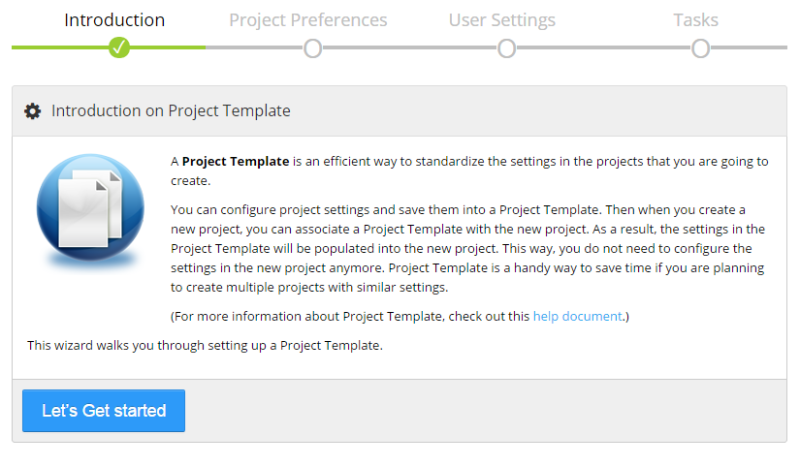
You might need to create and manage multiple projects, and in many situations you want to set up the projects in a similar way. For example, you want to allow users in your projects to be able to add tasks, you do not want the Observers to see the rate of the users in the project, you want to prevent your users in the project from discarding logged screen shots, and etc. These options are not the default options therefore currently you need to adjust them manually after the project is created. When the number of projects is large, this could become quite tedious and time consuming. Now we have come up with a new feature called Project Template that allows you to pre-build a set of settings of a project and save them as a template. When you create a new project, you can use the Project Template to populate the settings to the new project. This will greatly reduce the effort to configure each new project and make the process much more efficient.

Here is how it works. First, you go to Manage >> Manage Templates to create a new Project Template. You will be presented with a 3-step wizard that guides you through setting the necessary options. These options are pretty much replica of those in a real project.

create_project_template_00

Continue reading

Remote Work Digest: December 13, 2016

The latest on all kinds of information, news, and resources that help you make working remotely better.

office-972624_960_720

Image from Pixabay.com

Six ways to keep employee productivity high during the holidays | Coadvantage.com

With so many major events crammed into a relatively brief period, the holiday season is often one of the busiest and most demanding times of year for everyone – employers and employees alike. That, in turn, can have a negative impact on productivity, if employees are distracted by being pulled in too many directions at once, or they are fretting over meeting all the demands on their time and energy, or the workplace is unprepared. Here are six tips for keeping productivity high during and after the holidays!

Relax. Consider online holiday shopping: many employers monitor such activity (48%) or even block online shopping sites (25%), per a survey by staffing firm Robert Half Technology. But those numbers have fallen over past years as employers have relaxed their vigilance.

Clarify. Confusion can be a productivity-killer, as can poorly articulated leave policies that inadvertently allow too many employees to take time off at the same time.

Adapt. Consider offering flexible hours during the holidays, whose extra demands on employees can result in burnout if not managed well.

Slow. This may sound counter-intuitive, but your office might consider allowing for extra time off (and thus lower productivity) during this period to promote greater productivity later.

Comply. Compliance can be a concern during the holidays; for example, the Equal Employment Opportunity Commission requires that employers accommodate religious differences in the workplace, and that can impact how employers handle holiday-themed events and activities.

Appreciate. The holidays are a great time of year for employers to show that they appreciate employees. That, in turn, can boost employee morale and engagement. Employers can show appreciation through employee bonuses, small gifts, personalized thank you notes, catered events, fun outings, award ceremonies, etc.

How To Convince Your Boss To Let You Work Remotely | Rachel Ritlop, Forbes.com

If you are a part of the 84% of millennials seeking greater work-life balance, how can you join the roughly 25% of the US workforce that telecommutes and reports being happier as they enjoy greater flexibility and freedom? Check out these five negotiating tips to convince your boss to let you work remotely:

Timing is everything.
Figuring out the best time to have the conversation with your boss is vital. Tricia Sciortino, president of an all-remote workforce eaHelp, suggests it’s best “during peak season or other busy times.” The logic here, she says, is that “many times managers will be looking for employees to put in some overtime to meet deadlines”.

Know your worth.
If you can quantify your value to your boss you will have greater leverage when making the argument that you will be more productive and creative while working from home with fewer distractions.

Get your facts straight.
Research supporting telecommuting has been overwhelmingly positive for both the employer and employee. For instance, many companies are looking to implement green initiatives, and by allowing employees to work from home a day or two a week, they will be significantly reducing their carbon footprint.

Anticipate concerns or red flags.
Many companies today deal in sensitive information that they may not want you to bring home. “[This] makes leaders uneasy to welcome telecommuting,” says Sciortino. Try to be mindful of this and other potential red flags or concerns your boss may have about you working remotely.

Suggest a trial run.
Your boss may be skeptical to let you work from anywhere on a whim. Ease into it with a trial run. “Ask for one to two days a week and see how it goes,” suggests Sciortino. She also recommends offering to come in for team meetings, and create a check-in schedule with your boss to gauge comfort and determine what could be improved on within the new working arrangement.

The more specific you can be with your boss in terms of how you will remain a part of the team, boost creativity and productivity, and track your progress on deadlines, the better of you both will feel. Once the trial run is successful and both parties are feeling confident about the roles, you can always re-negotiate for more flexible hours or remote days.

Everything You Need to Know About How to Land a Remote Job | Cameron Chapman, Skullcrush.com

Not everyone gets to have the same kind of natural transition into remote working, though. If you’re reading this, you’re probably wondering how you can purposely start working remotely.

Everything you need to know about how to get started working remotely is included in the completely update Ultimate Guide to Getting a Remote Job You Love.

If you’re not sure if working remotely is right for you, check out these amazing reasons:

Work From Anywhere
Home office, front porch, kitchen table, coffee shop, coworking space, RV traveling across America, an exotic beach somewhere, camping in the woods (thank you, 4G hotspot!), or pretty much anywhere else you can connect to the Internet.

Set Your Own Schedule
Not every remote job allows for this, but a lot of them offer at least some flexibility around when you work. That means if you find you’re more productive at a specific time of the day, you can roll with it.

Save Money
You won’t need an entire work wardrobe if you’re working from home every day. And you’ll save a lot by not commuting every day. You can also avoid the costs of the big city and choose to settle where the cost of living is lower, and your paycheck goes further.

Make More Money
That means you can live in the middle of nowhere but make the kind of salary you’d make in NYC.

Be More Efficient
This one might come as a surprise, but meetings done via Google Hangouts or Skype always seem to stay on task and operate more efficiently than those that happen in person.

The best paying remote jobs are almost all at least somewhat related to tech, whether it’s content marketing (design and basic HTML & CSS skills come in super handy there) or web development (which requires, you know, coding skills), tech knowledge makes you way more hireable as a remote worker.

5 Legal Risks Freelancers Face | John Rampton, Huffingtonpost.com

Being a freelancer and working from home can be great. You can wear whatever you want and not have to worry about having a boss. But the reality is that there are also disadvantages to becoming a self-employed freelancer. For instance, it might feel like you have several bosses if you don’t have good boundaries set with your clients.

If you are considering becoming a freelancer, here are 5 legal risks you need to know about.

Non-payment issues

Because you are providing a service instead of a product for them, it can be difficult to collect payment in these situations. Make sure you get a contract signed by your client that is clear about the service being provided and the payment you expect. In addition, check very carefully to make sure there are no errors or falsified information. Also have a 3-5 percent penalty per month if you are not paid on time.

Defamation of character

You must use caution in your wording when talking about other businesses or famous people to avoid a lawsuit for defamation of character. Do not make statements that slander or harm someone else and certainly do not make false statements or accusations.

Taxes

As we all know, paying taxes is unavoidable, and depending on the volume of work you are doing, you are probably paying quarterly self-employment taxes. What you pay every three months may seem steep, but it helps you in the long run when you file your tax return and send that final, somewhat smaller, check to the government.

Additionally, make sure you keep good records so you can avoid legal ramifications.

Introducing Always-Active Task

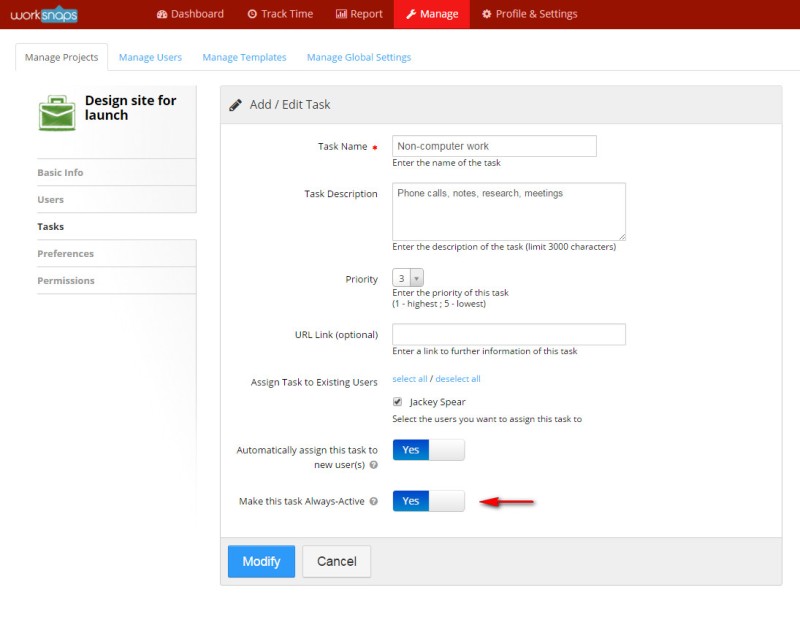
Sometimes, a user does not always use computer to do his work. For example, one might need to make phone calls, have meetings, read documents, or write notes. These tasks are not necessarily performed using computer. Even on computer, the user might just be having a Skype call, in which case he does not really need to interact with computer therefore he might appear to be idle. In order to facilitate the tracking of these activities, we have introduced a new feature called Always-Active task. When a user logs time by selecting an Always-Active task, the time logged is always considered to be active, regardless whether the user has been interacting with the computer or not. This way, when a user needs to go to do work off the computer, he can simply switch the task to an Always-Active task and keep logging his work time.

When creating a task, a Manager can set the option to make the task Always-Active. It is completely to the discretion of the Manager.

always_active_task_01

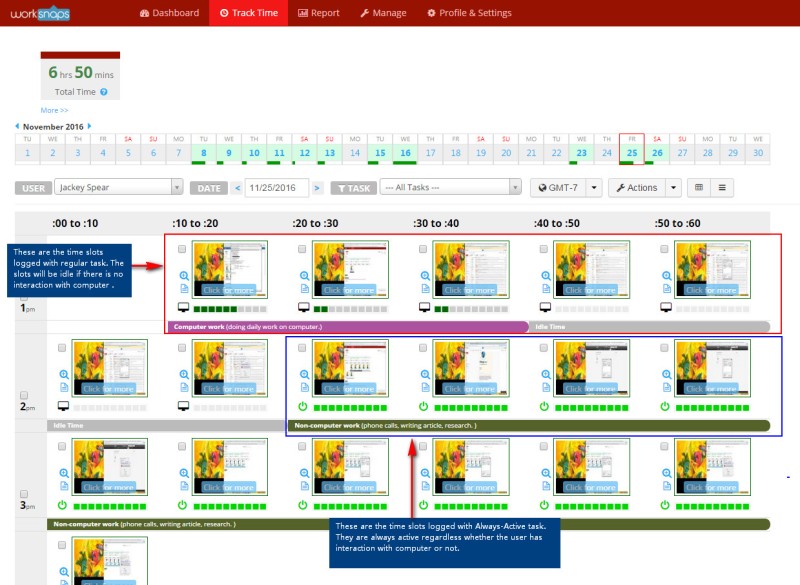
After a user logs time to the Always-Active task, it appears slightly different on the Track Time page. The color indication is little different and the activity meter is always in full strength. Here is an example.

always_active_task_03

By logging time using Always-Active task, you have the benefits of (1) eliminating the need to manually add offline time later, and (2) still keeping the screen shot record if you do work on computer such as Skype call or watching video.

We hope that you find this feature useful. For more information about the feature, you can find it in this help document.

As always, we will be glad to hear your feedback and comments.

Basecamp 3 Integration is Available

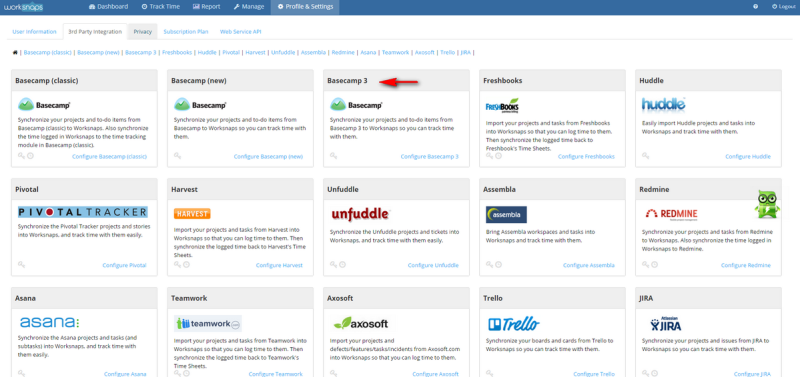
We are happy to announce that Worksnaps now works with Basecamp 3. Basecamp 3 is the newest incarnation of the hugely popular project management tool. It is the 3rd revision and 37 Signals (the company that created Basecamp) claims that it is so much improved that it is a game changer. You can read more about Basecamp 3 here.

Worksnaps has been supporting integration with the previous two versions of Basecamp (called Basecamp Classic and Basecamp New, or Basecamp 2). Now Worksnaps can work with Basecamp 3. The projects and to-do’s from Basecamp 3 can be imported into Worksnaps and users can log time against those projects and to-do’s (we call them “tasks” in Worksnaps). For those who use Basecamp as project management tool, you will find Worksnaps enhances Basecamp with time tracking  and makes it even more powerful.

To integrate with Basecamp 3 in Worksnaps, you can go to “Profile & Settings” >> “3rd Party Integration“, you will find the Basecamp 3 section where you can link your Worksnaps account with your Basecamp 3 account. Then you will be import your Basecamp 3 projects and to-do’s into Worksnaps and start tracking time against them.

basecamp_3_integration

For a detailed description on how to set up the integration with Basecamp 3, you can look up this help document.

We hope that you find the Basecamp 3 integration useful and look forward to hearing your feedback.


Remote Work Digest: October 27, 2016

The latest on all kinds of information, news, and resources that help you make working remotely better.

shutterstock_222984970_workfromhome_640x366

Image from Onecom.co.uk

How to Reduce Distractions, Improve Productivity and Leave On Time | Julia Naughton, Huffingtonpost.com.au

Whether it’s your never-ending inbox or finally working on that creative project you didn’t get to during the working day, we can all agree that in 2016, staying back late doesn’t exactly reflect flawlessly on your time management skills.

Though, it’s not entirely your fault.

Michael McQueen, author of Momentum: How to Build it, Keep it, or Get it Back explains the modern workplace doesn’t make it any easier for us.

“The rise of technology has placed immense pressure on us in the form of expectations, both from others and the expectations we place on ourselves, which can be detrimental to our productivity,” McQueen told The Huffington Post Australia.

Ahead, McQueen reveals his top 6 productivity tips for canceling out the noise and ticking off your to-do list so that you can get home on time.

1. Turn off notifications… all of them!
“Interruptions are an inevitable part of modern life, but by simply turning off all notifications for new mail, texts, alerts and requests you will immediately lessen the blow.”

2. Make this new approach known
Basically, if you’re only doing your emails in batches three times a day, let your colleagues know so they understand and adjust their expectations around receiving an immediate response.

3. Make friends with your phone’s “Do Not Disturb” function
“When you hear the ping of your phone, even if you have no idea what the alert is about, knowing it’s there impacts your ability to focus,” McQueen said.

4. Get out of the office
Remove yourself from the environment by heading out to a cafe, park or a quiet room.
“Even if the cafe is a little noisy, you still would have removed other distractions like conversations happening around you and interruptions from other colleagues.”

5. Put your headphones in
“If you can’t get out of the office, try plugging in some headphones,” McQueen said.
Depending on what kind of work you are doing, McQueen said listening to some music or even some white noise will help you to focus on the task at hand.

6. Set clear boundaries
“The big trend in the last five years is having office workers work from home one day a week,” McQueen said.
While this has many positive effects including increased productivity due to less people spending time commuting and a decrease in cost for office space, McQueen said many people, especially those who are extroverted struggle to stay motivated in the absence of accountability.
“Sure, you have less colleagues interrupting you but at home there might be kids and piles of dirty washing waiting for you — so there’s a whole set of new issues.”
This is where setting clear boundaries becomes important otherwise any distraction that comes up becomes an opportunity to procrastinate,” McQueen said.

10 ways to help employees achieve better work-life balance | Lauren Steed, Hrmorning.com

Many American simply feel overworked — despite what the numbers say.
As a result, people are clamoring for more of a work-life balance.
Sometimes what’s needed isn’t more time off, but the right time of day off. In most instances, employees want to find a way to juggle both work and their personal lives.

Here are 10 ideas that could help your company create that balance:

1. Make sure management is promoting the right image. Each employee has a different work style. But some managers may be workhorses. And guess who’s setting the expectations and culture for the workplace? Your managers — and not every employee can match a feverish pace set by a manager without risking burnout. Solution: Consider having managers promote more short breaks throughout the work day.
2. Draw a hard line on work hours. Some employees take work home with them or answer emails at night or during the weekend, making their actual work hours harder to track — and setting yourself up for overtime liability. Establishing defined boundaries can help prevent burnout and overtime headaches.
3. Offer flexible scheduling or a work-from-home option. This is always a good option to help people manage their various responsibilities, if it’s the right call for your workplace.
4. Promote vacation time. Some employees need convincing to take their vacation time. Make sure they know it’s not only OK to do so, but it’s also encouraged.
5. Allow pet (or kid) visit days. One way to help people balance their working and personal life is to occasionally allow the two to mix. It helps boost morale around the office by giving people a much needed quick mental break.
6. Ban tech from face-to-face meetings or corporate outings. Sometimes emergencies do spring up, but chances are it’s going to do more good to completely disconnect from the digital world.
7. Remind people hours aren’t a competition.

An efficient employee may not need a full eight hours to finish his/her work for the day, while another may have a more relaxed working style and need more time to complete his/her tasks.
8. Allow specific time off to contribute to a charity. Giving people some time off or incentives to go out and pursue a cause they find meaningful boosts their sense of fulfillment. The fact that your company will back employees looking to volunteer also boosts its image and propels it into the spotlight when trying to attract top talent.
9. Help employees accomplish their everyday tasks. This could be as simple as providing on-site coffee so people don’t have to go out for their own, or offering dry cleaning services once a month.
10. Finally, educate employees. Providing time-management training to employees can help them help themselves achieve the work-life balance they seek.

Guidelines for Better Time Management and Getting Things Done | Dave Jones, Iamwire.com

Here are methods that bode well with managing time and getting things done by Dave Jones, manager of Live Tecs.

Characterize you needs
Prioritize things that are an absolute necessity, an ought to or a need. Arrange your day around the ‘must’, planning in the rest of stuff from the ought to and need list. Simply make certain to remember what you have to finish in the short term to work towards your bigger, long haul objectives. This conveys me to the idea of significance versus criticalness.

Make a schedule
Schedules will shift incredibly individual to individual, yet they do work best in the event that they genuinely turn into a propensity. For instance, you may begin your day with 30 minutes of activity, drink some espresso while you audit your calendar, and listen to the news. Whatever works for you!

Start your day with the most significant work, end with the simplest
It’s been found that when individuals have remarkable things on their schedule, whether it is everyday family tasks or imperative undertaking for work, thinking simple and focusing gets to be troublesome. So by accomplishing your all the more difficult work right in the morning, your mind can unwind and concentrate on whatever else comes up.

Take a shot at your responsibility each day
Whatever work you have planned, make it a point to do it consistently. The work or discovering that you do day by day will include fundamentally after some time.

Build up a rhythm
You may might be great at maintaining focus for 1, 2 or even 3 hours. The trick is to test and find what works for you, and afterward plan your work in these augmentations, with little breaks in the middle.

Overlook states of mind
You’re not in the mood to work? Gracious well. Show up in any case. This may be the hard, however it’s unquestionably legitimate. On the off chance that something is imperative to you, then you have to do it, paying little mind to whether you need to or not. This will go far in helping you finish your objectives.

Cut the diversions
What intentional things do you invest your time in that suck time and vitality? Online networking or email? Television? Whatever it is, simply stop. At any rate when you have booked your major time for your work. Individuals are bad at opposing enticement, so help yourself out and evacuate it totally.

Cluster comparable undertakings together
It’s best to do comparative assignments together to keep your brain from expecting to switch gears.

Pinpoint why you linger
Do you abstain from taking a shot at a task since you are exhausted? Do you not know how to accomplish something? It is safe to say that you fear feedback? Consider every option and truly make sense of what the issue is. When you know, you can do your best to manage it and proceed onward.

Figure out how to say no
We as a whole are continually besieged with solicitations. Begin adjusting these solicitations to your needs, and say no to the things that don’t affect your objectives.

Remote working, without a remote experience | Adrian Hipkiss, Itproportal.com

Research shows that company culture is key to attracting great employees, with HR leaders considering culture and engagement their number one challenge.
Company culture can be described as the personality of your business, and it’s the personality of the environment in which your employees work that is likely to keep them with you.

The traditional forms of employee interaction to help the work environment prosper – from daily meetings, to after-work drinks, to even simple things like cakes on birthdays – are noticeably more difficult when employees spend barely any time in the same office. However, the key is to focus on bringing your team together virtually if they cannot be brought together physically.

Here are a few questions to ask yourself when considering how to improve collaboration in your virtual office:

Is your communications system fit for purpose?
The first place to start is with your communication system. Do you have a platform that can be easily accessed by all of your staff? Does it really make your life easier – and that of your employees? Ideally, this should be a unified communication system that is simple to use. If you need to have a lot of conference calls, choose a system that is easy to dial in to – complicated passwords and IDs aren’t always the best way to begin a productive call.

Does your remote time often end up being down time?
When most of your team is working remotely, this means everyone has to essentially take some responsibility for the technology they use. As an employer, you need to make this as easy as possible by ensuring that your back office systems are up-to-date and reliable.

Having a suitable system in place can also ensure downtime is kept to a minimum, which stops your remote employees from being stranded without a connection to the virtual office.

Are your employees comfortable?
The next thing to consider is if your employees are able to communicate in the way that is most comfortable for them. This may mean a discussion about the devices they use to communicate – would they prefer to contact you and other members of the team by smart phone, tablet or desktop computer?

Are you in a routine?
Without regular, routine interaction, great company culture cannot be built naturally. Regular rewards are part of this – scheduling in time to talk about success is a really important part of keeping your employees in the loop and enhancing the bond between your team.

Is your collaboration integrated?
Using apps is a great way to keep employees engaged with one another, and nowadays there are plenty of user-friendly programmes that can be used to improve remote communication. For example, Skype can now integrate with an organizations’ unified communications solution, which means that employees can not only use their favorite device but also combine elements that are familiar to help them unify their personal and business life.

It is easier to “get to know” your employees when they have a personalized profile they can share! Overall, with the right tech behind you and your team, working remotely doesn’t have to be a remote experience.

Remote Work Digest: September 21, 2016

The latest on all kinds of information, news, and resources that help you make working remotely better.

telecommuting-1

Image from News.filehippo.com

11 time-wasting habits that are hard to quit, but you’ll be glad you did | Aine Cain, Uk.businessinsider.com

It’s important to identify and drop harmful time-wasting tendencies before they seriously mess up your career.

Here are 11 awful time management habits that are tricky to quit — but you’ll thank yourself once you do:

1. Multitasking
Contrary to what you might think, multitasking doesn’t boost your productivity.
It’s easy to trap yourself into this work style by convincing yourself that you’re being hyper-efficient. However, the evidence just isn’t there.

2. Procrastination
This is probably one of the hardest bad habits to quit, but it’s possible to break free of procrastination’s stranglehold on your precious time.

3. Neglecting deadlines
Flaunting deadlines is a terrible habit to get into. One of these days, you’ll cross a deadline that really wasn’t meant to be crossed. It’s important to start managing your boss’s expectations — or, you know, just start respecting deadlines.

4. Inability to streamline
In our chaotic, technology-heavy world, this is an easy trap to stumble into. It’s crucial to make the effort to streamline your life a bit — otherwise, you risk becoming disorganized and discombobulated.

5. Never saying no
Try to stick up for your time and become less of a yes man. This can be difficult if you’re a bit of a pushover, but it’s necessary if you’re going to fix your terrible time management habits.

6. Not setting goals
If you have no clue about your destination, you’re probably just going to get yourself lost. It can a bit daunting to sit down and outline all this, but think of it this way: without short and long term goals, you have no foundation to build your schedule upon.

7. Failing to ‘eat a frog’
No, eating an actual frog won’t help your time management skills. This just refers to Mark Twain’s famous quote: “Eat a live frog first thing in the morning and nothing worse will happen to you the rest of the day.”

Eat your live frog first thing in the morning. Get all the tasks you’ve been dreading done first. That’ll jump start your productivity for the rest of the day.

8. Forgetting that perfect if the enemy of good
Perfectionism is a hard tendency to drop, but it’s important to realize that this is a trait that can kill, rather than boost, your career.

9. Burning yourself out
Burn out is terrible. Stop killing yourself trying to do everything and start focusing on doing a handful of things very well.

10. Failing to prioritize
Certain tasks are more deserving of your time and attention than others. Unless you’re carefully ranking each item on your list, you risk lacking priorities throughout the day.

Lack of priorities puts you at risk for cutting through busy work while ignoring truly important projects.

11. Forgetting to write things down
You don’t actually have to write things down on paper — using an app to manage your time is great too. You just need to find some way to hold yourself accountable and stay organized.

A Remote Workforce and Its (Non) Impact on The Environment | JTRipton, Theenergycollective.com

Being able to work from home is a dream for many people, particularly those of us with long commutes and dreary offices. Between 80 and 90 percent of the US’s workforce admits they would like the option to work remotely, ideally two or three days each week.

Remote work offers various benefits, not least from an engagement perspective. Research shows that those who work remotely from time to time tend to be more engaged in their work than those who are never given the chance to work from home. Telecommuting is an ideal solution for employees with mobility issues, as well as parents looking to relieve child-care costs.

Beyond these, however, telecommuting is of major benefit to the environment. In this day and age, taking a green approach to business is incredibly important, and adopting a more environmentally-aware mindset will help businesses cultivate a more eco-friendly operation.

Here are four benefits remote working offers businesses today.

# 1: Less Gas Emissions and Expenditure
Traffic is a problem for drivers, for businesses facing widespread lateness, and for the planet itself.

Businesses which offer employees the chance to work remotely can help to increase productivity, cut wasted gas, and help reduce congestion even a little. Research shows that each 1 percent reduction in vehicles can create a three-fold drop in congestion.

# 2: Remote Working Encourages Smaller Business Space
Companies reducing their in-house staff can create a cultural shift resulting in less demand for business properties. One major knock-on effect of this could be a reduction in deforestation and less strain on land resources.

# 3: Remote Work Reduces Businesses’ Carbon Footprints and Energy Usage
Research suggests that businesses allowing employees to work remotely even just half the time can save as much as $11,000 per year through reduced overheads.
Workers based in their own home will be responsible for maintaining a green lifestyle, but a business will need less electricity for lighting, air conditioning, and other essentials.

# 4: Working From Home Leads to Less Food and Drink-Related Waste
For employees working at home, refreshments can be taken from your own kitchen rather than using vending machines or driving to a nearby coffee shop or convenience store. Not only is this more cost-effective, it also leads to less non-recyclable containers, bags, and wrappers being tossed in bins. Even if fewer recyclable items are purchased, this places less strain on recycling plants.

By reducing the amount of waste-materials you direct into bins every day, telecommuting employers and employees can reduce their carbon footprint.

In order to ensure a cleaner, healthier environment for ourselves and future generations, businesses must embrace a greener ethos. Allowing staff to work from home is a major step in reducing carbon footprints, creating a happier workforce, and cutting overheads. By embracing remote work, companies of all size can help to create a safer, brighter future, maximizing their budgets and resources alike.

Work from anywhere: What it takes to be a digital nomad | Monty Majeed, Yourstory.com

According to the 2016 Deloitte Millenial Survey, the most important things that millenials look for in jobs are flexibility, work-life balance and a sense of meaning from the work they do. This is exactly why we are seeing an emergence of remote workers and digital nomads in almost all industries. Unlike remote workers, who are based out of office or out of the location where their employers are, digital nomads are not based anywhere in particular. They are constantly on the move. They are those intelligent ones who combine work and their passion to travel the world – and no, you don’t need to be a travel writer to do that.

Who can be a digital nomad?

Marianne Cantwell, career coach, author, Founder of the Free Range Humans concept and a digital nomad herself, calls such people Cubicle Cage Humans. The whole idea of becoming a digital nomad started with the idea of not having “to be trapped to get paid,” says Marianne. “A free range human chooses when, where and how they work,” she says. “They have freed themselves from societal expectations of fitting into a career-shaped cage and now get paid to do what they really want to do.”

According to author and digital nomad Jodi Ettenberg, of LegalNomad.com, these are a few jobs you can do on-the-rod:

  • Media-related jobs (translator, content writer, journalist, editor, proofreader, technical writer, blogger, photographer, videographer, podcaster, digital marketeers)
  • Finance jobs (e-commerce, product promoter, accountants, insurance agents, online trader)
  • Organisational support roles (virtual assistant, researcher, customer service executive, travel agent)
  • Teaching
  • Computer-related jobs (programmers, database managers, web designers, software developers, software testers, UX designers)

Now that you are armed with a list of jobs that you can pursue while travelling around the world, here are some tips to stay productive while at it.

Keep your connections posted
Let people you work with know at what times you are available for work, meetings and other communication. This will help you manage work communication efficiently and divide your time productively.

Divide work and play times
Divide your time in a day for work and set aside time to relax. A digital nomad has the freedom to work for two hours at a stretch, take a five-hour break and then resume his or her work. Whatever be your schedule, make sure that during your work time, you remain focused on getting things that get you paid done in the best possible way.

Make backups of your work and important documents
You may get lost, get robbed, get stranded in a place with no internet or lose your phone. Work out solutions and alternatives for such problems before you set out. You could use cloud space to securely save your data online, carry portable modems and routers for net connectivity, chargers and power banks for your batteries and so on.

It is empowering to be able to work from anywhere and have full control over your schedule. However, do not forget that working from anywhere comes with its own set of challenges. Make sure that you have access to a reliable internet connection, a well-planned schedule and proper backup systems to turn you into a rather productive and efficient digital nomad.

7 Ways to Help Younger Employees Improve | Rieva Lesonsky, Smallbiztrends.com

Randstad and Future Workplace conducted a survey of Millennial and Generation Z employees and found that, while the majority of both generations believe their educations prepared them well for their current jobs, there are some important gaps. If you want to get the most from your younger employees, how can you help them improve? Here are seven steps to take.

Tips for Managing Young Employees

1. Set Expectations
One-third of Generation Z employees and 29 percent of Millennials say their education did not prepare them to work long hours, and one-fourth of Generation Z workers say it did not prepare them to manage their time effectively.

2. Provide Opportunities for Collaboration
Since project-based work is the number-one way Gen Z likes to learn new skills, try putting younger employees in teams with older workers so they gain experience in getting along with different generations. (Make sure the older workers are prepared and willing to provide some guidance to the younger ones.)

3. Educate Millennial Employees in Management and Conflict Resolution Skills
More than one-fourth of Millennials say their educations did not prepare them to manage others or resolve conflicts. These interpersonal skills are critical as Millennials move into managerial positions. Pair new Millennial managers with more experienced managers who can mentor them.

4. Communicate Often and Honestly
39 percent of both Millennial and Gen Z workers say the most effective way to communicate is “in person.” In other words, you don’t have to text, IM or Snapchat to reach young workers — simply walk around and talk to them.

5. Provide Ongoing Feedback
Forty-six percent of both Millennials and Generation Z say providing quality feedback regularly is the best way to help them excel. Among the highest-performing companies in the survey, nearly one-third provide feedback to young workers on a regular basis (that is, after every project, assignment or task), and 22 percent provide daily feedback.

6. Design a Workspace that Enables Both Collaboration and Focus
An open, collaborative workspace isn’t always the most conducive to focus. Help younger employees focus better by setting up an office space that includes quiet areas for focused work.

7. Help Them Lessen Stress
Regularly review workloads so employees aren’t burdened with more than they can realistically handle. Suggest or teach time management strategies that can help with stress. Create a culture that encourages breaks and downtime in addition to hard work.

Taking the steps to help your young employees improve can pay off big. More than 80 percent of both Generation Z and Millennial employees want to take leadership roles at work. Start now, and you can shape the next generation of leaders to fit your business’s needs.

Remote Work Digest: August 18, 2016

The latest on all kinds of information, news, and resources that help you make working remotely better.

iStock_65658807_MEDIUM

Image from Lifehacker.com.au

5 Rules To Follow When Working From Home | Spandas Lui, Lifehacker.com.au

Working from home is something that a lot of people desire and small business owners often have the luxury of doing so. But the home is full of traps that can distracts us from getting work done, which is why setting up some ground rules is so important.

Over at small business blog Flying Solo, Emma Heuston-Levack, talked about her experience of working from home for the past 18 months and the commandments that she follows in order to stay disciplined and keep herself in line:

  • Separating your workspace
    A separate space is important to help you ‘leave the office’ each day so you’re not tempted to work around the clock.
  • Set your space up with good equipment
    Make sure your home work space is set up with the right things to ensure you can work smoothly and comfortably throughout the day.
  • Exercise discipline
    Don’t just roll out of bed and start working in your pyjamas at noon; get up, get dressed and sit down at your workspace by a certain time each day.
  • Ensure you take regular breaks
    You won’t have office buddies remind you that it’s lunchtime, so you should be mindful to take regular breaks or risk burning out.
  • Get out of the house
    You don’t get to interact with people on a daily basis like you do in a real office so make sure you schedule some social catch-ups regularly. Otherwise, you’ll end up becoming a hermit.

You can read more about Heuston-Levack’s work from home commandments over at Flying Solo.

How to win at working from home | Tracy Ramsden, Marieclaire.co.uk

A new study reveals that over half of UK employees think they are more productive working from home, let’s take a moment for the procrastinators and the easily distracted out there. We asked Jason Downes, MD at Powwownow, the company behind the Smarter Working Initiative for his advice on how to make working from home work for all of us.

1. Have a plan (and stick to it)
Before you get started, write a to-do list and make sure you stick to it. This will help create a structure for your day and establish an end goal.
2. Have a routine (and don’t stay in your Pjs)
It’s a good way to remind yourself that you are still working even though you are at home and to stop you from feeling lethargic and unfocused.
3. Create a workspace (probably not the sofa)
Having your own space will help you stay focused and organised and also let anyone else who may be at home that you are working.
4. Be truly flexible (that means to a cafe sometimes. Win)
It’s important that the confines of an office, is not replaced by the confines of your home. Changing location and working from a library or coffee shop can help stimulate the creative juices.
5. Stay connected and communicate (so sync your email with your iPhone)
The changes in technology means that we now have the ability to communicate and work effectively from home. The use of quick conference calls can be frequently used to catch up with remote staff to prevent people feeling isolated and helps set the agenda for the day.
6. Take a break (i.e. you may not have to walk to Pret but don’t forget lunch)
Working from home should not turn into a bigger task than it has to be. Make a nice lunch or go for a walk as you would when popping out to get lunch from the office, don’t just sit by the computer all day.
7. Be clear with your manager regarding targets (like a virtual to-do list)
This helps to establish structure in your day, can act as a huge motivator and makes sure that you and your manager both understand what outcomes to expect– this avoids any miscommunication, crossed wires or finger pointing come the end of the day.
8. Leave work (it’s 5pm, you can close your laptop now)
When it’s time to finish work and you have done all the things you need to do, then you should stop working. It’s important to know when to finish for the day and maintain a good work-life balance. Just make sure you have achieved the goals that you set out to achieve.
9. Talk to other flexible workers (it’s good to share ideas, people #PassItOn)
Speak to other flexible workers to share thoughts on what does and doesn’t work well. We have just created the Smarter Working Initiative so that all companies that offer their staff flexible working can come together to share positive experiences and companies that don’t currently encourage this way of working can sign up to try it.

6 signs your hobby is benefiting your career | Aine Cain, Businessinsider.com

Today, “get a hobby” is usually a rude thing to say. It’s typically meant to signify that you’ve got too much time on your hands.
But as it turns out, it’s pretty good advice.
You should get a hobby. Committing time to an activity that makes you happy can do wonders for your life — not to mention your work performance. Hobbies are good for you.
Here are six signs that your hobby is paying off big time:

Your hobby helps you structure your time
Try taking on a hobby to see if it boosts your time management skills. As the Harvard Business Review previously reported, conventional time management solutions have become increasingly less effective. Scheduling time for your hobby might be a surefire way of avoiding distractions both at work and after hours.

Your hobby balances you
Citing a Bain & Co. study of MBA students, The Boston Globe reported that work-life balance is an increasingly important issue to workers, despite the fact that businesses have been slow to catch on to the trend.
By taking on a hobby, you can begin to prioritize your own work-life balance and capture this sense of contentment.

It allows you to pursue your passion – realistically
The platitude “follow your dreams” is typically a lot of fluffy nonsense. Most of our “dreams” are pretty impractical. For most people, it’s far better to get a decent job doing something you really like and are good at than to set off on a quest to find your “calling.” Perfect is the enemy of good, and all that.

However, that doesn’t mean you need to give up on your other pursuits entirely. You can make time to sculpt, do stand up, or crochet after hours. If you fiercely guard that hobby time, you’ll find that you’re able to continue to pursue your passion in life, even if it’s not your main career. Who knows — you might eventually get so good at your side hustle that it will eventually become your full-time job!

It keeps you healthy
If your hobby involves physical activity, you could be boosting your memory and cognitive abilities, according to a Stanford University psychological experiment.

It can be difficult to schedule time for exercise into your busy life, so working out during our hobby is also extra efficient.

It allows you to connect with others outside of work
It’s great to make friends at work. However, workplace relationships don’t necessarily blossom at every company — some offices are too toxic, competitive, or transitory to sustain lasting friendships.

Making friends through your hobby is different. You’re not just bonding over circumstances, you’re getting to know each other through a shared interest!

It makes you less stressed
Some worry that taking on a hobby might add to the stress in their life. In fact, hobbies have the opposite effect — they relax you.

A San Francisco State University study discovered that employees who pursue creative hobbies are able to recover better from the demands of their job.

“Creative activity was found to have both indirect effects and direct effects on performance-related outcomes, but the effects varied by the type of performance-related outcome,” the study found. “The results indicate that organizations may benefit from encouraging employees to consider creative activities in their efforts to recover from work.”

What Are Best Practices for Employee Retention and Recruitment? | Lindsay Wissman, Zanebenefits.com

There is good news for entrepreneurs with growing businesses: it doesn’t have to be rocket science. Here are some simple things you can do to provide a meaningful experience for your employees — and why you can’t afford not to think about your employee retention strategy.

Hire the Right Managers
When hiring managers, it’s common to look for someone who will fit in with the culture. However, Forbes recommends that hiring someone whose skill-set aligns with the job is the best route. The thought process here is that a person with the proper skill-set is better equipped to succeed in their role and motivate direct reports to do the same.

Provide Career Navigation and Growth Strategy
Experts suggest hiring people that are planning their careers with the company, rather than just filling roles. During interviews, ask candidates what their goals are, what motivates them, and then assess whether those answers coincide with what your company can provide for them. Once you’ve hired the person you feel will be the best fit, be sure to sit down with them and outline an individualized path for success.

Staff Recognition
It’s important to remember that motivation is not a one-size-fits-all system. While monetary rewards will be the catalyst for one person, it could be investment shares, a gift card, or extra vacation time for another. Be flexible in your rewards system and be willing to negotiate if the winning employee would like to tweak the prize just a bit. It doesn’t mean they aren’t appreciative — they are just trying to tell you what works for them.

Why Employee Retention Matters
A popular argument for pushing employee retention strategy to the back-burner is that the cost of losing an employee is difficult to monetize. Yet, it doesn’t take a whole lot to realize the impact turnover can have on your business. Poor morale, lower productivity, more frequent mistakes, and disengagement are all issues that can cost your company dearly, but do not have a price sticker.

Conclusion
An employee retention strategy is often overlooked in small businesses that are otherwise strapped for resources. Not investing time in such areas can have a drastic and costly effect on your businesses. As J.W. Marriott famously said, “If you take care of your people, your people will take care of your customers, and your business will take care of itself.”

Remote Work Digest: July 22, 2016

The latest on all kinds of information, news, and resources that help you make working remotely.

remote-work-telecommuting-isl-online-airport1-780x300

Image from Pcsupportgroup.com 

4 Signs You’re Not Cut Out to Work From Home | Shereisa Ngo, Cheatsheet.com

Being able to work from home full-time is great, but it’s not right for everyone. Do you have what it takes? Here are a few clear signs that you don’t have what it takes to maintain employment in a work-at-home arrangement.

1. You’re too relaxed about work
Do your best to stay on top of deadlines and submit quality work. Now is not the time to kick back and relax. Don’t forget that you still have an employer to answer to. Show your appreciation for being able to work from home by doing your best work. You can relax on your own time.

2. You have poor time management
If you don’t know how to manage your time well, the day can easily slip away from you. Try creating a to-do list of everything you need to accomplish for a specific work day. This will help you stay on track and stay focused on what you need to do.

3. You’re lazy
If you need help finding your get-up-and-go, enlist the help of a work buddy who also works from home. You can check in with each other throughout the day and help each other stay motivated. Also try to create a strict work schedule for yourself so that you can reduce opportunities to waste time.

4. You have too many distractions
Think about some of the things that get you off track during the work day. Is there a TV in your office space? Get rid of it. Are your children yelling and screaming all day? Hire a reliable babysitter or ask a family member to take over for a couple of hours. You’ll be surprised to see how much more productive you can be with just a few small changes to your environment.

How To Fix Three Of The Biggest Project Management Problems Your Business Faces | Maren Hogan, Forbes.com

97% of organizations believe project management is critical to organizational success and business performance. Something so crucial to small business success shouldn’t be taken lightly, and the wrong project management processes can completely destroy business growth.

Problem No. 1: Your Team Doesn’t Understand The Project
One of the most obvious problems occurs when your team doesn’t understand the project. This is the result of a lack of communication between upper management, the project manager and you. As the owner of the company, it’s your duty to ensure your management team and project managers (PMs) are equipped with the tools they need to seek accurate information regarding the projects.

Problem No. 2: The Project Manager Is Either Too Relaxed Or Uptight
Not everyone is cut out to be a project manager, and having someone who is too lax about deadlines or the work that needs to be involved leaves your team idle and frustrated. On the other hand, a project manager who is too rigid and micromanaging can overwhelm and demotivate your team. If you have a project management novice, make sure to pass out peer evaluations after major projects.

Problem No. 3: The Goal Time Line Is Impossible
If your PM can’t envision the big picture and understand the team’s workload, then projects will never be finished on deadline. PMs need to be able to see that every member of the team contributes to each ongoing project and foresee the end results.

If you already have or are thinking about delegating project management, be on the lookout for these three issues. Be proactive in fixing these problems, and consider how project management software may help you. Don’t forget to conduct peer reviews after projects are completed, and give your PMs access to all important information they need to complete the work. After all, the success of your business is ultimately dependent on the performance of your team.

3 Modern Products For The Work-At-Home Entrepreneur | Melanie Nathan, Huffingtonpost.ca

As a professional, you already understand that organization is one of the key components to the success of any venture. Thankfully, there are new tools that you can pack in your toolkit to help you also stay well-rested, healthy and stimulated — making work-at-home life a little easier.

Blackout Blinds
Blackout blinds are ideal for the business owner who needs to grab some shut-eye during the daylight hours. Blackout blinds cover the window completely and are well-sealed, so there will be no bright rays of sunshine peeking through while you sleep. Blackoutblinds.ca (created by an entrepreneur), offers an effective product created especially for those in need of sleep during daytime hours. Whether your business requires shift work or you are a night owl with the height of your productivity occurring at night, these will help you get the rest you need whenever you need it.

Treadmill Desks
Many health reports though, tell us that sitting for extended periods of time is not good for your overall health. Apparently our bodies were made to move.
The Lifespan treadmill desk takes the idea of moving around while at work one step beyond the sit to stand desks (which we will discuss below). With the treadmill speed set ideally at less than two miles per hour, they offer ample space to accommodate your laptop or monitor and keyboard (though jogging and typing simultaneously is not advised), as well as smart phone and other desk utensils.

Sit to Stand Work Space
Maybe you are not so inclined to enjoy the advantages of the treadmill desks, but you still do not want to acquire the fabled “secretary’s spread” from sitting at your desk all day.
The height adjustable sit-to-stand Varidesk is a great option for those looking to move around more while working. This is the height adjustable base that can be placed on top of your desk and raised or lowered, accommodating your need to sit or stand at various periods during your work day. This style has room for single or dual monitors, keyboard and note-taking.

Gadgets Galore
There are a ton of fun but functional gadgets to bring more ease into your world and break up the monotony without taking you off course for the day.

Establishing your boundaries to separate your business hours from the daily meanderings of home life is key to your sanity. The aesthetics and functionality of your work at home space will encourage your productivity and help to keep you on task. Ensuring that you have all the business tools, technology and gadgets you need, you are setting yourself up for complete work-from-home entrepreneurial success.

8 Managers Share The Best Way To Ask For A Raise (And Get It) | Elana Lyn Gross, Forbes.com

How do you ask for a raise and get it? Elana Lyn Gross asked managers to share best practices for asking for a raise.

1. Share your goals and ask for feedback.
Have an honest and open conversation with your manager. “If you’ve been in your current role for at least six months, then in a non-pushy or self-serving way, have a conversation with your supervisor to let them know that, while your first priority is to excel in your current role, your long-term goal is to advance and that you want to make sure you’re doing everything that you can to set yourself up for success,” says Danielle Harlan, Ph.D., the founder and CEO of The Center for Advancing Leadership and Human Potential.

2. Take on more responsibility.
“My best advice to fast-track a promotion is to dress for the job you want — and the job you have,” recommends Jenna Tanenbaum, the founder of the smoothie delivery service, GreenBlender. “First, command the tasks and responsibilities in your current role, and then start solving the problems that your soon-to-be self would be working on. The only way to effectively do this is through careful time management. Understand the core strategy of your organization, ask lots of hard questions, and align your priorities with that of the company. You’ll be running the show in no time,” she says.

3. Proactively communicate wins.
Jenn Grasso, vice president of product at the fashion subscription service Le Tote, says she gave an unplanned promotion to a product manager. “The most important thing she did was consistently exceed expectations in terms of her current role and job responsibilities. She always took on more than was expected of her, and managed these projects as well as her more senior colleagues,” she says. And she didn’t wait to share all of her accomplishments at once. “She was also great at proactively communicating her accomplishments to me. When she approached me with her request for a promotion, I already knew she deserved it! Every step of the way, she made it easy for me to see that she was a star performer who deserved a better title and salary.” Moral of the story? Share your accomplishments early and often.

4. Demonstrate your accomplishments and added value.
Show your value. “You want to be able to demonstrate that you have taken on additional responsibilities, as well as provide specific details about your accomplishments. Share examples of projects you have completed and how they’ve positively impacted the business. Was there an increase in revenue? Did you save a customer? If you’ve received positive feedback from colleagues or other leaders regarding your work, be prepared to share that with your manager as well. These are not only good indicators of your contributions, but also of your future potential,” recommends Kim Mullaney, executive vice president and chief human resources officer at Monster.

5. Focus on why you deserve it (not why you need it).
Before you can convince your boss that you deserve a raise, you need to believe that you’ve earned it. “The best approach to asking for a raise is to focus on deserving one versus needing one. Too often, people argue that a raise is important because of very real costs in their lives, however, an employer is looking to give raises to people based on performance,” says Beth Monaghan, CEO and co-founder of the public relations firm, InkHouse.

6. Practice your pitch and anticipate questions.
“This sounds strange and unnatural to a lot of people, but conversations in which you are asking for something almost always go better if you’ve rehearsed in advance and have considered the many possible responses that you’ll get to each of your requests, and how you’ll address these responses. After role-playing the part of a resistant boss, having the actual conversation with her will be infinitely easier—and you’ll have more confidence since you will be able to anticipate their responses and know how to address them,” says Harlan.

7. Do you research.
Use sites like PayScale, Glassdoor, and Salary.com to find out the market rate for your role or intended one. It will be useful when your boss asks you for the amount you’d like to make or tells you the amount she’d give. Researchers at Columbia Business School found that it’s best to give a precise number instead of a round number because it makes the person seem informed. They found that people who gave a precise number were more likely to get conciliatory counteroffers. Instead of saying you want $60,000 or $65,000 ask for $63,500. It’s also helpful to know the average raise is between one and five percent. You don’t want to suggest a number that is completely unrealistic.

8. Talk about the future.
Show you’re invested in the company. “Every manager values loyalty. Start the conversation on a positive note, and explain how much you like working for your manager and the company. Then explain what you want to do in the future, and how you plan to contribute to grow the business,” explains Mandy Gilbert, founder of the recruitment firm Creative Niche and tech school RED Academy. Volunteer for a project or create one by being a proactive problem-solver.

9. Be prepared to hear no.
Don’t be discouraged by a no. “If you don’t get the pay increase or new position you requested, it doesn’t have to be the end of your negotiation. Request an interim performance appraisal with clearly defined goals and salary adjustment before your next annual review. This puts you in line for a possible increase sooner and also communicates how seriously you take your career,” says Julia Bonem, a senior career consultant at Resume Strategists. If a raise and promotion isn’t going to happen right now, she suggests asking for things beyond salary such as bonus, incentives, professional development opportunities, or more vacation time.
The worst that can happen is that your boss says no. Either way, you’ll learn to advocate for yourself and understand and appreciate your worth. And there’s not much chance you’ll get more money if you don’t ask!