The Secrets to Managing Remote Workers You Need To Know Now

Image from SmallBizTrends.com

Image from SmallBizTrends.com

With more and more companies hiring virtual employees in today’s time and age, the industry of remote work has dramatically grown. Faster and augmented Internet, coupled with technological innovations in terms of web-based communications, has greatly contributed to this sector. Nowadays, you will find remote employees across a great number of industries, with their job descriptions ranging from being freelancers to having exclusive, permanent roles.

Why remote work is a booming industry

With so many beneficial aspects of working remotely, such as having more control over work and personal life, less expenses, and greater productivity, there is no longer a need to question why so many people choose to become virtual employees. The same goes true for businesses and companies; these organizations also enjoy a multitude of benefits for offering remote work, including increased productivity levels and less carbon footprint issues just to name a few.

The remote-work related challenges that employers are faced with

From a business perspective, all these benefits can only be reaped by employers who are able to hire the best people for the job, properly manage them, and retain their star workers. Unfortunately, many find it hard to effectively manage remote workers and teams of virtual employees. Some of the most common issues that organizations encounter when it comes to remote worker/team management are associated with communication and collaboration.

What can and should be done to address these issues

Overcoming the challenges associated with managing remote workers and teams should be a top priority of companies, especially since they can contribute significantly to the overall success of the organization. Therefore, it is a must that employers know what they can and should do to address these issues.

So here are the secrets to managing remote workers that you probably have been missing out on.

Take advantage of communication and collaboration tools

Image from PeopleFluent.com

If you have not been utilizing these tools, then you should start implementing their use as soon as possible.

  • BasecampThis easy-to-use yet extremely functional cloud-based tool comes with project management features. It allows for the easy streamlining of projects while also simplifying task management. Being able to keep in contact with all the members of the team with everyone staying updated on projects and their status have also been made easier by this tool.
  • Google DocsThis free-to-use tool organizes files and documents into a single location that can easily be accessed by anyone it has been shared with. Real-time revisions can also be done through this tool.
  • SkypeTaking advantage of this program will allow you to manage your virtual employees with no additional cost (to anyone). You can contact your team members through video and voice calls as well as chat messages. You can conduct face-to-face video conferences with up to 9 members of your team.
  •  WorksnapsWorksnaps is a time tracking tool specifically developed for the use in the remote work industry. Some of its key features include visual tracking of time and work details, integration with project management tools including Basecamp and Asana, and reporting functionalities. In other word, collaborating can be done much more efficiently if you use this program.

Some of the other notable remote work management tools you should check out and consider using are MyCrowdSnagItTogglAxureTrelloJingand Cacoo.

Repeat instructions as needed

One of the greatest challenges of having to manage virtual employees is the fact that you cannot be with them in person, so you have to rely on the tools mentioned above for communication. You assign tasks and send instructions. You then just wait for the completed project and focus on another project. In most cases, the results are exceptional, especially if you have award-winning team members. There are some situations though, wherein this can actually backfire.

For example, the instructions you gave were a bit incomplete or vague. If your remote workers are used to utilizing their own creativity and skills set to complete projects, they may end up going astray the specifics of the project. Yes, the work that they have done is impressive, but it is not what you are looking for. This is why you need to repeat instructions as needed and have your employees confirm that they do understand what needs to be done.

Understand the difference between time zones

Image from OptinMonster.com

Image from OptinMonster.com

Much thanks to technology, remote workers are brought together despite being in locations that can be as far apart as possible. Information can be sent and received in an instant. However, this does not mean that you should no longer take into consideration your employees’ location, and most importantly, their time zones. This is especially true if you have not set their specific work hours.

In other words, you have to consider the possibility that your employees may already be asleep before you give them a call, unless of course, it is really urgent. Before pressing that call button, think about what time it is in the state or the country where your team member is located in. Send you a text or a chat message first. If you do not get a response immediately, chances are, he/she is already asleep. Make that late night or very-early-in-the-morning call only if your reason is valid and is urgent in nature.

Be a manager that you would like to be an employee of

Image from MarkSanborn.com

Image from MarkSanborn.com

Whether you are dealing with a team of remote employees or managing a staff within the same location, you need to be a good leader. But what exactly does being a good leader mean? There is no exact answer to this, but in order for you to lead your people effectively and be respected by your team members, you have to do the following:

  • Set the right rules, regulations, and procedures that will guarantee the efficient operation of the organization.
  • Develop a working environment that will not only benefit the company, but will also support your team members and their best interests as well as hone their skills and talents.
  • Create innovative solutions to problems.
  • Welcome and embrace the creativity of your team members.
  • Handle conflicts without bias.
  • Be a role model who reaches goals and produces exceptional results.

In short, take some time to reflect on your personalities and attributes. Then, ask yourself this: Are you someone who you would like to work for? If no, then you cannot expect your employees, virtual or not, to respect you. Work on the qualities mentioned above and you will surely be a good manager that anyone would like to work for.


Webcam capturing now works on MAC

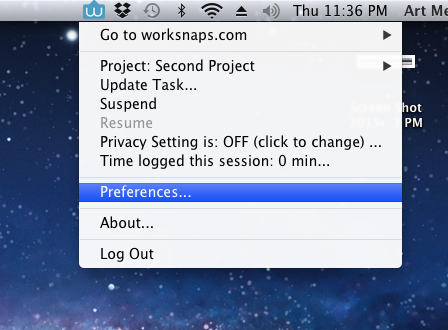
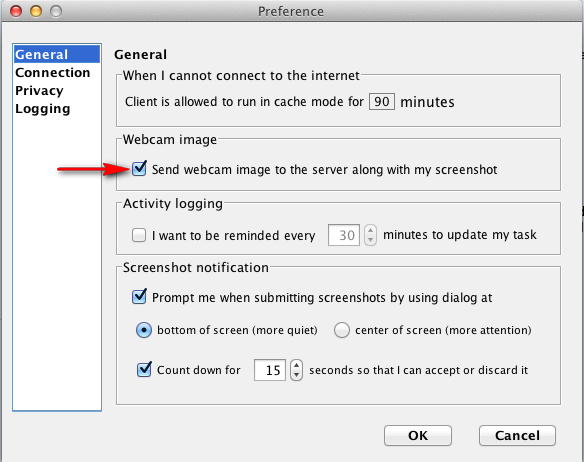
Webcam capturing has been supported for Worksnaps Client on Windows for quite a while. We are glad to announce that webcam image capturing is now available for Worksnaps Client on MAC. If you use MAC, you now have an option to turn on the webcam capturing so that a webcam shot is taken along with each screen shot and sent to the server. You can click on the Worksnaps icon on the menu bar (usually at the top right), a menu will show up. You can select “Preferences” to bring up the Preferences dialog. On the Preferences dialog, you will see an check box that allows you to turn on the webcam capturing. Here is an illustration.

Screen Shot 2015-01-01 at 11.36.28 PM


Screen Shot 2015-01-01 at 11.37.08 PM


Having a webcam image taken can provide further proof that you are working in front of the computer. It is completely optional and you can turn it on if it is required by your manager or you feel necessary to do so.

As usual, we look forward to hearing your feedback and opinions on this new feature.

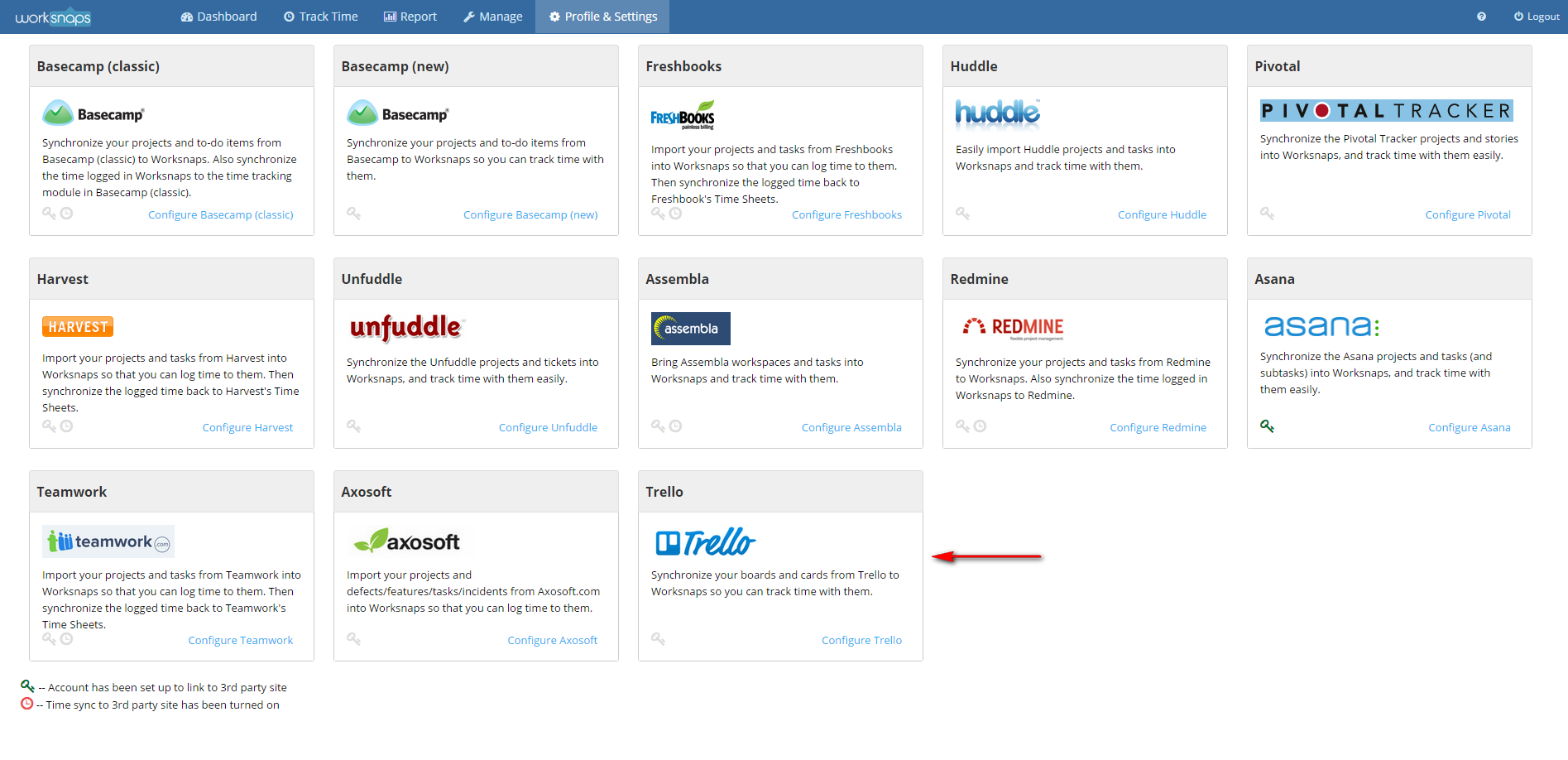
Worksnaps now works with Trello

We are happy to announce that Worksnaps now works with Trello. Trello is a dead simple and easy-to-use (and free) tool for organizing anything with anyone. With Trello, you can create boards to organize anything you’re working on. On each board, you can create Trello cards to keep track of your to-dos.

You can now import the Trello boards into Worksnaps as Projects and import Trello cards into Worksnaps as Tasks. Once you have done that, you will be able to use Worksnaps to log time against the Trello boards and cards. For those users who use Trello as their project management tool, you will find it convenient to use the best of Trello and Worksnaps, making your project management even more powerful.

To integrate with Trello in Worksnaps, you can go to “Profile & Settings” >> “3rd Party Integration“, you will find the Trello section where you can configure your Trello credential and link with your Trello account. Then you will be import your Trello boards and cards into Worksnaps and start tracking time against them.

trello_integration2

For a detailed description on how to set up the integration, you can look up this help document.

We hope that you find the Trello integration useful and look forward to hearing your feedback.

Review of Shift Management SaaS

Shift-Workers

Employee shift management has always been an integral but tedious part of the business process. This is primarily due to the huge number of tiny details you have to keep track of. Each employee has shift they have to follow through with, but that also comes with overtime schedules, off days, and unusual work hours. Recording these details manually can be a heavy task. There are always unexpected events such as employees calling in sick or schedule conflicts arising when making shift adjustments. The list goes on and on, and this is why shift management has always been an unappreciated job for any manager. Here is where Shift Management SaaS apps come in to lighten the load. These tools are leveraging web, mobile, social technologies and sophisticated algorithms to make the tedious shift management job easier and even sometimes enjoyable. So, for the company that needs more efficiency with less stress, here are a few SaaS shift managing programs your business can use right now.

PlanDay

Retail or restaurant businesses may experience a few problems when it comes to their workforce. While a stable staff is great, sometimes you will need extras or replacements in order to accommodate more traffic. PlanDay is the answer to a lot of the needs of businesses which use freelancers as a workforce. However, the program also comes with an array of schedule templates which makes any transitional process much easier. PlanDay also works with time constraints in mind; the program constantly checks for any conflicts or double booking issues. Finally, its integrated payroll feature allows for quick calculations on payday.

Pros
– Union Rules can be applied to employee schedules
– Employees are given a measure of power by allowing them to exchange shifts with other workers
– The extensive event management system ensures that you can schedules public and private functions instantly
– Cross platform support allows you to schedule and monitor shifts on a phone, tab, and from your desktop.

Cons
– Adding overtime, budgeting, turnover, external events, and union rules to the program will cost more per month.
– Training on your part will be necessary
– Larger companies with more than 150 will have to negotiate a special package with the company

Shift Planning

From the get go, Shift Planning presents itself as a clear and user friendly program. The prime difference between SP and PD is that the former uses a clean grid interface rather than a drop down menu with hour long assignable shifts. Each schedule is laid out cleanly on a grid and every box represents each day of the week. The power of shift management can also be shared to your employees, much like PlanDay. The relative flexibility of the program will ensure that you keep track of your employees’ payrolls and any fluid changes will show up in your inbox as soon as it happens. Pricing ranges from $33 for 20 people all the way to a customizable package which can be negotiated upon with the people at Shift Planning.

Pros
– Free month long training program
– Excellent and simple time tracking and scheduling
– Map options allow you to set up schedules in different locations
– Integrates and syncs up with 3rd party apps like Google Docs

Cons
– Notifications are still limited to SMS and emails
– More active push notification would be welcome
– Extensive employee profile modifications mean extensive and set up
– The program is better used in a restaurant environment

7Shifts

7Shifts is a bit a like Shift Planning in that it offers restaurants an alternative to spread sheet and pen paper scheduling. Upon start up, you’ll be treated to a clean interface with a very minimalistic look and theme. There are few options available, but that isn’t a negative in this case. Clicking on a specific shift or job will show you the schedules and employee profiles assigned to each. It also supports multi-location planning so catering services are made simpler. Mobile presence and an online manager log book ensures that on the fly changes are possible and easy.

Pros
– Simple but detailed scheduling system
– Task reassignment and trade are even easier
– Predictive scheduling system allows you to have an accurate reflection of hours on an employee’s payroll

Cons
– Employee bidding is a little difficult to get a hang of
– The program’s focus on restaurant makes it very limited
– Established employee profiles mean temp workers will have to fill out the full form

Hello Scheduling

Hello Scheduling has a very simple foundation; scheduling with a friendly vibe. Instead of setting days, the schedules are laid out according to the employee’s time. It will detail the time all your employees and present them in a graph. There’s shift swaps and requests for time off, making it easier for your staff to swap workloads whenever available. Pricing is also relatively cheap when compared with the rest of the programs on this list. However, Hello Scheduling’s simplicity is both a blessing and a bit of a letdown as well.


Pros
– Accurate to the dot scheduling mechanics
– Relatively easy to use so training is optional
– Cheap monthly rates
Cons
-Only the second package onwards include the Time Clock
– It lacks a few advanced features like expansive rules or more detailed schedule modifications
– Web Based and can prove unstable with sketchy connections

ESchedule

Seeing this program from startup looks gorgeous because of how well presented the UI looks. It’s easy to find the tasks and the schedules you’ll need to alter. Employee accounts will also come with the ability to trade and grab new shifts. One of the bonuses to this program is that it supports a wide number of employees and juggles all schedules with relative easy. Active reporting is also a plus because you’ll be served an overview of your businesses movements. ESchedule is very flexible in that it can be up-scaled from a smaller business all the way up to a mid-scale company. It is also the cheapest program, coming in at $20 at the most basic package.

Pros
– Relatively cheap packages with a significant number of employee counts making it perfect for starter companies
– The shift guidance feature helps you set up future schedules using historical demands
– Excellent UI and it is also very user friendly
– A long free trial period which allows you to make a more informed decision

Cons
– It’s a very basic program
– No Payroll system
– This is another program which focuses more on restaurant shift management

These are just a few of the most reliable SaaS shift management programs available on the market right now. It is worthy to note that you can subscribe to each of these programs’ free trials if you need to test the water for any one of these programs.

You can now set Weekly Limit for your projects and users

hourglassWhen you work with remote contractors, many things might catch you by surprises. For example, your contractor lose her internet connection and cannot get online. This does happen more often than you think in some countries where home internet connection is spotty at best. And she cannot simply go out to nearby Starbucks or McDonald’s to work with free WiFi because they simply don’t have Starbucks or McDonald’s around. Not to say that remote contractors usually do a bad job, it is just the inherent nature of remote work that could more likely result in such surprises. At Worksnaps, we always keep this in mind. Therefore we design our product to control such surprises and make remote work more accountable which is to the benefits of both the employer and the contractor side.

One of the most common requirements from our customers is to be able to set a limit on how much time a contractor can work each week. This allows them to allocate the workload and control the budget. Now Worksnaps has provided flexible ways for you to do that. You can now set a weekly limit in number of hours for a project and/or a weekly limit for a user. Let’s call them Project Weekly Limit and User Weekly Limit respectively. A Project Weekly Limit controls how many hours your users in a specific project can altogether work in each week. A User Weekly Limit caps the number of hours a user can log in all your projects. These two settings give you convenient ways to budget your time allocation based on your organizational structure.

8985So what will happen if weekly limit is reached? Let’s use an example to illustrate. You have a project in which 3 users are working and you set a weekly limit of 120 hours for it. Once a week starts (usually Sunday), the users can start logging time against this limit. Let’s say when Friday comes along, and the three users have logged 45 hours, 40 hours, 35 hours respectively. The weekly limit of the project has been reached. Then the users will receive a message in their Worksnaps client telling them that the project’s weekly has been reached and they cannot log time to the project anymore. They have to switch to another project (if any) or they have to stop working. They won’t be able to start logging to the project until the upcoming Sunday when the weekly limit is reset.

Weekly limit for a user works in a similar way. Say you have a user who is working in three different projects owned by you, and you have a budget of 40 hours a week for the user. Once the user has reached 40 hours of logged time in your three projects, she will be presented a message telling her that she cannot log time to your projects anymore. She has to stop working until the next weekly cycle starts.

You can use User Weekly Limit in junction with Project Weekly Limit to achieve finer control if you feel it is necessary. If both Project Weekly Limit and User Weekly Limit are set, whichever has been reached first will take affect.

This feature looks quite straight forward from outside, but there are a lot of things happening under the hood to make it happen. The intelligence needs to be built into the client and the back-end to support this feature. We have been working on this for quite a while and we are happy to make it available for use now.

There are a couple of articles in our knowledge base that can help you to get started with this feature:
Please feel free to give it a spin and let us know what you think. As always, we would like to hear any comment, feedback and opinion from you.

Group Chat and Collaborative Work: The Future of Online Job Interactions

collaboration_group_chatThe Internet has made many things possible across the world. People from the opposite hemispheres can chat in real time consistently and constantly. However, the real revolution is how the Internet makes it easier for people to work together. Companies can hire global freelancers and even set up whole businesses based online. Of course, a company can still live with using different silo tools to handle their collaboration, such as using Skype for text and voice chat, join.me for screen sharing, gotomymeeting.com for full-blown team meetings,  Asana for project and task management, Google docs for document sharing. The list goes on. The more technologies a company employs, the more pressing it has become to maintain, search and collaborate on the dispersed information in an effective way. A new breed of application has emerged to take on such challenges presented by trend of dispersed work locations, variety of devices and wide range of SaaS tools used. These products almost all started with the cornerstone capability, Group Chat. But as things evolve, there have become much more advanced than group chat and now encompass a spectrum of functionality ranging from video conference to interconnectedness of all relevant apps. The grand vision is to provide everything you need to get your work done. For businesses that need to bring their collaboration to a whole new level, here are some of the best such collaboration suites. Continue reading

5 Million Hours Tracked

5million_hours

We are happy to announce the milestone of 5 million hours logged on Worksnaps. It is a nice round number, but we understand that it is the result of lot of trust and support given by our customers to use Worksnaps to manage their work, time and teams. We have heard a lot of excellent feedback from our users. We will continue to prioritize them, translate them into product features and enhancements, and make our product better. In addition to addressing customer requests, we have many exciting features in our pipeline to be released, such as

  • Project Weekly limit — Manager can budget weekly hours allowed for all the users in a project
  • User Weekly Limit — Manager can budget weekly hours allowed for a user to log in all the projects
  • Auto-clicker Detection — A comprehensive mechanism to fend off fraud by using auto-clicker programs
  • Time Approval Workflow — A light weight work flow for submitting offline time by users and approve offline time by managers

We will write separate blog articles to introduce these features in the near future.

We are also actively working on upgrading back-end infrastructure to provide higher scalability and performance. We believe all these will give better overall user experience to our customers.

We would like to thank our users for your support. Your inputs are invaluable and we believe you are also our partners to drive our product better. Therefore, we look forward to hearing any idea, comment and feedback from you.

The Online Design Market Place: Where you should send your Design Request

Online graphics design has always required a balance between artistic and functional. The fact here is that without one or the other, it would hard to sell your brand because both work together in tandem. However, talent is hard to come by, and sometimes deals can get expensive if you  hire a professional designer. So, what can you do in order to find the perfect balance? Well, why don’t you look for a freelancer? There are thousands of them online at any one time, but the trick  is to find the right place where they do their business. Here are some of the sites where you might find the perfect designer.

Continue reading

Worksnaps Now Integrates with Axosoft

We are happy to announce that Worksnaps now integrates with Axosoft‘s scrum tool. Axosoft provides a complete set of development tools including scrum, bug tracker, wiki and help desk. Its scrum tool lets project managers and developers visually see each task, requirement, defect and incident in the system on individual filing cards through the Scrum planning board.

Axosoft Scrum Tool

In Worksnaps, now users can import the following objects from their Axosoft projects into Worksnaps as tasks:

  • Defects
  • Features
  • Tasks
  • Incidents

Then users can use Worksnaps’ visual time tracking tool to log time against those tasks. This provides the convenience to manage the scrum items in Axosoft and log time against them in Worksnaps.

Continue reading