Change to Worksnaps API Entry URL

We are making a change to our API URL entry point. Before you might be using https://www.worksnaps.net/api or https://www.worksnaps.info/api to access Worksnaps API. Now you are required to issue API requests to https://api.worksnaps.com/api which is served by a new server dedicating to handling API requests.

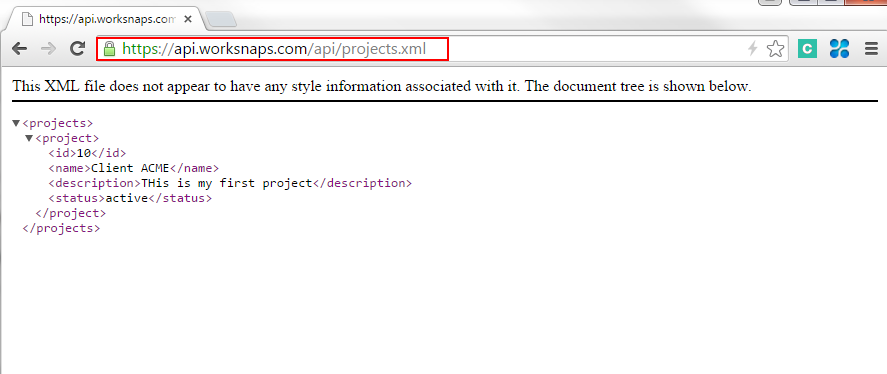
For example, if you want to retrieve all your projects, the API invocation URL will be

https://api.worksnaps.com/api/projects.xml

(Please note that you still need “api” in the path of the URL.)

Here is the visual example of invoking the API using a web browser for illustration purpose —

api_call_new_server

Please make such adjustments in your API caller programs. We will block the API access to all other URLs on Oct 31, 2015. If there is any question, feel free to send your query to [email protected]. We will be happy to hear from you.

Remote Work Digest: September 23, 2015

The latest on all kinds of information, news, and resources that help you make working remotely better.

Image from Lifehack.org

Image from Lifehack.org

10 Tips for Working from Home | Emily Schuman, Thefashionspot.com

Blogger Emily Schuman has worked at home for almost seven years. According to her, procrastination has been a part of her day and then she would work late into the night just to get the next day’s post finished. Here are the changes she made in order to be much more productive when working at home.

  1. Staying in pajamas may sound more appealing but getting dressed and doing your hair will make you feel that you are ready to conquer the day.
  2.  Set up an office space. It will help differentiate the times when working or when hanging out at home.
  3.  Set specific hours. It’s easy for the lines to get blurred and shutting your office door when the days ends reinforces the idea that work is done for the day.
  4.  Always make it a point to take a morning walk and regularly have small breaks.
  5.  Working for yourself means you may lose certain perks like access to employer’s retirement plant and health insurance. Implement a plan with those types of benefits and/or work with a reputable accountant to manage taxes and payroll.
  6.  Socialize. Schedule a couple of lunch meals out with friends, several meetings and a nighttime event.
  7.  Remember to take advantage of flexibility.
  8.  Stock healthier foods. It’s hard to stay away from the refrigerator when your procrastinating and picking on fruits, nuts and crackers are better options.
  9.  Make a to-do list. Using work flow programs like Asana can help keep you accountable.
  10.  Take a minute or two to tidy up your work space. It’s nice to come in the next day and feel inspired instead of dejected because of a mess.

Continue reading

Delegate Managing Projects to Other User(s)

In many cases, the owner of a Worksnaps account is also the person who manages projects and places users into the projects. In other cases, an account owner might not be the same person who manages projects and users. For example, a finance manager creates a Worksnaps account and sets up the payment for the service, however the responsibility of setting up projects and users belongs to another person in the organization. In this scenario, the account owner can delegate managing projects and users to other people, while projects created by the a delegated person are still owned by the account owner therefore accounted towards the owner’s subscription quota.

Here is how to delegate managing projects to another user.

  • Go to Manage >> Manage Users
  • Edit the user whom you want to delegate
  • Select Basic Info tab on the left
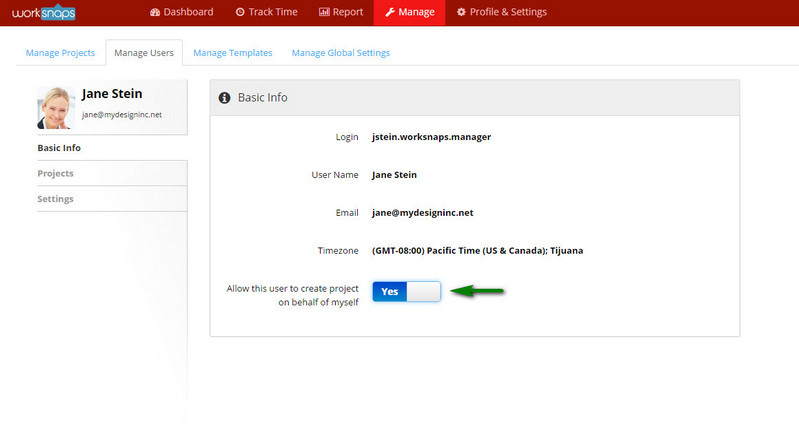
  • You will see an option “Allow this user to create project on behalf of myself“. You can turn on the option.

delegate_user_01_medium

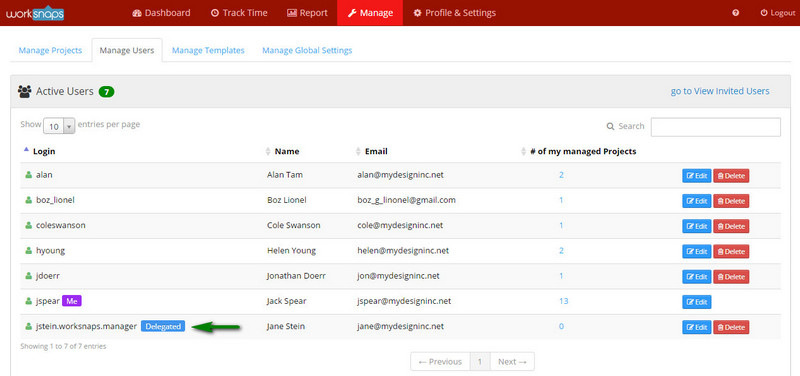
delegate_user_02_medium

Once this is done, the user (in the above example, Jane Stein) can create projects on your behalf. You can delegate up to 3 such users.

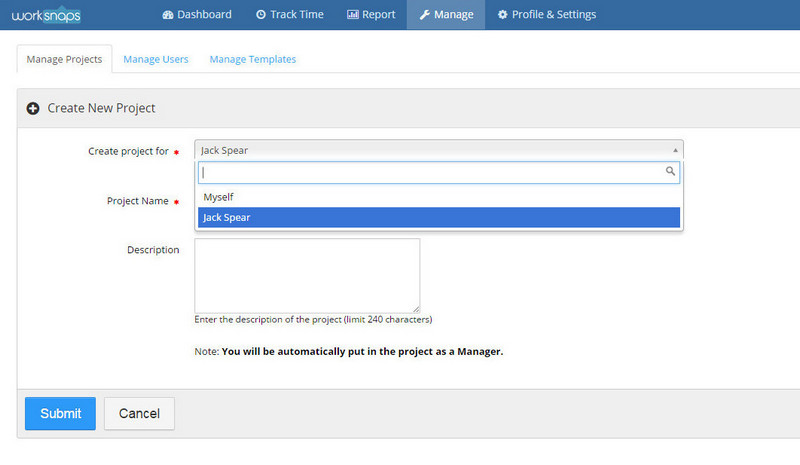
Here is how Jane Stein sees when she is trying to create a project. She will have a drop-down list to choose whether she wants to create a project for herself or for Jack Spear who allowed her to create project on his behalf.

delegate_user_03_medium


You can now blur screen shot images

Sometimes screen shots contain certain sensitive information and you want to have extra protection over them. Worksnaps now has a feature to allow you to blur the captured screen shot before being transmitted to the server. The blurred screen shot images will make it not possible to recognize the regular size texts, most typically texts with fonts of size 10-pt to 13-pt.  This provides an added level of security while keeping screen shot monitoring useful.

As a manager of a project, you can turn on the image blurring option for a user. The followings are the steps how to do it.

  • Go to Manage tab and select Manage Projects.
  • Go to Users tab, then go to User Settings in Project for a target user.
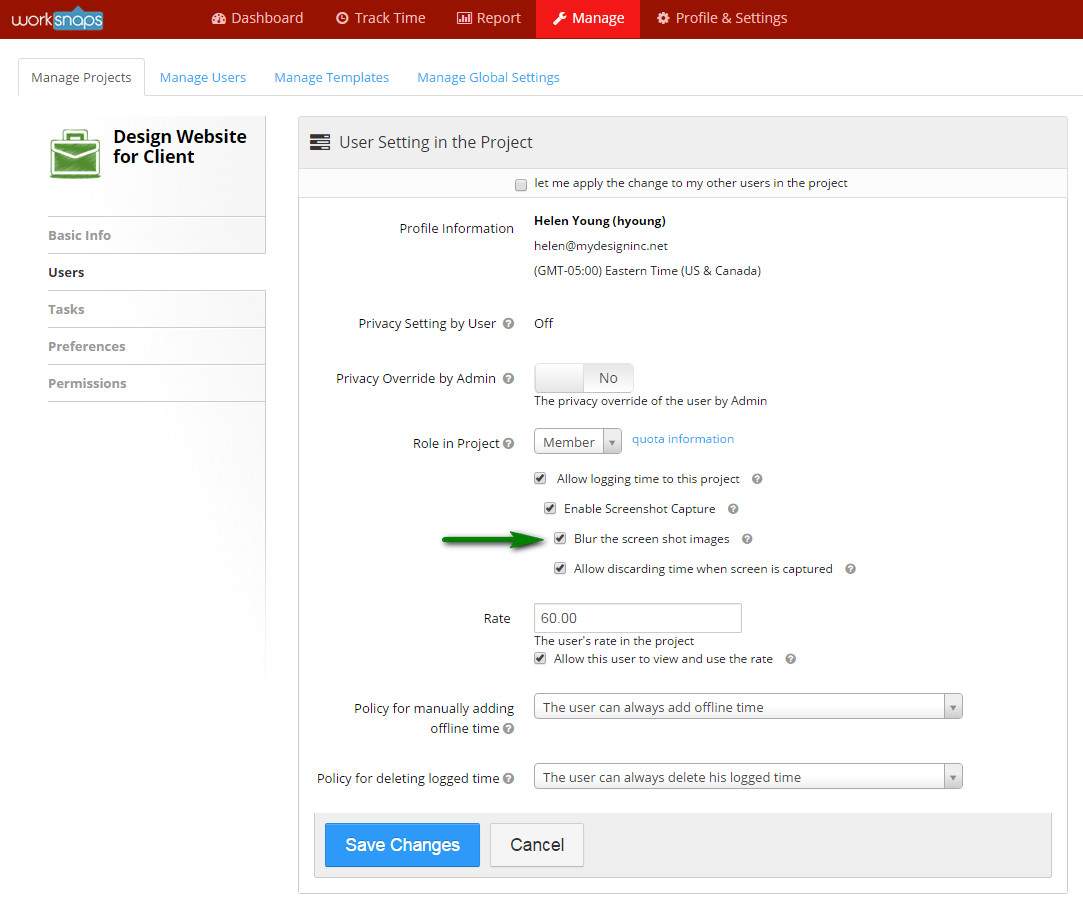
  • In the middle of the User Settings page, you will find an option “Blur the screen shot images“. Check it to enable image blurring.
  • Click Save Changes button to save the setting for the user.

Once this is done, the user will send the blurred screen shot images to the server.

blur_screen_option

Here is an example of the blurred image comparing to the original for illustration purpose.

Screen shot before being blurredscreenshot_non_blurred

Screen shot after being blurred (and sent to the server)screenshot_blurred

We hope that you find this feature useful. Please send us any feedback or question and we always look forward to hearing from you.

Remote Work Digest: August 24, 2015

The latest on all kinds of information, news and resources that help you make working remotely better.

Image from Coloradohomeexplorer.com

Image from Coloradohomeexplorer.com

Keep Virtual Workers Engaged From the Start With These 4 Simple Onboarding Practices | Entrepreneur.com

When you work with remote employees, an exceptional and thorough onboarding program is critical. It’s even more challenging to keep remote workers engaged. Setting the right tone at the onboarding stage will improve engagement, productivity and employee satisfaction.

If your company utilizes remote workers, here are Beth Miller‘s four best practices to set up your entire team for success.

1. Recognize that onboarding starts at hiring
Always look for signs that candidates are self-starters and will thrive in an often isolated work environment. It’s important to remember that working remotely is very different from working on site. Assessing skills is important, but it is equally imperative to assess a candidate’s ability to thrive while working from a distance.

2. Deploy the right technology
Choose your technology based up on the needs of the group, and be sure that your company has the bandwidth and capabilities to keep those technologies up and running. These technologies humanize the digital experience, and foster a connection with remote employees that’s stronger and better that a phone call or email.

3. Maintain a continuous connection
Remote employees and managers should speak each day for the first two to three weeks. During those check-ins, managers should make sure the employee is clear on his or her priorities and what needs to be done.

4. Help telecommuters help themselves
Managers aren’t the only team members challenged by telecommuting. The employees themselves also face challenges. Working from home can be isolating, and employees face a daily onslaught of distractions. Virtual workers can also face challenges when it comes to establishing connections with team members and colleagues.

Through strong hiring practices, the strategic deployment of technology, continuous communication and some creative thinking, managers can set the tone for a great working environment for even their most geographically distant team members.

Is Remote Working Right For You? | Worksmart.org.uk

Is working from home right for you? Taking a telecon in a hip cafe; commuting ten paces to work in your pajamas; fitting a trip to the gym into a long lunch hour…what’s not to like about the attractive and endlessly flexible ways of modern remote working? But is the grass really as green as it looks? Here are a few things to consider if you are considering asking to telework.

The pros

Remote workers can look forward to saving time on commuting, and having more control over their working time, often helping them to reconcile work and home life.

Benefits to workers include:

  • the potential to work virtually anywhere you want
  • freedom from the time-consuming distractions of the office
  • contact with other teleworkers could help stimulate more creative approaches to your own work

Employers can also benefit. They save on desk space to cut office overheads, and create more agile workforce. There is also evidence that trusting staff to organize themselves effectively to do their job can boost morale, nurture greater responsibility and pride in their work, and ultimately deliver better results for companies and organizations.

The cons

There are some great benefits to teleworking for both employees and employers. You should weigh these against the pitfalls of teleworking. Here are just a few;

  • People working from home often find themselves going ‘stir-crazy’ after a day or two away from the social life of the office.
  • Slowly losing some of the workplace social and professional skills you need to keep aquiring to develop in your career.
  • Slipping into bad work habits is very easy without traditional work structure around you.
  • Flexible working needs boundaries and it’s easy for your colleagues to assume you are absolutely flexible and perpetually ‘on call’.
  • Teleworking: your rights

If you have started to telework but found it isn’t for you, you should be able to change your mind.

Why Home-Based Jobs for Moms Work for Stay-at-Home Mothers | Latinospost.com

There are so many opportunities online that only require a little of your time, and you can earn money, which you can use for perhaps, additional budget on groceries. You just need to treat technology as your best friend and know which websites offer legitimate work.

If you have experience doing administrative or technical tasks, you can check out Upwork, formerly known as Elance – oDesk, or FlexJobs, where you can search for data entry, medical transcription jobs and the like. If you are considering a full-time career even while at home, there are so many available jobs out there that you can fit in your busy schedule. Here are some jobs being offered online.

  1. Call center representative/ Tech support specialist
  2.  Writer / Editor
  3. Online Teacher / Tutor
  4. Web Developer / Designer

Having a work from home career is very stressful at first, but if you have the support of your family, this will be easy as a pie in the long run.

How to Take Advantage of your Brain’s Hidden Productivity Powers | Fastcompany.com

If you think keeping everything you need to know neatly packed away in your head is a smart way to run your life, you’re probably hurting your productivity and stifling your creativity. Mental lists, like keeping track and remembering appointments, meetings, deadlines, and to-dos, distract you from more productive uses of your brain like solving problems. According to Scott Shafer, associate dean and professor of management at Wake Forest University School of Business, Mental lists are more difficult to manage than physical lists. Shafer recommends doing a brain dump and to – do lists out of your head and onto a physical list and calendar.

Brain Dumps Fill Your Calendar

One a week, set aside a half hour and write or type all the loose thoughts in your brain about what you have to do or need to remember. Capture this information in whatever way feels most comfortable to you, says Shafer, such as in a Word document, Excel file, task list or legal pad.

Brain Dumps Can Also Jumpstart Creative Projects

According to Barnet Bain, producer of the Oscar – winning film What Dreams May Come and author of The Book of Doing and Being: Rediscovering Creativity in Life, Love, and Work, “You need to be willing to let your inner censor take a break, just as you would suspend criticism of a child who is sharing an idea with you or showing you an art project.”

Using your head as a place to store information and ideas is not an effective use of your brain, nor is it an efficient way to keep track of your work, says Shafer. “Trying to keep track of everything that way just creates mental and physical stress,” he says.

10 Ways to Identify a Bad Manager! | Linkedin.com

There are several books, articles, and papers that show you ways to be a good manager. Here are ten characteristics of a bad manager:

Manages everyone the same – Bad managers manage everyone the same. It doesn’t matter to them whether you are able to perform at the same level as other members of the team, the expectations are the same.

Picks their favorites – Bad managers pick favorites. Not necessarily because they are better performers than you, but because they simply like them better than you. The favorites will get the best assignments, the most kudos, the best yearly reviews, and the biggest raises.

Their point of view is the only point of view – Bad managers are terrible listeners. They neither want to hear nor do they accept others’ opinions and even if they do listen, they will come up with an excuse why that won’t work in their department.

Technical to management – Technical people are good at managing technical things, not necessarily managing people. They simply don’t have the people skills and empathy to deal with subordinates’ problems, both work-related and personal. Technical people, for the most part, should stay technical.

Heart is not in the game – Bad managers really don’t want to manage. They don’t want to put in the time, energy, and effort to become better managers. If you want to be a manager, then you really need to want to manage people.

Lack of empathy – Bad managers don’t care about their subordinates. They spend more time finding things that their subordinates are doing wrong instead of rewarding things they are doing right. They have little tolerance for people who may need help and don’t want to take the time to train, coach or improve each member of the team.

Lack of management skills – Many managers have never taken a management, leadership, or communication workshop or class. Many have never managed people before. Many don’t believe they need to take any training, seek any advice, or accept any coaching to be able to manage people. They are wrong.

Lack of time – Bad managers don’t want to invest the time necessary to become good managers.

Lack of effort – Managing people takes effort. It doesn’t happen overnight and it doesn’t happen by chance. It is an ever-learning process where the emphasis is on the end result of being able to effectively coach, mentor, and improve your subordinates.

Lack of smart goal setting – Bad managers set terrible goals. They are generally nonspecific, non-measurable, non-attainable, non-realistic, and not time bound so it is up to the manager to determine if the subordinate actually achieved the goals set forth.

Bad managers come from those who realistically do not want to manage people. If you have the heart, and are willing to put in the time and effort, you can be more than a manager. You can be a good coach and mentor, which is what all managers should strive for anyway.

 

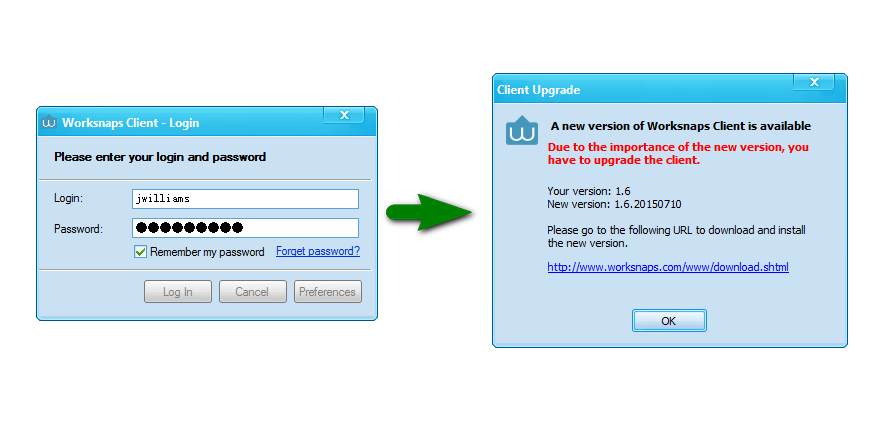
Worksnaps client upgrade

We are currently rolling out the upgrade to Worksnaps client to our users. The new client provides enhanced functionality and better stability. Based on the current version that you are using, you might be required to upgrade. In such case, upon logging in, you will see a message that prompts you to upgrade Worksnaps client. The following is an example.
client_upgrade_process

If you see such message, you can click the link in the dialog window and you will be brought to a page where you can download the newest version of Worksnaps client. You can simply download the new client program, uninstall your current Worksnaps client, then install the newly downloaded one. All it takes should be less than 5 minutes.

Here is a help link on how to uninstall a program on Windows:

http://windows.microsoft.com/en-us/windows/uninstall-change-program#uninstall-change-program=windows-7

If you have any question, feel free to open a ticket or send your question to [email protected].


Remote Work Digest: August 6, 2015

The latest on all kinds of information, news and resources that help you make working remotely better.

Image from Ph.jobsdb.com

Image from Ph.jobsdb.com

5 ways to keep your employees happy | Bizjournals.com

No one seems to work nine-to-five anymore, not you or your employees. To explore this work flexibility, a new study conducted by the business-to-business division of Staples gets at the heart of the employee attitudes toward the shifting ways we work, and what keep employees happy at their jobs.

Study results

The study revealed surprising statistics that cause companies to look at workplace happiness in a new way and, more importantly, motivated and productivity staff. While 52% of office workers say they are suffering from burnout as a result of the hours they work, 86% are still happy at work and motivated to rise in their organizations, so there’s more to workplace happines than what we might initially think.

According to Dan Schawbel, founder of WorkplaceTrends.com, employees are overworked and burnt out, yet they are still happy, loyal and interested in moving up to management in the next few years. Here are five tips to keeping that upbeat feeling:

1. Hours aren’t everything

Encouraging employees to work outside “normal” hours – flexible scheduling – can result in better, more productive work and increased happiness.

2. Invest in your employees

Spending to provide employees with the latest and greatest technology will ultimately mean happier, more loyal staff.

3. Encourage breaks

Encouraging breaks for staff helps them recharge and increase both productivity and morale.

4. Implement a telecommuting/flex work policy

Implementing an official flexible work policy will encourage employees to work in the environment that suits them.

5. Go green

The happiest workers are more likely to work in companies with Eco-friendly policies of some kind (74%). Sustainability plays a huge factor in talent retention and helps keep employees motivated.

Small changes can go a long way to keeping employees happy and loyal. After all, a happy, motivated employee is a productive employee.

Working from Home? 6 Free Tools That Boost Your Productivity | Business.com

According to the 2010 U.S. Census, 13.4 million Americans telecommute at least one day per week, up substantially from the 9.5 million who did so in 1999. A study by the Harvard Business Review found that working from home dramatically improves productivity and increases employee happiness.

Here are 6 helpful apps and tools that make it easy to organize your work flow, enhance your productivity and leave yourself with some time to unwind when you’re a remote worker.

1. Evernote: Keep Everything Organized

Evernote is an all-in-one app that allows you to collect your ideas, notes, and tasks in one place. Think of it as an external hard drive for your brain. You can draft quick notes, attach documents and emails, set up to-do lists, and organize everything by category.

2. Wunderlist: Balance Personal and Professional Tasks

Wunderlist helps you organize and prioritize everything you need to accomplish. You can arrange your tasks by category and due date, set up recurring reminders, and check off items once they’re completed.

3. Hours: Manage Your Time

Track the time you spend on different tasks throughout the day. Set up as many task categories you need and set a timer with a simple thumb tap.

4. How Much Speed Do I Need Tool: Increase Digital Productivity

Do some research and find out how much Internet speed you need. You may find that the productivity gains of faster Internet more than makeup the added service costs.

5. Boomerang: Schedule Emails for Later

Boomerang lets you schedule emails in advance. If you’re a night owl, you can type out emails when you’re most productive, click “Send Later”, and have them sent out during daytime hours.

6. Timely: Track Your Hours

This app lets you track how much time you spend completing tasks throughout the day. You can set goals for completion and organize tasks by level of priority.

With these apps and websites, you can ding the tools you need to make the most productive use of your at-home work time.

How Good Design Can Make Telecommuting Work for You | Metropolismag.com

Spurred by shifting family dynamics, an upswing in non-traditional work environments and in increasingly digital age, employees and independent contractors are giving up office walls for the convenience and confines of their homes. This shift has spurred contract furniture manufacturers to add or expand their home-office furniture collections.

Define a Work Space

Clearly defined spaces devoid of distractions like TVs and gaming consoles help to keep the stay-at-home worker on task. Creating a dedicated work space, especially in a small apartment, can be as simple as hanging a curtain or erecting partitions that can also double as a storage.

Aesthetics, Aesthetics, Aesthetics

Incorporate your personality into a space by adding curios of interest. But restraint is a virtue, as the addition of unnecessary distractions might actually keep you from getting tasks fulfilled.

Ergonomic Furniture is Key

Invest in comfortable and ergonomic furniture that can help you concentrate over extended periods of time. Sit/stand desks can help introduce a new level of activity into your workday, while a chair with an adjustable seat and backrest can help avoid repetitive injuries.

Four tips to help start up founders develop high performance remote team | Startupsmart.com.au

Flexible work options have become an important tool for start ups wishing to attract high quality candidates, and retain them over the long term.

But business leaders still struggle to adapt traditional management practices to this new way of working. So how do you manage your remote workforce in a way that delivers results?

Here are four strategies that are essential to developing a high performance remote team:

Find the right people

Remote work isn’t for everyone. It usually means working alone without the social aspects of an office environment. This means you need people who are self-motivated and can manage their own work flow.

Work to outcomes

Rather than tracking daily activities and tasks, agree on project milestones and deadlines with your team. Give your staff the flexibility to manage their own time to achieve those results.

Communicate consistently

It’s important to establish clear rules for how and when interaction will take place. This provides a sense of stability and structure for your team.

Build a team culture

Working remotely can leave people feeling invisible and unappreciated. It’s important to give regular feedback and recognize good work. Constructive criticism is equally important. It ensures your relationship is focused on progressing, learning and achieving your goals together.

3 Management Mistakes That Could Destroy Professional Services Business | Entrepreneur.com

A professional services business is only as the work it does for clients. If projects fails, a business can lose clients and revenue or even worse, kill the business.

As professional service business continue to see record employment growth, now is the perfect time to focus on three common project management mistakes businesses make and how to avoid them.

1. Client communication failures

With growing teams and bigger projects, it’s impossible to keep track of every small detail using traditional manual approaches, such as copying and pasting or multiple all-hands meetings. While new collaboration tools are trying – unsuccessfully – to replace email entirely, the real solution is to use project management software that integrates with email automatically, tracking conversations and treating the content of their messages as assets to share across the team.

2. Inaccurate budget tracking

Even when firms attempt to properly track time, managers are often in the dark around budgets and time spent by team members when it matters most: while the project is running. Our study found that only about 30 percent of professionals use a time sheet connected to their project management software. The vast majority, about 69 percent, track time spent on projects manually or not at all, leaving them uninformed and risking financially catastrophic project failure.

3. Assuming projects are too short for management

Professional services businesses are only profitable if they can effectively manage projects and keep clients happy. Unhappy clients lead to loss of business and poor project organization leads to loss of profits. Without clients or profits, a professional services business cannot succeed. These matters are made even worse as businesses grow out of old processes. All growing businesses should re-evaluate their project management capabilities and consider new technology to ensure long-term success.

Remote Work Digest: JULY 13, 2015

The latest on all kinds of information, news and resources that help you make working remotely better.

Image from Tassuru.com

Image from Tassuru.com

3 Things You Must Know If You Work From Home | MoneySmart.sg

Working from home can be hellish sometimes, unlike in the office, slacking off can result in some major guilt and self-loathing. If you work from home or have a flexible schedule, here are a couple of things to do according to Joanne Poh.

Schedule Ruthlessly

Draw up a timetable and schedule every darn thing. Neglect to do that and a simple task can take the entire day, thanks to lack of urgency and discipline.

Eliminate time wasters and distractions

If you want to be efficient, eliminate as many distractions as you can. Disconnecting from the internet whenever you don’t need it and silencing your smart phone might be essential.

Master your energy cycles

Once you’re left to your own devices, it becomes crucial to understand and master your energy cycles. Know your energy peaks and troughs, schedule mundane tasks like replying to emails or doing admin to times when your energy is low.

7 Tips to Help you Stay Healthy while Working from Home | India.com

Struggling to maintain a healthy lifestyle while working from home is definitely a big challenge. When you can get away with moving very little and is very close to the snack cabinet, it can be incredibly difficult to keep up with healthy habits.

Here are Zara Husaini‘s simple tricks that can help you stay in top shape – no daily commute required.

1. Try to eat at home as often as possible
One of the biggest advantages of working from home involves being able to whip up a healthy meal in the middle of the day. Take advantage of this and your body will thank you.

2. Prepare your meals ahead of time
Always keep a healthy meal in your fridge and have it ready to go for the next day’s lunch. You will be less tempted to grab something from your local fast food joint if your food is already prepared.

3. Give yourself breaks
Taking at least one break a day to get your blood flowing and clear your mind will always make your days feel less stressful.

4. Schedule weekly trips to the grocery store
Choose one day a week to hit the grocery store and stick to it like it’s a business meeting. When your home office is full of healthy snacks, it’s much easier to reach for something nutritious when you get hungry.

5. Schedule a walk every day
Even if you don’t have the time to workout, starting each day with a 20 minute walk is a great way to jump start your mind and body.

6. Set alarms for activity breaks
Hold yourself your accountable to this healthy lifestyle by programming alerts to regular activity intervals. It may not seem like much at first, but it will make a big difference if you do it consistently.

7. Embrace midday workouts
Take advantage of your flexible schedule and break up your day with a trip to the gym.

Don’t do your laundry: How to be an effective work-from-home employee | Financial Post

Working from home is both a blessing and a challenge. You may be thrilled about the “freedom” of setting your own hours, but any work-from-home veteran will tell you that it requires a lot of discipline. According to Megan Santos of Jobpostings.ca, the key to success is emulating an in-office workday.

Establish a home office

Working from home shouldn’t mean curling up on the couch with your laptop. Whether it’s in a spare room or the corner of your kitchen, setting up a home office in a place that offers less distraction is a must.

Set firm office hours

Draw a line between work and your responsibilities at home. The best way to achieve this is by setting office hours. If you have a family at home with you during the day, make sure they recognize and respect your work hours.

Resist the urge to dress down

Dressing up can help you mentally transition from a homebody to an employee. While your colleagues won’t be around to evaluate your wardrobe choices, you should do your best to look the part of a productive and gainfully employed individual.

How to find an IT job with better work-life balance | Mashable

If you’re searching for a new IT job, here are some of Tim Cannon’s specifications to look for to find more balance between your work and personal life.

Flexible Options

Flexible options range from part-time telecommuting, full-time telecommuting, flexible start times and more. The key is finding an option that fits your lifestyle and will actually offer more balance between work and personal time.

Emphasis on teamwork

Achieving work-life balance is nearly impossible if you’re not supported by a solid team. Team dynamics are difficult to judge from the outside, but asking questions about the balance between individual work and teamwork during the interview process can give you an insight.

Fewer devices

Using multiple devices can not only lead to overworking habits, but can also create the expectation from your employer that you are always outside of normal working hours. In an interview, ask how many personal devices employees typically use on the go and out of the office. Fewer devices will most likely mean better balance.

When in doubt, ask

If you do meet any team members or those in similar positions during the interview, don’t be afraid to ask them about the work life balance of the job. If you’re uncomfortable discussing balance in front of your potential boss, connect with them on LinkedIn.

9 Ways Freelances Can Get Paid on Time and Avoid Deadbeat Clients | Entrepreneur

Cash flow management for freelancers is more than just finding clever ways to save money personally and professionally. Here is what Peter Daisyme learned about getting paid as a freelance accountant and small business owner for 15 years:

1. Be known as a professional
Prove to clients that you are a true professional worth hiring by always being polite, exceeding goals on time, sharing reviews and showcasing your portfolio on your website.

2. Do some homework on prospective clients.
When you are approached by a client, you should do a little research. Check online for any red flags from your fellow freelancers. If you know that the client could become a potential headache, when why would you want to take a chance with them?

3. Be flexible with your rates.
You deserve to get paid for what you’re worth. If you want to attract clients, you might want to be flexible with your rates especially when you’re just starting out, since this will add to your experience and maybe earn you some referrals.

4. Bill up front
Don’t think it’s rude or unprofessional to bill up front. It’s not only a common practice, it also ensures that you get paid for your services and keep the cash flowing in.

5. Make it easy for clients to pay you.
Whether it’s accepting eChecks, credit/debit cards or setting up a PayPal account, you need to make it easy for your clients to pay you. Most invoicing software allows you to select your preferred method(s) of payment, so a client should be able to pay your invoice with just one click of a button.

6. Invoice promptly.
Instead of waiting every month to get paid, you should either bill weekly or immediately following the completion of a job. This not only keeps a positive cash flow, it also prevents you forgetting to send out the bill.

7. Never work until you’re paid
Instead of spending time tracking down clients and asking why their invoice is overdue, you could be working on other projects for the clients who are paying you. If you send out an invoice and it hasn’t been paid on the agreed upon date, then stop working for that client until the invoice is paid.

8. Have it in writing.
A contract protects both parties, since it should prevent either party from pulling a fast one. Contracts also specify the terms and conditions of the project which include everything from expectations to terms of payment.

9. Call in the Calvary.
What happens when a client still hasn’t paid an invoice? If you have an assistant or colleague who is more assertive than you, have them handle outstanding invoices.

If you want to get paid on-time make sure you communicate frequently with your client, set clear expectations and that you’ve properly invoiced them.

Remote Work Digest: June 26, 2015

The latest on all kinds of information, news and resources that help you make working remotely better.

Image from Ipdn4life.wordpress.com

Image from Ipdn4life.wordpress.com

4 Tips for Setting Up a Productive Home Office | Tech.co

Creating a cozy and productive work space that will help you stay on task is a must. Here are Dianna Labrien’s 4 effective tips to create to the perfect working environment:

1. Choose the right space
Keep a boundary within your home where work begins and ends. If you have the luxury of choosing your work space, it should be maintained as distinct from other rooms as possible. Make sure that distractions like game consoles, personal books, and other things that are non-work related are eliminated. Give it the real importance it deserves, set up your office at a more convenient area of your house.

2. You can never have too much storage space
Even when you work in tech, you can’t avoid having papers around. Invest in at least one four-shelf bookcase that can hold dozens of folders, books, and paper periodicals you still read. Organization is key to maintaining a good working environment.

3. Choose the right tools and support
Having a great work from home set up doesn’t assure you that your work flow will always go smoothly. Make sure that you have that you have the number of the most convenient local IT provider to cover your tech needs.

4. Lighting is crucial
The kind of light source you put in your work area will not only affect the quality of your work but the also your health. If you spend most of the time staring at your scree, f.lux should become your best friend. Aside from automatically adjusting your display colors and contrast depending on the time of the day to keep your eyes less stressed, it also helps you wind down easier by eliminating the blue light of your screen in case you’re working till late.

How to keep remote teams productive | Productive Mag

Keeping employees both happy and productive requires more thought and effort than most think. With all the articles on the internet regarding remote work productivity, you’ll read the employees who work remotely are happier and more satisfied due to less commute and more flexibility.

Here are the building blocks for a productive remote work set up according to Edsel Mendoza:

1. Over communication

According to Walter Chen of iDoneThis, “A virtual team must use a number of different tech tools to facilitate those varied employee relationships and interactions. This requires deliberate thought on how the team needs to communicate.”

Sqwiggle and Speek are among the communication tools that can integrate smoothly into your common work habits.

2. Effective asynchronous working

Working towards a common goal can be challenging when your distributed team is working in a different time zone. Using collaboration tools meant for teams, like Nozbe and Campfire, to simultaneously work on projects are great for working asynchronously.

3. Progress tracking

The best tools for tracking productivity focus less on your laundry list and more on your accomplishments. Edsel suggests we check out Yesware, a lightweight plug in that tracks email activity, and iDoneThis, a great way to keep the team updated on everyone’s progress.

Telecommuting brings challenges, benefits to companies | Biz Journals

Telecommuting is rising, no one will argue with that. According to Society for Human Resource Management (SHRM), 38% of employees has offered the benefit in 2014 – an increase of 23% since 2008. Also, more companies began offering telecommuting in 2014 than any other benefit.

Telecommuting offers benefits for both employee and employers, including:

Improved employee satisfaction

Increased productivity

Cost savings

Flexibility

Although working from home sounds like a great idea, there are a variety of challenges we need to address in order for us to enjoy the advantages that come with it. Telecommuting can isolate you and that may not be a good attribute for productivity. It can also present too many distractions. The need for employers to be connected and working during the business hours should be explicit. However, using the right tools and understanding the nature of telecommuting can help you overcome the drawbacks that come with it.

10 Questions To Keep Your Remote Team Focused On Their Work | 15five

Creating a strong company culture can be difficult when you’re managing a remote team. One of the biggest reasons why virtual teams fail is because they don’t communicate or collaborate as much as they need to. However, according to David Hassell, asking the right questions at the right cadence builds structure and team cohesion and turns your imaginary office into something tangible.

Here are 10 questions designed to help you support your remote team to do their best:

Who on the team would you like to get to know better?
What do you think could help us to improve daily communication?
How have you improved your remote working skills this month?
What value do you get out of the daily/weekly call? How would you feel if we held it less frequently?
How’s the morale in your virtual office? What challenges are you facing?
Are you out of the office or traveling in the near future?
What has communication been like with team leaders, managers, and directors?
What are your primary goals this quarter?
Would any additional training be helpful?
What has become harder and easier in our work and business?
Communicating effectively and knowing the right questions to ask will help you keep your remote team focused on achieving company goals.

How to Effectively Delegate to Your Remote Team | Business Collective

Delegation is an essential leadership skill, and delegating to a virtual workforce is especially challenging. Here are some valuable tips on how to handle virtual delegation from Reputation Central, a fully decentralized business with remote workers around the world.

Understand Your Process

The key to assigning a task to someone is to fully understand what you are asking them to do. “Even with a proper structure in place, you’d be surprised how many people will wait until halfway through a project to admit that they don’t understand something,” says Dave Davis of Redfly Marketing. “Rigorously testing the knowledge of a particular individual or team’s task at hand in an informal way at the beginning of a project can quite literally save a project.”

Match the Communication Tool to the Task

Know when to use instant messaging versus email versus a phone call or a face-to-face meeting. There are times when a phone call or face-to-face meeting is better. According to a recent survey by online project management comparison firm Software Advice, 38% of respondents cited communication as the key issue when working within a virtual team.

Don’t Skimp on Background

In order to create a chain of communication that everyone can reference, you must document everything. Using project management tools like Basecamp will allow you to upload emails, documents and other files that everyone can access when needed. John Jonas, owner of Replacemyself.com and Onlinejobs.ph, recommends having the digital equivalent of an office whiteboard accessible to keep the team on track.

Break Up Projects

If you’ve got a full team, share the load. Being flexible with tasks and who can do them ensures your business is ready to pivot if something changes.

Remote Work Digest: June 9, 2015

The latest on all kinds of information, news and resources that help you make working remotely better.

Image from Communitytable.com

Image from Communitytable.com

The Remote Worker’s Guide to Office Etiquette | Life Hacker India

Communicating with your coworkers is much harder when you’re working remotely. Alan Henry from Gawker Media, says that, a little empathy can keep you happy on any remote team set up. Face to face interaction may be completely avoided but it doesn’t mean that there won’t be any awkward silence when in conference calls or online meetings. In order to avoid that, here’s a helpful list of office etiquette that shouldn’t be forgotten:

  • Respect Everyone’s Time Zones and Busy Time
  • Use Technology to Make Remote Communication Easier, Not Harder
  • Navigate Office Chat Like a Pro
  • Communicate Clearly: Your Works Matter More Without Non-Verbals

Working remotely has a lot of benefits, Henry explains that you’ll have to put in a little extra effort and make sure you’re clear when you need something, respect other people’s boundaries, and reinforce your own. As long as you can get those things down you’ll be fine.

12 Ways to Stay Focused and Productive When You Work From Home | Lifehack

Having the option to work from home brings a lot of benefit to employees and employers alike. You can set your own hours, dress how you want and work in a way that maximizes your time and skill set. However, working from home, whether it is on a part time basis or full time job, is not without challenges.

Here are Kristen Brown’s best ways to make working from home easier:

  1. Be Honest
  2. Designate a Space
  3. Make it Pretty
  4. Stick to a Schedule
  5. Dress for Success
  6. Take Breaks
  7. Go Public
  8. Multi-Communicate
  9. Be Human
  10. Create a Calendar
  11. Find Your Tribe
  12. Prioritize Right

Following the tips mentioned above will greatly help you increase your productivity levels while still enjoying the perks of working from home.

Does Working From Home Really Save You Money | Bplans

There are countless benefits when working remotely, such as having control over work schedule and personal life, expenses, and greater productivity. There is no longer a need to question why so many people choose to become virtual employees. On the other hand, working from home also adds a few lines to the budget that might not have been there previously.

If you’re thinking about making the switch to a home office, here are Kelly Gurnett’s list of financial pros and cons you keep in mind:

Pros:

No More Commuting Costs

Even if you ride the bus or own a car, commuting a long distance is not really helping you save money at all. There are more expenses that just gas to take into account such as tolls, parking, vehicle wear and tear and maintenance, and the lost time spent driving or commuting when you could be doing other important things.

No More (or At Least a Lot Less) Eating Out

Eating right helps you work better, think better and play better. When you work from home, it’s a lot easier to find the time and motivation to make healthy and budget-friendly meals.

Childcare Savings

Childcare can be really expensive, but working from home allows you to spend more time with your kids depending on the schedule you have established.

No more peer pressure purchases

We might feel the need to keep up with everyone and sometimes you have to spend money to do so. Working remotely relieves you of peer pressure and unnecessary purchases.

Cons:

Healthcare

Cutting ties with a traditional job also means losing your healthcare coverage and if you’re used to having your insurance covered, this can be a big adjustment.

Taxes

In order to know more about working from home tax implications, you should do more research and ask a CPA to fully understand how taxation works. There are a number of rules, and the rules differ depending on whether you’re self-employed or an employee.

Misc. Business Expenses

If you want a smooth work flow, spending extra for computer upgrades, higher internet speed and additional equipment is a must. The good thing is you might be able to write off a number of them come tax season.

How to work from home efficiently | KnowHowNonProfit

With long commutes and budgets cuts, more people are working from home. But how can you make sure you do work and not watch TV? Stephanie Hill shares her tips on how to work efficiently.

1. Know the flexible working policy of your organization.
Flexibility can be challenging, especially in small organizations. In order to get a clear understanding, you should take time to ask your HR department for their homeworking policy.

2. Prepare your workload the day before

3. Set up your home office
Creating a home office that provides comfort and contains everything you need to work with is very important if you want to be more productive in what you do.

4. Be present from home
Take advantage of modern technology to establish an online presence. If you want to ask a question or discuss work related issues, don’t be afraid to call the office as well.

5. Review it
Is working from home right for you? Make notes of what works and what does not.

4 Challenges of Managing Remote Teams | ReadWave

Telecommuting is getting a lot of attention lately. According to the research, there are more than 53 million Americans working remotely, on a freelance basis. The report says that approximately 20% of the entire global workforce work on a telecommuting basis and about 29% of them work from home at least part of the week while 10% of them work full-time from home.

Working from home is a dream, but for many, it also has its pitfalls. Christoper Calhoun, from ReadWave, writes about the challenges of building and managing a team remotely.

Communication

Every member of the team must have great communication skills and share a common vision and culture. Aside from the occasional video conferences, you should also take advantage of the numerous tools that can help virtual teams communicate better. Skype, GoToMeeting and Yammer are just some of them.

Security

Telecommuting will always bring with it certain security issues. Thankfully, Proxy Networks says that most of the security problems a remote help desk team may encounter can be sold.

Company Culture and Team Building

Building a company culture remotely can be a true challenge. Slack, Uncover and Google Hangouts are some of the tools that can help you build a team that knows how to have fun remotely and not just work remotely.

Concentration and Focus

Concentrating while in the comfort on one’s home can be challenging with so many distractions near by. This can be solved when your team is properly motivated and everyone are all professional and driven.