Looking at Cute Things Increases Productivity

CC Image courtesy of Hege Hovde on Flickr

Are you looking for a way to make your employees more productive? Have you ever thought about sharing some cute kitten pics around the office? While that idea may sound counter-productive, a recent study, the “Power of Kawaii” conducted by a Japanese research team at the Hiroshima University, found that looking at pictures of cute animals could increase concentration and productivity.

This might be surprising for employers as well as those who are self-employed and trying to fight the urge to view something they feel would not be conducive to doing a good job. The idea is that you should ONLY work on things that are highly related to “getting the job done”.
Continue reading

Worksnaps Launches Service End Point in Asia Pacific Region

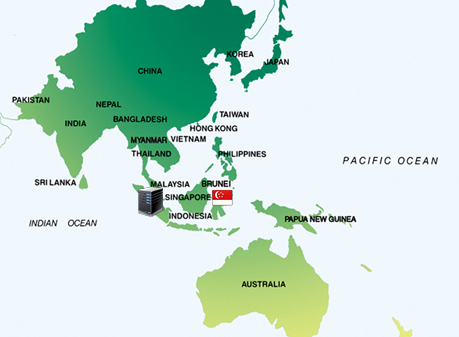
Worksnaps is excited to announce the launch of its service end point in Singapore to better serve the customers in Asia Pacific Region.

We have seen great momentum in adoption of Worksnaps service in the Asia Pacific Region, especially in the Philippines, India and Vietnam. In order to allow those customers to have better connectivity and higher service reliability, we see a compelling reason to place a new service end point in the region. Singapore is known as a global tech center and for its advanced infrastructure, and it is why we choose to put our service end point there. Our engineers have worked hard to make the software architecture to be one that supports distributed services. With the enhanced architecture, we see ourselves better positioned to scale up and serve customers worldwide.

We look forward to many more improvements in the future.

Good Time at EverywhereElse Conference


We were honored to be a part of the Everywhere Else Conference last week in Memphis, TN. It was an amazing experience to be in the same room with so many other like minded people, those with lofty ambitions of changing the world with their startup.

We set up our booth in the middle of the Memphis Conference Center next to a number of startup exhibitors and a couple thousand attendees. On the first day of the conference, we did a presentation and demo to a full room of people.

Continue reading

How to Wisely Use Privacy Options


A frequently-raised concern about using Worksnaps to track time is about privacy. As time being tracked and screen shots being taken, how can one protect his privacy and make sure that manager sees his work but not his private information, such as the web pages he visited when taking a legitimate break from work to deal with the personal matters?

Allocate time to process your personal things

It sounds quite trivial, but this good habit goes a long way. Just like working in an office, it is important to form a habit to allocate a chunk of your time to do personal things such as making doctor’s appointment, checking how your kids are doing, replying personal emails and etc. By having the time allocated for those, you can focus on work and not get distracted since you know when you will get to your personal tasks. The same principal applies when you work remotely. When you use Worksnaps to log time, you focus on the work related tasks. When it’s time to do personal things, you can suspend logging time and screen shots.

Continue reading

Your Time is Your Product – Track and Bill Accordingly


If you do not accurately track and bill your time, you could be missing out on a lot of income. One of the biggest reasons for lost wages amongst freelancers and those who must log their hours to be paid is lack of adequate time tracking. Why would someone not track for billable hours? Well, one of the most common reasons is simply that they forget.

When you work at home, there are many distractions to deal with and they occur on a daily basis. You may be trying to balance work, home, and other responsibilities and when it comes time to log your hours on a project, you “guesstimate” how much time you actually spent working on it. Work time is billable time but if you’re not clearly separating time spent on a particular project with all the other things you are doing in your day, you may be missing out on billable hours and short-changing yourself.

Another problem is that when you’re new at working for yourself, you may not realize just how much time you really do put into your job. It could be a lot more than you think, which means that you could be losing a lot of income simply because you are not tracking your time properly.

Your Time is Your Product
Continue reading

How to Interpret Inactive Time


Many users have asked about inactive time — what it means, how to interpret it, or even whether we should track inactive minutes or not. This article intends to answer these questions.

What is Inactive Time

As you might already know, Worksnaps tracks time by 10-minute intervals. Each hour has six 10-minute intervals. During each 10-minute interval, Worksnaps client records the mouse and keyboard volume. If there is mouse or keyboard activity, that means the user is working on the computer therefore the 10-minute interval is accounted as work time. On the other hand, if there is no mouse or keyboard activity recorded, the 10-minute interval is categorized as Inactive. Inactive minutes are not accounted in the reports or billing. They are there for information only (we will explain it later).

Continue reading

1 Million Hours Tracked!


We are happy to announce that Worksnaps has surpassed 1,000,000 HOURS tracked on its system. This is definitely an exciting milestone for us. One million certainly sounds like an cool number.
Looking back at how we get here, we have come a long way to provide one of the most practical, user friendly and feature rich time track solutions for remote work. Thousands of users are now using Worksnaps to
accurately track time, improve productivity and make remote work more successful. We would like to thank them for trusting us and giving us so many valuable feedback and suggestions.

One million hours is an important milestone. Yet, it is very small comparing to the hours other services claim. It is a paltry 2% of the 51 million hours clocked on Toggl. It is an even more insignificant 0.5% of the 200 million hours entered on ClickTime. SO WHAT IS THE BIG DEAL?

Continue reading

Introducing Advanced Calendar View

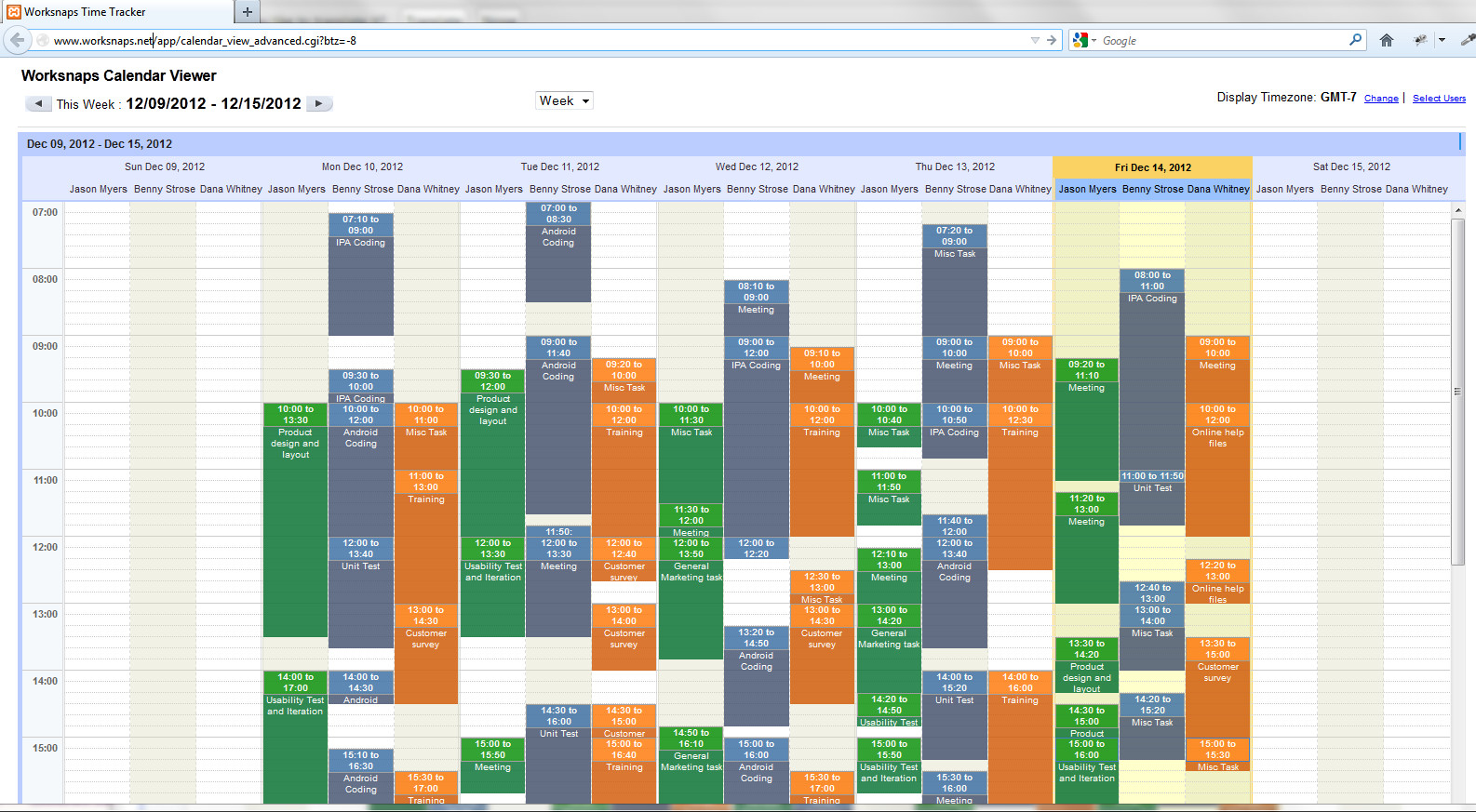
We are happy to announce a new feature called Advanced Calendar View. We have been hearing requests from customers about needing a way to see team member’s time and activity side-by-side. This way, it is easy to visualize how they spent time comparing with each others. We have developed an interface quite like Google Calendar that displays the time and tasks that the team members have worked.

In the Advanced Calendar View, each team member’s logged time is displayed in different colors for easy identification. The contiguous time span that a user has worked on the same task is displayed as a block, annotated with start time, end time and task name. You can choose between a Daily view or a Weekly view, and you can scroll backward and forward the time window. In addition, you can conveniently choose different users and different time zones to display the data.

Continue reading

Time Tracking for Community Managers and Social Media Professionals


When your job is to work with the community, post to forums and social media, and keep up to date on social media trends and activities, it can be hard to stay focused and not get lost in the sea of whatever is going on. Social media is a time sink. Few will deny that. So what do you do when your job is social media but you’re required to be productive rather than distracted?

There are some key methods of planning, goal-setting and time tracking that can help you be accountable for your time and what you spend it doing. When you enter social media, forums and other online communities, it’s very easy to get sucked into the nothingness of distractions when you work online but time tracking and a schedule with goals you can keep will help you avoid this.

The first thing you need is the commitment to reach your goals. If you’ve fallen into some poor habits, you might also need the willingness to change but it’s possible and it’s probably when you have the right tools.

Continue reading

Worksnaps Now Works with New Basecamp


Worksnaps has long been integrated with the original Basecamp (now called Basecamp Classic). We are happy to announce that Worksnaps now works with the new Basecamp. The new Basecamp was introduced by 37Signals earlier this year and is a completely redesigned version of the product. The last version of the product is now called Basecamp Classic.

One of the major changes of the new Basecamp is that it has a new set of API, which is not compatible with the Basecamp Classic API. The new API requires using OAuth2 to establish authentication. Worksnaps now has released a feature to integrate with the new Basecamp by using the new Basecamp API.

Continue reading